
Many UK business owners assume connecting a point of sale system to their other software is straightforward. Plug it in, switch it on, and everything talks to everything else. The reality is far more costly. Integration failures cost UK retailers over £50,000 annually, with 60% of businesses affected and 10% losing more than £1 million. This guide will walk you through what POS integration actually means, how it works in practice, the methods available, the pitfalls to avoid, and the expert steps that separate businesses that thrive from those that haemorrhage revenue quietly.
Table of Contents
- What is POS integration?
- How POS integration works: approaches and methods
- Benefits of POS integration for UK retail and hospitality
- Common challenges and pitfalls in POS integration
- Expert recommendations for seamless POS integration
- How YCR can help your business with POS integration
- Frequently asked questions
Key Takeaways
| Point | Details |
|---|---|
| Connect systems smartly | Efficient POS integration links sales, stock, and accounts, saving time and money for UK retail and hospitality. |
| Select the best method | Middleware or unified API solutions offer flexibility and resilience compared to custom direct connections. |
| Avoid common pitfalls | Test edge cases and monitor integration performance to prevent costly failures and lost revenue. |
| Start simple, scale up | Begin with inventory and sales sync as your integration foundation, then add more connections as you grow. |
What is POS integration?
With that costly backdrop in mind, it is worth starting with the basics. What does POS integration actually mean, and why is it a genuine business priority rather than just an IT concern?
At its core, POS integration connects your point of sale system with other business applications such as inventory management, accounting software, ecommerce platforms, CRM tools, and reservation systems. This connection happens via APIs or middleware, enabling automated, real-time data synchronisation across your entire operation. You can read more about the definition of integrated POS and what a POS system is if you are starting from scratch.
Here is what that looks like in practice for UK businesses:
- A restaurant takes an order at the table. The POS instantly updates kitchen stock levels and flags low ingredients before service ends.
- A retail shop sells the last unit of a product in-store. The ecommerce listing updates automatically, preventing an online oversell.
- A café processes end-of-day sales. Accounting software reconciles revenue without anyone touching a spreadsheet.
- A hotel bar runs a tab. The POS links to the property management system, posting charges directly to the guest’s folio.
“Integration is not just a technical upgrade. It is the difference between running your business on accurate data and running it on guesswork.”
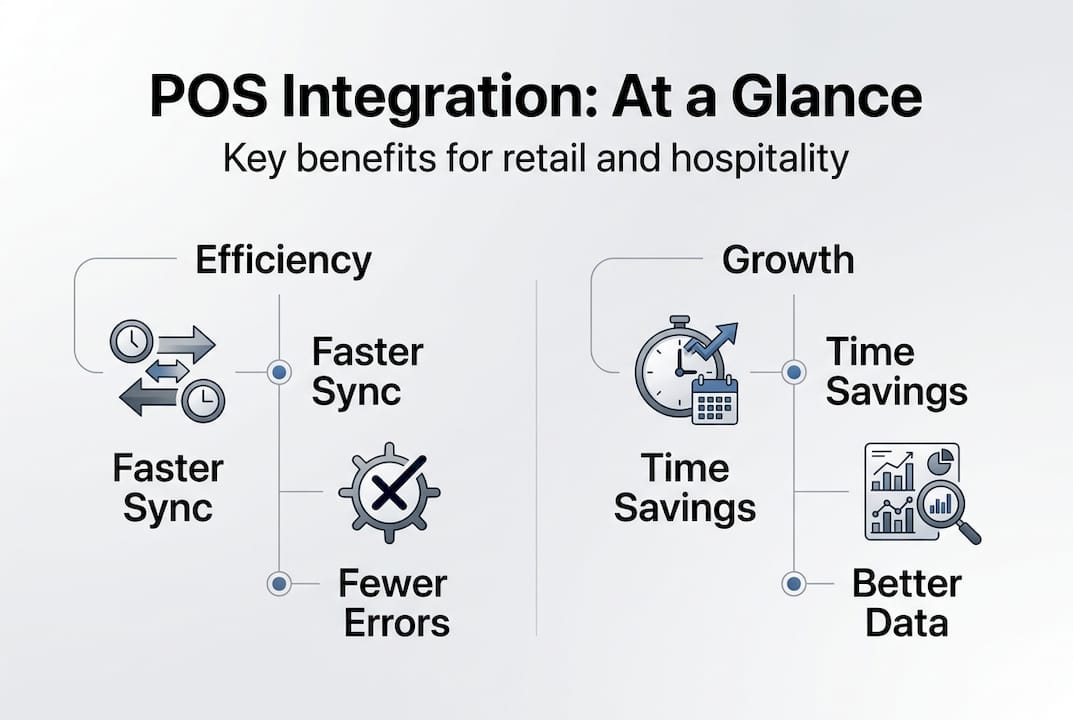
Efficient integration reduces manual data entry, eliminates costly errors, and gives your team the information they need to make faster, smarter decisions. It is the operational backbone that connects every part of your business.
How POS integration works: approaches and methods
Now that you know what POS integration involves, the next step is understanding how these connections are actually built. There is not just one way to do it, and the method you choose will significantly affect your long-term flexibility and cost.
The main integration methodologies used in UK retail and hospitality are:
| Method | How it works | Best for | Risk level |
|---|---|---|---|
| Point-to-point | Direct custom link between two systems | Small setups, two systems only | High (brittle) |
| Hub-and-spoke | Central hub routes data between systems | Mid-size businesses | Medium |
| Middleware/iPaaS | Dedicated integration layer manages all connections | Growing businesses | Low |
| Unified API | Normalised access to multiple POS systems | Multi-site or multi-brand | Low |
Here is how a typical integration is set up step by step:
- Audit your current systems. List every platform your business uses, from your POS to your accounting software and ecommerce store.
- Choose your integration method. For most UK retailers and hospitality operators, middleware or a unified API is the most resilient choice.
- Map your data fields. Ensure product codes, SKUs, and customer records match across all systems before connecting anything.
- Configure real-time sync. Use webhooks or API calls for live inventory and sales data. Avoid batch polling for anything time-sensitive.
- Test thoroughly before going live. Simulate peak trading periods, outages, and edge cases before your integration touches real transactions.
Pro Tip: Avoid batch syncing for inventory. If your stock levels only update every few hours, you risk overselling during busy periods, which is a common and expensive mistake for UK retailers. See retail integration examples and streamlined POS solutions for practical guidance, and review the POS workflow steps to understand how data moves through a connected system.
Benefits of POS integration for UK retail and hospitality
Understanding the technical side is useful, but what does successful POS integration actually do for your bottom line? The benefits are measurable and significant.
The numbers speak clearly. Businesses that implement well-designed POS integration report 30% admin time reduction, labour savings of 20 to 40% (roughly £26,000 per year for a mid-size operation), inventory distortion dropping to just 1.5%, and food waste cuts of 15 to 25%. In hospitality specifically, 73% of restaurants report 25% faster order processing after integration.

Here is what that means across different sectors:
For retail businesses:
- Real-time inventory sync prevents overselling across shop floor and online store
- Automated accounting reduces end-of-month reconciliation from days to hours
- Accurate stock data supports smarter purchasing decisions and reduces dead stock
For restaurants, cafés, and takeaways:
- Kitchen display systems receive orders instantly, cutting ticket times
- Ingredient-level stock tracking reduces waste and over-ordering
- Integrated loyalty and CRM tools personalise the guest experience
The POS integration benefits for hospitality businesses are particularly strong when reservation and table management systems are included. For retail, the advantages of integrated POS become most visible during peak trading. Error reduction alone delivers ROI of 60 to 90%, which means the investment pays for itself faster than most operators expect. Explore how streamlining UK retail operations with the right software compounds these gains over time.
Common challenges and pitfalls in POS integration
While integration offers huge gains, there are real-world obstacles that need careful planning. Skipping this stage is where most businesses lose money.
The most common pitfalls include:
- API rate limits. Sending too many requests too quickly triggers 429 errors and failures, causing data gaps during your busiest trading periods.
- Poor data mapping. If product codes do not match between your POS and ecommerce platform, orders fail silently and stock figures become unreliable.
- Batch sync overselling. Updating inventory every few hours instead of in real time means you can sell stock you no longer have.
- No idempotency controls. Without these, a single failed transaction can be processed twice, creating duplicate orders and accounting headaches.
- Insufficient testing. 73% of integration failures occur because edge cases were never tested before go-live.
“The businesses that suffer most from integration failures are not those with the worst systems. They are those that assumed everything would work without testing it properly.”
Black Friday and Christmas trading are the moments that expose weak integrations. A spike in orders can overwhelm an API, break a sync, and leave your team manually reconciling hundreds of transactions. UK retailers lose £50k+ annually from these failures, with inventory distortion alone causing a 6.5% revenue loss.
Pro Tip: Before any peak trading period, run a stress test on your integration. Simulate double your average transaction volume and check whether your sync holds. If it breaks in testing, it will certainly break on the day.
For sector-specific risks, see how POS integration in restaurants differs from retail, and review the key factors when choosing POS integrations for your business type.
Expert recommendations for seamless POS integration
To ensure you make the most of integration and avoid the hidden costs, here is what the experts consistently recommend for UK retail and hospitality operators.
- Start with inventory sync. This is your foundation. Get stock levels accurate across all channels before adding accounting, ecommerce, or CRM connections.
- Choose middleware or a unified API over point-to-point. Middleware and unified APIs protect you from vendor changes. If your POS provider updates their system, a point-to-point connection breaks. Middleware absorbs the change.
- Use real-time webhooks for inventory. Never rely on batch polling for stock data. Webhooks push updates the moment a sale happens, keeping every channel accurate.
- Build in idempotent endpoints. These ensure that if a transaction is sent twice due to a network error, it is only processed once. This prevents duplicate orders and accounting errors.
- Use dead-letter queues for failed messages. When a sync fails, the data should be captured and retried automatically rather than lost.
- Test every edge case before launch. Simulate outages, peak volumes, and data mismatches. The 40 to 60% long-term savings from a well-implemented iPaaS solution only materialise if the setup is solid from day one.
- Plan for hospitality-specific needs. Restaurants and hotels require folio blocking and reservation sync that retail integrations do not. Factor this into your integration design early.
Pro Tip: Do not try to integrate everything at once. Start with inventory, prove the sync works reliably, then layer in ecommerce, then accounting. Each stage should be stable before you add the next. See POS solution examples for a practical view of how this phased approach works in real UK businesses.
How YCR can help your business with POS integration
Efficient POS integration starts with the right hardware and software working together from the outset. Mismatched components or unsupported systems are often the root cause of the failures described throughout this guide.

At YCR Distribution, we supply, configure, and support complete POS integration solutions for UK retail, hospitality, cafés, takeaways, and more. Whether you need POS software such as SAMTOUCH or EZEEPOS, purpose-built POS hardware from trusted brands like SAM4S and iMin, or guidance on the hardware options for retail and hospitality that best suit your operation, our team has over three decades of experience to draw on. We offer next-day delivery, same-day dispatch, and expert support to keep your integration running smoothly. Get in touch with us to discuss a solution built around your specific business needs.
Frequently asked questions
What systems can be integrated with a POS?
POS systems integrate with inventory management, accounting software, ecommerce platforms, CRM tools, and reservation systems, all via APIs or middleware for automated real-time data sync.
How long does POS integration take for UK businesses?
Timelines vary by sector. Retail integrations typically take 6 to 10 weeks, restaurants 8 to 14 weeks, and full hospitality setups 10 to 16 weeks depending on complexity.
What is the biggest risk with POS integration?
The biggest risk is revenue loss from poor setup. UK retailers lose £50k+ annually from integration failures, with broken data sync forcing costly manual reconciliation and causing inventory distortion.
Does POS integration help with online and in-store sales sync?
Yes. Real-time inventory sync keeps stock levels and sales data accurate across both your ecommerce store and shop floor, preventing overselling and improving customer satisfaction.
Recommended
- Optimising POS for hospitality: boost efficiency 15%
- Optimize Hospitality POS: Cut Transaction Times 30% & Errors 40%
- Benefits of integrated POS systems for UK hospitality 2026
- Harness the role of POS software for hospitality success
- How to integrate a Dutchie 2.0 Ecommerce menu to your website using reverse proxy integration – Cannabiz Marketing Solutions – Dope SEO
- Optimize restaurant coffee service for 2026 profitability