

TL;DR:
- POS peripherals are critical operational components that directly impact customer experience and sales flow.
- Proper selection, standardization, and routine maintenance of peripherals prevent most failures and downtime.
- Regular cleaning, testing, and ensuring compatibility are essential for reliable POS hardware performance.
Most business owners think of POS peripherals as optional extras, a nice-to-have layer on top of the till. Then the receipt printer jams on a Saturday afternoon, the barcode scanner stops reading, and suddenly a queue of frustrated customers stretches to the door. Peripherals are not accessories. They are the working parts of your entire sales operation, and getting them right is one of the most practical decisions you can make. This article covers what POS peripherals are, the key types, how to choose and integrate them correctly, and how to keep them running reliably in a busy retail or hospitality environment.
Table of Contents
- What are POS peripherals and why do they matter?
- Key types of POS peripherals in retail and hospitality
- Choosing and integrating the right POS peripherals
- Maintenance and troubleshooting of POS peripherals
- A fresh perspective: Why standardisation and maintenance win every time
- Enhance your operations with innovative POS hardware
- Frequently asked questions
Key Takeaways
| Point | Details |
|---|---|
| Peripherals are business-critical | Printing, scanning, and cash handling devices keep POS systems running smoothly and improve customer experience. |
| Choose for your environment | Select wired or wireless peripherals based on your shop’s needs, volume, and layout. |
| Standardise for reliability | Using consistent hardware across sites reduces errors and simplifies support. |
| Maintain regularly | Scheduled cleaning and part replacement prevent most common POS peripheral failures. |
| Plan for integration | Test all peripherals with your POS software to avoid costly compatibility issues. |
What are POS peripherals and why do they matter?
A POS peripheral is any external device connected to your point-of-sale system that supports a transaction or customer interaction. Think barcode scanners, receipt printers, cash drawers, customer-facing displays, and card readers. These devices sit alongside your POS terminal and handle the physical side of every sale. Without them, your software has nowhere to go.
In a typical retail or hospitality workflow, peripherals carry enormous weight. A cashier scans a product, the system calculates the total, the customer pays, the drawer opens, and a receipt prints. That entire sequence depends on at least three or four peripheral devices working in sync. If one fails, the chain breaks.
There is a persistent misconception that peripherals are secondary to the software or terminal. In reality, POS terminal peripherals are what your customers actually see and interact with. The software runs invisibly. The hardware is the experience.
“The physical touchpoints of your POS system shape customer perception more than any screen interface ever will. When a printer jams or a scanner misreads, the customer does not blame the software. They blame the shop.”
Here is a quick comparison of core versus optional peripherals in a typical UK retail POS environment:
| Peripheral | Type | Typical use |
|---|---|---|
| Barcode scanner | Core | Retail, convenience, supermarkets |
| Receipt printer | Core | All sectors |
| Cash drawer | Core | Retail, pubs, cafes |
| Customer display | Core | Retail, fast food |
| Kitchen printer | Optional | Restaurants, takeaways |
| Digital signage | Optional | Hospitality, retail |
| Tablet stand | Optional | Cafes, mobile setups |
| Label printer | Optional | Retail, warehousing |
Common peripheral problems in 2026 include printer cutter wear, scanner window dirt, and compatibility challenges between devices and updated software. These are not rare edge cases. They are everyday realities in busy shops and restaurants, and they are almost always preventable.
The key insight here is that peripherals are not an afterthought. They are the operational backbone of your POS setup, and treating them as such from day one changes how you buy, configure, and maintain them.
Key types of POS peripherals in retail and hospitality
Understanding what each peripheral does helps you make smarter buying decisions and spot problems before they become costly. Here is a breakdown of the most common types.
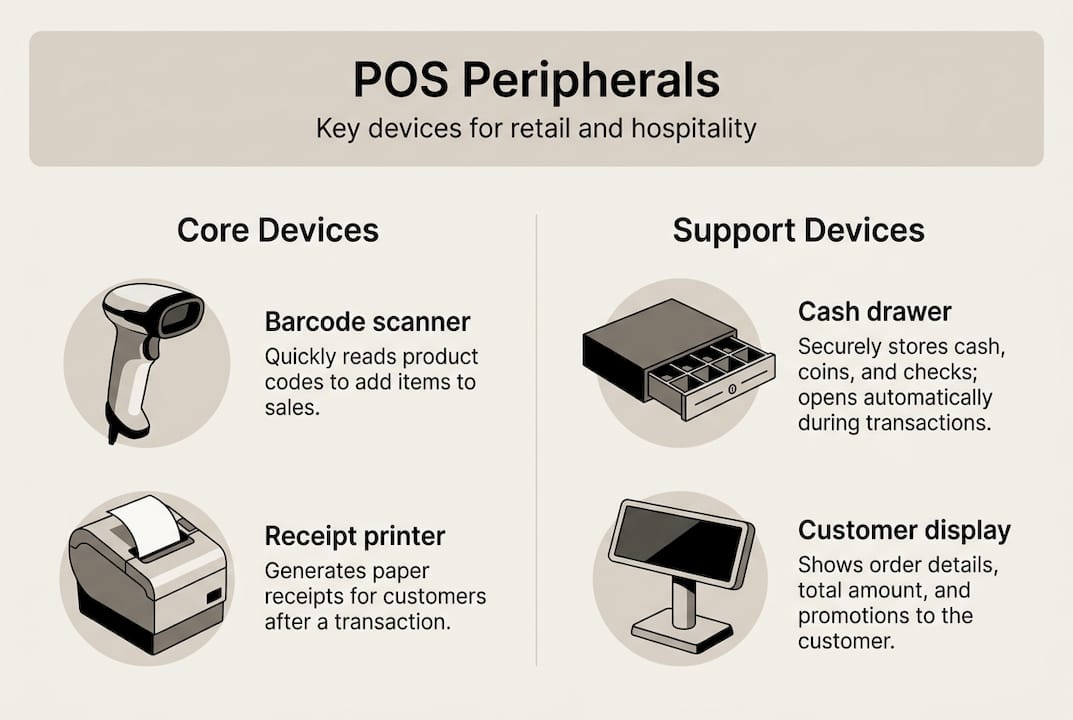
Barcode scanners read product codes and feed data directly into your POS software. Handheld scanners suit smaller shops and stock rooms where staff move around. Fixed scanners, mounted at checkout, work better in high-volume environments like supermarkets or convenience stores. Wireless models offer flexibility but require reliable connectivity and regular charging.
Receipt printers produce transaction records for customers and internal records. Thermal printers are the standard choice because they are fast, quiet, and low-maintenance. Wired models are preferred at fixed tills, while Bluetooth or Wi-Fi printers suit mobile setups at markets or events.

Cash drawers connect directly to your printer or terminal and open automatically on transaction completion. They come in various sizes and are rated by the number of daily opens they can handle reliably.
Customer displays show transaction totals and promotional messages to the buyer. They build trust and reduce disputes at the till.
For a quick reference, here is a summary of function, environment, and maintenance intervals:
| Peripheral | Best environment | Maintenance interval |
|---|---|---|
| Barcode scanner | Retail, convenience | Clean window monthly |
| Receipt printer | All sectors | Cutter service every 12 to 18 months |
| Cash drawer | Retail, hospitality | Inspect mechanism quarterly |
| Customer display | Retail, fast food | Clean screen weekly |
For real-world context on how these devices perform across sectors, examples of POS hardware in active retail deployments show the difference good peripheral selection makes.
Signs a peripheral needs replacing or upgrading:
- Consistent misreads or scan failures despite cleaning
- Printer producing faded, smeared, or incomplete receipts
- Cash drawer failing to open on command or opening randomly
- Customer display flickering or showing incorrect data
- Frequent disconnections or driver errors after software updates
Pro Tip: Standardise hardware models across all your sites. When every location uses the same scanner and printer, your team can troubleshoot faster, spare parts are interchangeable, and training takes half the time.
Wired setups suit high-volume sites, wireless for mobility, and regular maintenance prevents 80% of failures. That statistic alone should shift how you think about peripheral investment.
Choosing and integrating the right POS peripherals
Choosing peripherals is not just about picking reliable brands. It is about matching devices to your specific trading environment. A busy pub needs different tools from a boutique clothing shop, and a multi-site restaurant group has different priorities from a single-location cafe.
Start by assessing three things: your transaction volume, whether staff need to move around, and whether you operate across multiple locations. High-volume fixed checkouts need robust wired scanners and fast thermal printers. Mobile setups need wireless reliability. Multi-site operations need standardisation above all else.
Follow these steps when selecting, testing, and integrating peripherals:
- Audit your current setup. List every device, its age, and any recurring issues. This reveals gaps and priorities.
- Define your environment. Fixed or mobile? Single or multi-site? High or low volume? These answers narrow your options quickly.
- Check compatibility first. Confirm that any new peripheral works with your existing POS software and operating system before purchasing.
- Request a demo or trial unit. Test the device under real trading conditions, not just in a showroom.
- Run an offline test. Check how each peripheral behaves when your network drops or your system updates mid-shift.
- Train your team before go-live. Even simple devices need a short briefing to avoid misuse and early wear.
- Document your setup. Record model numbers, driver versions, and configuration settings for every device.
Regular maintenance schedules and compatibility checks head off most peripheral breakdowns. Skipping this step is the single most common reason businesses face avoidable downtime.
For a structured approach to your full setup, a solid retail POS system setup guide covers the broader integration picture. If you are still exploring which devices suit your sector, reviewing types of POS hardware across retail and hospitality gives useful context.
Pro Tip: Always test how your peripherals behave offline during installation or system updates. A printer that cannot queue jobs locally will stall your entire checkout when the network hiccups.
Avoid buying mismatched models from different manufacturers unless you have confirmed cross-compatibility. Mixed hardware environments create support headaches and increase the risk of driver conflicts after software updates.
Maintenance and troubleshooting of POS peripherals
Maintenance is where most businesses fall short. It is not glamorous, but a simple cleaning and inspection schedule prevents the vast majority of peripheral failures. The goal is to catch wear before it becomes breakdown.
Routine maintenance tasks by device:
- Printers: Clean the print head monthly, remove paper dust from the feed mechanism, and inspect the cutter blade for wear. Replace the paper roll before it runs out completely to avoid feed jams.
- Scanners: Wipe the scan window with a dry lint-free cloth weekly. Check the cable connection at both ends. For wireless models, inspect the charging contacts monthly.
- Cash drawers: Test the open mechanism weekly. Clean the coin and note sections monthly. Inspect the solenoid (the part that triggers the open action) quarterly.
- Customer displays: Clean the screen with a screen-safe cloth weekly. Check the mounting bracket and cable connections monthly.
As research confirms, cutter maintenance every 12 to 18 months and regular cleaning of scanner windows prevent the majority of point-of-sale glitches. These are small tasks with outsized impact.
“The businesses that experience the fewest POS disruptions are not those with the most expensive hardware. They are the ones with the most consistent maintenance habits.”
For troubleshooting specific issues, a dedicated troubleshooting POS peripherals resource covers the most common fault scenarios. For printer-specific guidance, Bixolon printer upkeep offers model-level maintenance advice.
Knowing when to repair versus replace is equally important. If a device is more than five years old, requires frequent repairs, or is no longer supported by the manufacturer, replacement is almost always the better investment. Use your retail POS checklist to schedule regular reviews of every device in your setup.
A fresh perspective: Why standardisation and maintenance win every time
The industry conversation around POS peripherals tends to focus on the newest features, the fastest scanners, or the slimmest printers. That is the wrong conversation for most UK retail and hospitality businesses.
What actually drives resilience is standardisation and maintenance discipline. When every site runs the same models, your support team knows exactly what to expect. Training takes less time. Spare parts are interchangeable. Troubleshooting becomes a checklist rather than a guessing game.
Maintenance empowers small teams. If your staff know that a scanner misread is usually a dirty window and a printer jam is usually a worn cutter, they resolve issues in minutes rather than waiting for a technician. That 80% failure prevention figure is not marketing. It is what happens when you take maintenance seriously.
The businesses we see struggle most are not those with outdated hardware. They are those with inconsistent hardware and no maintenance rhythm. True resilience comes from testing how your peripherals handle a power cut, a full-queue panic, or a connectivity drop. Integration discipline, not hardware specs, is what delivers long-term operational wins.
Enhance your operations with innovative POS hardware
Getting your POS peripherals right is one of the most practical steps you can take to improve daily operations and customer experience. Whether you are setting up a new site or upgrading an existing one, the right hardware makes a measurable difference.

At YCR Distribution, we supply a full range of POS hardware solutions for retail and hospitality businesses across the UK, from barcode scanners and receipt printers to cash drawers and customer displays. If you are unsure where to start, our hardware terminology explained guide cuts through the jargon. For businesses dealing with existing issues, our hardware troubleshooting advice offers clear, practical guidance. With next-day delivery and same-day dispatch available, getting the right peripheral in place quickly has never been easier.
Frequently asked questions
What is a POS peripheral?
A POS peripheral is any external device connected to your point-of-sale system to support transactions, such as a barcode scanner, printer, or cash drawer. These devices handle the physical side of every customer interaction at the till.
How do I know which peripherals my business needs?
Match peripherals to your trading environment by considering shop size, transaction volume, and mobility needs. Best practice is to align your hardware choices with how your team actually works day to day.
What causes most POS peripheral failures?
Most failures stem from missed maintenance or compatibility issues triggered by software updates. A simple cleaning and inspection schedule prevents the majority of breakdowns before they affect trading.
How often should I maintain POS printers and scanners?
Printers need cutter maintenance every 12 to 18 months and monthly print head cleaning. Scanner windows should be wiped weekly to maintain accurate read rates.
Can I use wireless POS peripherals reliably?
Wireless peripherals work well for mobile setups, but network stability and battery management are critical. Always test wireless devices under peak trading conditions before committing to a full rollout.