

TL;DR:
- POS peripherals are critical devices like printers and scanners that ensure efficient transactions.
- Failure of peripherals causes significant disruptions, longer queues, and revenue loss.
- Regular maintenance and timely upgrades of devices over four to five years prevent costly breakdowns.
Hardware failures account for 45% of POS disruptions in retail, yet most business owners focus their budget and attention on software and terminals, overlooking the devices that sit alongside them. POS peripherals, the printers, scanners, cash drawers, and displays that connect to your main system, determine how fast your queues move, how confident your staff feel, and whether your customers leave satisfied or frustrated. This guide cuts through the confusion, explaining what peripherals are, why they fail, how breakdowns cascade into real business losses, and what practical steps UK retail and hospitality owners can take right now to protect their operations.
Table of Contents
- What are POS peripherals and why do they matter?
- Key types of retail POS peripherals in the UK
- How peripheral breakdowns disrupt retail operations
- Smart strategies for managing and upgrading POS peripherals
- The overlooked truth: how peripheral choices drive UK customer loyalty
- Start transforming your retail POS with YCR
- Frequently asked questions
Key Takeaways
| Point | Details |
|---|---|
| Peripherals drive reliability | Nearly half of retail POS disruptions stem from hardware or peripheral failures, underlining their critical role. |
| Cash drawers remain essential | With cash representing 15.2% of UK transactions, drawers are still vital despite digital payments growing. |
| Printer and scanner maintenance | Printers and scanners require regular checks as they are the most frequent sources of repair incidents. |
| Upgrade regularly | Replacing devices over 4-5 years old reduces downtime and boosts operational efficiency. |
| Smart choices boost loyalty | Integrating advanced peripherals can enhance customer experience and improve brand reputation. |
What are POS peripherals and why do they matter?
A POS peripheral is any device that connects to your central point of sale terminal to extend its functionality. Think of your POS terminal as the brain and the peripherals as the hands, eyes, and voice of your operation. Without them, even the most powerful software cannot process a transaction efficiently.
Common POS peripherals include:
- Receipt printers for issuing paper or digital proof of purchase
- Barcode scanners for reading product codes at speed
- Cash drawers for secure, controlled access to physical currency
- Customer-facing displays to show transaction totals and promotional messages
- Payment terminals for card, contactless, and mobile payments
- Kitchen display systems used widely in hospitality to relay orders without paper
Each of these devices plays a direct role in transaction speed. A queue that moves swiftly because a barcode scanner reads first time, every time, translates to more customers served per hour. A receipt printer that jams mid-rush creates a bottleneck that ripples through your entire operation, frustrating staff and customers alike.
Understanding POS peripherals efficiency is not just about avoiding breakdowns. It is about designing a system where every component works in harmony. When one peripheral underperforms, the knock-on effects are immediate and measurable. Slower transactions mean longer queues. Longer queues mean abandoned purchases. Abandoned purchases mean lost revenue, and that damage is rarely recovered.
The age of your devices matters enormously. Devices over four to five years old show exponentially higher failure rates, meaning that running ageing printers and scanners is a financial risk masquerading as a cost saving. Many UK operators hold onto peripheral hardware far longer than is sensible, partly because failures feel random and partly because replacement seems disruptive.
Pro Tip: Schedule a simple annual audit of every peripheral in your business. Note the purchase date, number of daily uses, and any incidents over the past twelve months. This single habit gives you the data you need to make upgrade decisions before a device fails during a busy service.
You can also browse examples of POS hardware to understand the range of devices available and how each one maps to different business environments, from fast-food counters to boutique retail shops.
The practical message is straightforward: peripherals are not accessories. They are critical infrastructure. Treating them with the same strategic attention you give to your software licence or your internet connection is the mindset shift that separates resilient businesses from reactive ones. A clear understanding of the types of POS hardware available in the UK market is the foundation for making better purchasing decisions.
Key types of retail POS peripherals in the UK
Once you understand why peripherals matter, the next step is knowing which devices are most relevant to your business and what to look for when choosing them.
Cash drawers remain essential for a significant proportion of UK businesses. Despite the rapid growth of contactless and mobile payments, cash accounts for 15.2% of retail transactions in the UK. For convenience stores, market traders, and certain hospitality venues, that figure is considerably higher. A reliable cash drawer must offer secure locking, a durable till interface, and compatibility with your receipt printer for automatic triggers on cash sales.
Barcode scanners come in several forms: handheld wired scanners, cordless Bluetooth models, and fixed-mount scanners built into countertop units. For high-volume retail such as supermarkets or pharmacy counters, a fixed-mount scanner reduces the physical effort on staff and speeds up throughput significantly. For hospitality environments or stockroom use, a handheld wireless scanner offers the mobility needed.
Receipt printers are split broadly into thermal and impact models. Thermal printers are faster, quieter, and require no ink ribbon, making them the default choice for most UK retail and café settings. Impact printers remain in use where duplicate copies are needed, particularly in kitchen environments. Connectivity options now include USB, Ethernet, and Bluetooth, giving greater flexibility in how you position the device at your counter.
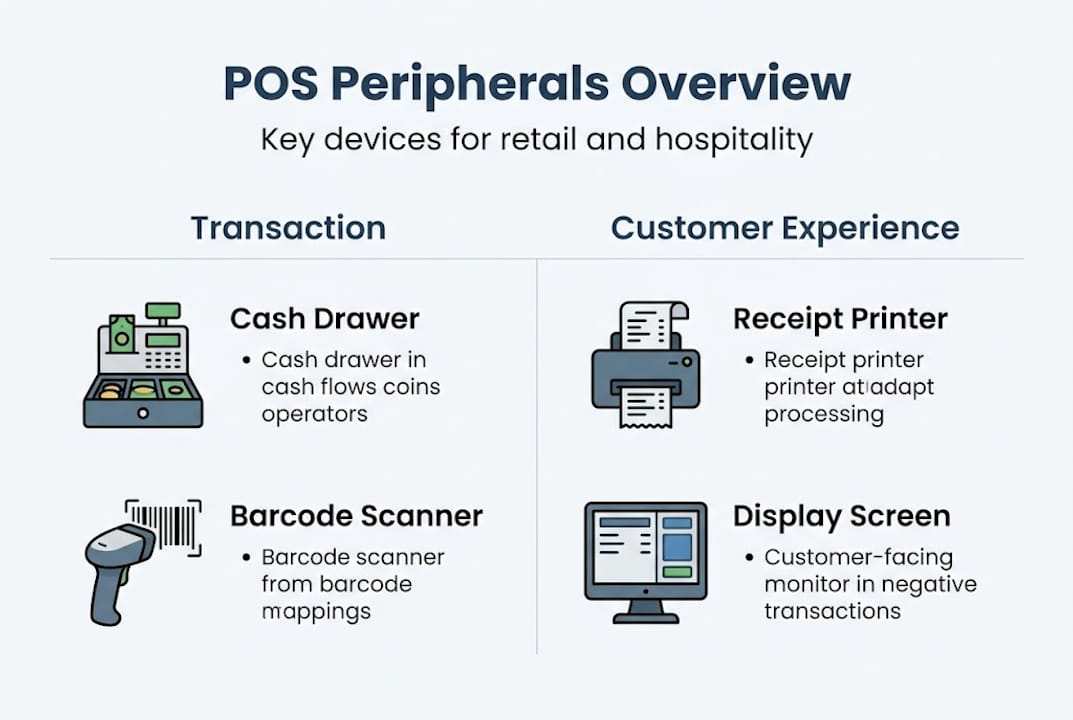
Customer-facing displays are increasingly influential in shaping how customers perceive your brand. A bright, responsive display that shows itemised totals reassures customers and reduces the chances of disputes. Some models double as advertising screens between transactions, displaying promotions or loyalty programme information.
Here is a quick comparison to guide your decision-making:
| Peripheral | Primary use | Key feature to check | Typical lifespan |
|---|---|---|---|
| Receipt printer | Proof of purchase | Print speed, paper width | 3 to 5 years |
| Barcode scanner | Product identification | Scan accuracy, IP rating | 4 to 6 years |
| Cash drawer | Currency management | Lock mechanism, trigger | 5 to 7 years |
| Customer display | Transaction transparency | Screen brightness, size | 4 to 6 years |
| Payment terminal | Card and contactless | PCI compliance, speed | 3 to 5 years |
“Choosing peripherals based solely on upfront price is one of the most common mistakes UK retailers make. The true cost of a device includes maintenance, downtime, and eventual emergency replacement during a busy period.”
Exploring the full range of terminal peripherals available for UK businesses helps you match the right device to the right environment. It is also worth reading about the receipt printer roles in modern retail, because these devices do far more than simply produce paper, they also serve compliance, returns management, and branding functions.
For hospitality operators specifically, kitchen printers and bump bars (devices used to acknowledge completed orders on kitchen display systems) deserve equal attention. A kitchen printer that fails during a dinner service can cause order confusion that damages customer experience and staff morale simultaneously.
How peripheral breakdowns disrupt retail operations
Understanding what peripherals are is one thing. Feeling the weight of what happens when they fail is another. Breakdowns are rarely isolated events. They cascade.
Consider a busy Saturday afternoon in a UK clothing retailer. The receipt printer jams. Staff attempt to reprint, creating a delay of two to three minutes per transaction. The queue builds. Customers grow impatient. Some leave without purchasing. Others complete the transaction but carry a negative impression of the experience. One or two may post about it online. The financial loss from that single hardware incident reaches well beyond the cost of a new printer roll or a service call.
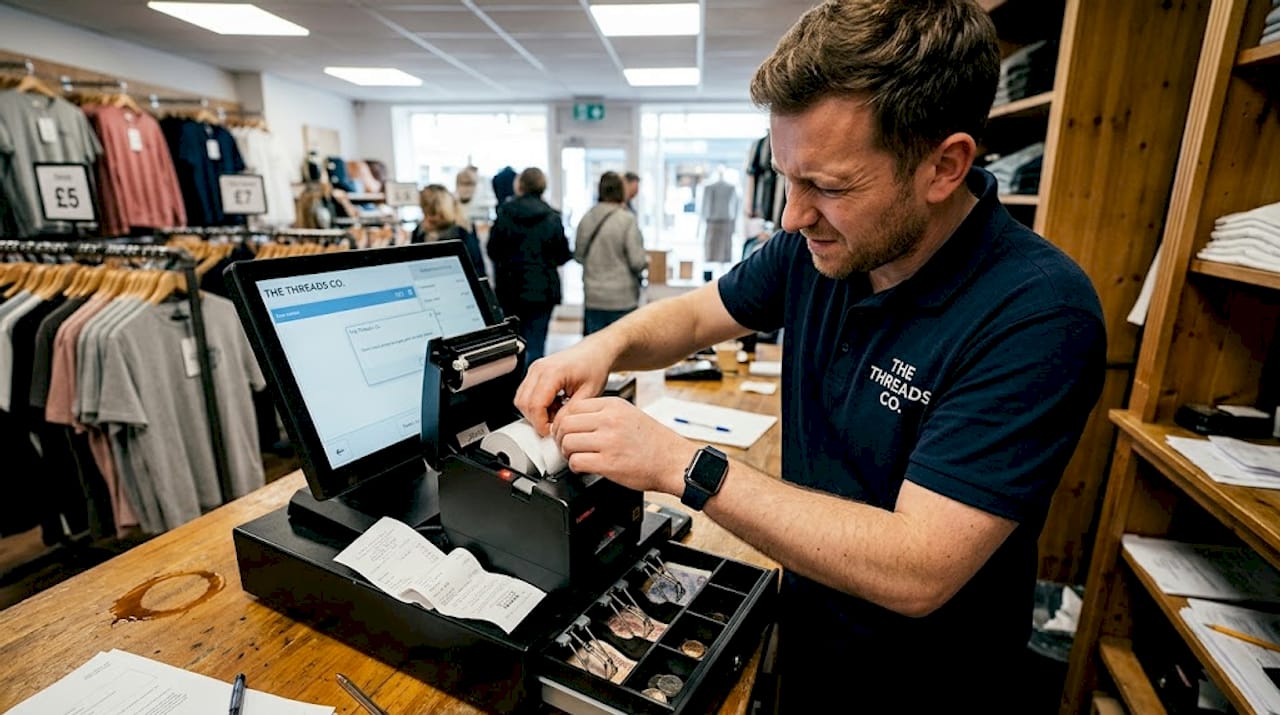
Power outages cause 35% and network failures 34% of connectivity-related POS issues, making infrastructure resilience as important as the peripheral devices themselves. A scanner that cannot communicate with your server due to a Wi-Fi dropout is as useless as one with a cracked housing.
The most common types of disruption you are likely to encounter, and how to spot them early, include:
- Printer jams and feed errors — usually preceded by inconsistent paper feeding or faint print quality in the days before a full jam occurs
- Scanner misreads — often begin with items needing multiple scan attempts, a sign of a dirty lens or degrading laser
- Cash drawer misfires — the drawer failing to open on trigger, typically caused by a worn solenoid (the electromagnetic mechanism that releases the drawer)
- Customer display freezes — intermittent blank screens or display lag, usually linked to firmware that has not been updated
- Payment terminal connectivity drops — slower card processing times are often the first signal of a failing connection or outdated firmware
| Failure type | Early warning sign | Typical cause |
|---|---|---|
| Printer jam | Faint or uneven print | Paper dust, worn roller |
| Scanner misread | Multiple scan attempts needed | Dirty lens, fading LED |
| Cash drawer failure | Slow or partial opening | Worn solenoid |
| Display freeze | Intermittent blank screen | Outdated firmware |
| Terminal dropout | Slow transaction processing | Network or firmware issue |
Adopting retail POS best practices around daily checks and scheduled maintenance is the most reliable way to catch these warning signs before they become full failures. A clear POS workflow optimisation process that includes a brief pre-opening check of all peripherals takes less than five minutes and can prevent hours of disruption.
Familiarising your team with basic hardware terminology also pays dividends. When a member of staff can articulate precisely what is happening with a device rather than just saying “it is broken,” your ability to diagnose and resolve the issue remotely or over the phone with a support provider improves dramatically.
Smart strategies for managing and upgrading POS peripherals
Reactive maintenance, waiting until something breaks before acting, is the most expensive way to manage POS peripherals. The good news is that a structured approach to management and upgrading is straightforward to implement and yields measurable results.
Start with a clear maintenance schedule. For most retail and hospitality environments, this means:
- Weekly cleaning of scanner lenses with a lint-free cloth
- Weekly removal of paper dust from receipt printer housings
- Monthly testing of cash drawer trigger mechanisms and lock functionality
- Quarterly firmware updates for payment terminals and customer displays
- Annual review of all device ages and performance logs
Devices that are older than four to five years carry exponentially higher failure risk. This is not a guideline to ignore. In practical terms, running a five-year-old thermal printer through a Christmas trading period is a gamble with your busiest revenue days. The upgrade cycle should be planned in advance, ideally aligned with quieter trading periods such as January or early autumn.
When selecting replacement peripherals, prioritise devices with proven durability ratings and IP certifications (Ingress Protection ratings that indicate resistance to dust and moisture). In a busy kitchen or outdoor market environment, these ratings are not optional extras. They are essential specifications.
Wireless peripherals have improved significantly in recent years. Bluetooth barcode scanners, for example, now offer reliable ranges of ten metres or more with battery life exceeding a full trading day. They reduce cable clutter, improve staff mobility, and integrate cleanly with modern POS terminals. Automated error detection is also becoming standard in higher-specification printers and scanners, sending alerts to your management dashboard when a consumable is running low or a mechanical component shows signs of wear.
Pro Tip: When budgeting for peripheral upgrades, factor in the cost of not upgrading. Calculate the average revenue generated during your busiest two-hour trading window, then ask yourself whether one failure during that window would cost more than the new device. In most cases, the answer makes the decision straightforward.
For hospitality businesses specifically, the strategies around optimising POS in hospitality go beyond hardware selection. They include table layout, order routing logic, and how kitchen display systems interact with front-of-house terminals. Similarly, cutting transaction times in busy service environments often comes down to peripheral configuration as much as software settings. A scanner positioned at an awkward angle or a printer placed two steps from the till adds seconds to every transaction, and those seconds accumulate across hundreds of covers.
The overlooked truth: how peripheral choices drive UK customer loyalty
Most conversations about customer loyalty centre on loyalty cards, personalised offers, and exceptional service. Rarely does anyone mention the receipt printer. Yet the reliability and quality of your peripherals communicate something powerful to your customers: that you take your operation seriously.
When a scanner reads a product instantly and a receipt prints cleanly without a second attempt, customers feel the efficiency even if they cannot name it. It creates a sense of trust, a quiet confidence that this business has its act together. When the opposite happens, when transactions stall and staff scramble, the impression is difficult to recover.
The businesses we see consistently retaining customers are often those that have invested thoughtfully in barcode scanning efficiency and peripheral integration. A reliable scanner is not just a functional tool; it is a statement about the standard of experience you are committed to delivering.
There is also a brand dimension that UK retailers undervalue. A clean, well-positioned customer display with your logo and a friendly message is a branding opportunity at the most attentive moment of any customer’s visit: when they are watching their total and reaching for their payment. Peripherals, chosen and configured with care, turn routine transactions into small but consistent brand touchpoints. That consistency, repeated across thousands of transactions, is what converts occasional shoppers into loyal regulars.
Start transforming your retail POS with YCR
If this guide has prompted you to look more critically at the peripherals running your daily operation, the next step is understanding exactly what is available and what fits your environment.
At YCR Distribution, we have spent over three decades helping UK retail and hospitality businesses select, configure, and maintain the hardware that keeps their operations running reliably. Whether you need to decode retail POS hardware explained before making purchasing decisions, browse our full hardware page to compare current models, or work through a specific device issue using our detailed troubleshooting guide, we have the resources and expertise to support your next steps. Same-day dispatch and next-day delivery mean your operation does not have to wait.
Frequently asked questions
What is a POS peripheral?
A POS peripheral is a device connected to your point of sale system, such as printers, scanners, cash drawers, or displays, that enables smoother retail and hospitality transactions.
How do peripheral failures impact retail operations?
Peripheral failures are responsible for 45% of POS disruptions in retail, leading to longer transaction times, lost sales, and customer dissatisfaction.
How often should POS peripherals be replaced?
Peripherals older than four to five years are significantly more likely to fail, so most experts recommend planning upgrades within that timeframe to avoid costly downtime.
Why are printers and scanners the most common peripherals needing repair?
Printers and scanners top repair incidents because they undergo intense daily mechanical use, making them more susceptible to wear, dust build-up, and component fatigue in retail settings.
Do UK retailers still need cash drawers?
Yes. With cash accounting for 15.2% of UK retail transactions, reliable cash drawers remain necessary for the majority of physical retail and hospitality businesses.