

TL;DR:
- Digital signage can significantly boost retail sales by up to 31.8% with proper strategy.
- Defining clear goals and updating content regularly are essential for signage success.
- Hardware is just one part; relevant content and ongoing management drive measurable results.
Every day you run your business without a structured digital signage strategy, you are leaving money on the counter. Outdated paper signs, hand-written specials boards, and static window displays communicate one thing to customers: nothing has changed. The result is stagnant footfall, missed upsell opportunities, and a customer experience that feels flat compared to your competition. The good news is that this is entirely fixable. Digital signage can increase sales in UK retail by up to 31.8%, and this guide will walk you through every stage of making that happen in your own business.
Table of Contents
- Assessing your business needs
- Essential tools and requirements
- Step-by-step digital signage setup
- Troubleshooting and optimising your digital signage
- What most digital signage guides miss
- Boost your business with expert digital signage solutions
- Frequently asked questions
Key Takeaways
| Point | Details |
|---|---|
| Start with clear goals | Successful digital signage begins by understanding your business’s unique objectives. |
| Choose the right hardware | Selecting quality screens and reliable content management software makes setup and use simpler. |
| Follow a structured setup | Careful planning and stepwise installation keep your rollout on track and efficient. |
| Monitor and optimise | Regular content updates and system checks ensure high customer engagement and sales. |
| Results come from strategy | The best ROI comes from linking content, placement, and ongoing analysis. |
Assessing your business needs
With the opportunity clear, the next logical step is to ground your approach in your own specific goals. Before you purchase a single screen or install a single cable, you need to understand precisely what problem you are solving. This is where most business owners go wrong. They buy hardware first and think about content second, which leads to expensive screens displaying irrelevant slideshows that customers ignore entirely.
The digital signage benefits vary significantly across different types of businesses. A busy sandwich shop in a city centre needs to display its lunchtime specials clearly and update them in real time when items sell out. A boutique clothing retailer wants to showcase seasonal collections and create an aspirational atmosphere. A hotel lobby needs to display check-in information, local weather, event schedules, and promotional offers for the spa or restaurant. Each scenario demands a different content approach, different screen placement, and a different level of system complexity.
Start by asking yourself these practical questions:
- What do you want customers to do differently after seeing your signage?
- Where are the natural bottlenecks in your customer journey right now?
- Are there peak times when staff cannot verbally communicate offers to every customer?
- Do you have promotions or menu items that change frequently and are slow to communicate?
- Is there wasted wall or window space that currently contributes nothing to sales?
Defining specific outcomes gives your project a measurable shape. Rather than saying “we want better signage,” say “we want to increase our average transaction value by 10% over the next quarter by promoting meal upgrades at the point of order.” That is a target you can track and a result you can prove. The digital signage role in retail goes well beyond advertising. It encompasses wayfinding, queue management, staff communication, brand storytelling, and real-time data display.
Pro Tip: Write down your top three signage priorities before speaking to any supplier. If you cannot articulate what success looks like, no hardware or software will save the project.
Essential tools and requirements
Now that you have defined your needs, it is time to prepare the resources that will help you deliver those results. Understanding hardware types is foundational to setting up an effective system, and skipping this stage leads to costly mistakes like purchasing a screen that is too dim for a bright shop window or a media player that cannot handle high-resolution video.
Here is a breakdown of what a typical digital signage setup requires:
Hardware essentials:
- Commercial display screens (not consumer televisions, which are not rated for continuous use)
- Media players or smart display units that run your content
- Secure wall mounts or freestanding display stands
- Power management solutions, particularly for multiple screens
- Cabling and cable management to keep installations safe and professional
Software essentials:
- A content management system (CMS) that allows remote content updates
- Cloud connectivity for real-time scheduling and content delivery
- A compatible operating system for your media player
- Basic design tools or templates for creating your own content
Optional but valuable add-ons:
- Touchscreen capability for interactive menus or product catalogues
- Audience analytics sensors that measure dwell time and engagement
- Integration with your existing POS system for live product and pricing data
- Digital menu board software specific to hospitality businesses
| Component | Budget option | Mid-range option | Premium option |
|---|---|---|---|
| Display screen | 32" commercial screen | 55" commercial screen | 75" 4K commercial display |
| Media player | Basic Android player | Windows-based player | Integrated smart display |
| CMS software | Free open-source | Subscription cloud CMS | Enterprise CMS with analytics |
| Installation support | DIY with guides | Local AV installer | Managed service provider |
| Ongoing support | Self-managed | Email support | Dedicated account manager |
The table above illustrates that digital signage scales to fit almost any budget. A single-screen setup for a small café can start with genuinely modest investment, while a multi-site retail chain can build a fully managed network that feeds live content to dozens of locations simultaneously. The key is matching your tools to your goals, not simply buying the most expensive option available.
Step-by-step digital signage setup
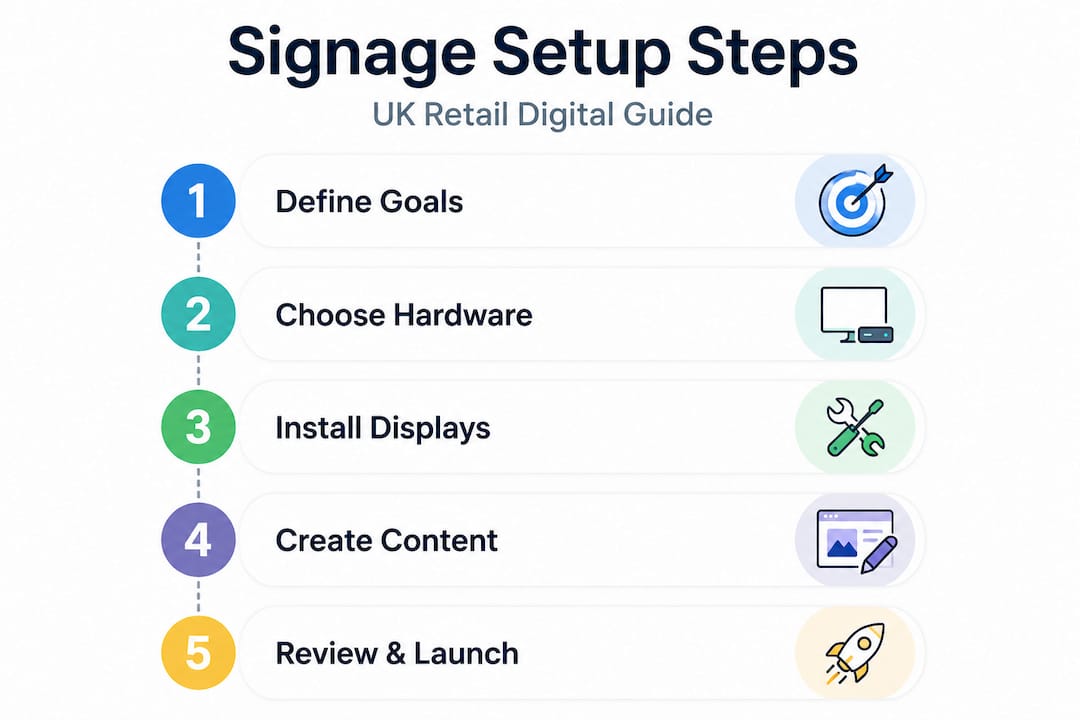
With your components ready, you can now confidently begin the installation and configuration process. Follow these steps in order to avoid common pitfalls and ensure your system works reliably from day one.
-
Plan your screen placement. Walk your premises as a customer would. Identify the spots where eyes naturally land: behind the counter, at the entrance, near the queue line, or above product displays. Screens placed at eye level with clear sightlines consistently outperform screens mounted too high or in corners.
-
Check power and connectivity. Before drilling any holes, confirm there is a mains power supply within safe reach of your chosen location. Also confirm whether you will use wired ethernet or Wi-Fi for your network connection. Wired connections are more reliable for commercial environments.
-
Mount your screen securely. Use a commercial-grade wall mount rated for your screen’s weight. If you are in a listed building or rented premises, check with your landlord before mounting. Freestanding options are a good alternative that require no structural work.
-
Connect your media player. Most media players connect to your screen via HDMI. Some commercial screens have integrated players, which reduces cabling and points of failure. Power on both devices and confirm the signal is recognised before moving to software setup.
-
Install and configure your CMS. Your CMS software is the brain of the whole operation. Follow the supplier’s setup guide to create your account, connect your media player to the platform, and confirm the device is showing as online in your dashboard.
-
Upload and schedule your content. Start with your most important messages: today’s specials, a current promotion, or your core brand content. Use the scheduling tool to set content to display at specific times. A breakfast menu should show in the morning; an evening deal should appear from 4pm onwards.
-
Test thoroughly before going live. Walk the floor, check the viewing angle, confirm text is legible from a typical customer distance, and verify that scheduled content changes at the correct time.
“Proper setup ensures maximum engagement and ROI.” The businesses that see the best engagement from digital signage are those that treat installation as a process, not a single event.
| Factor | DIY installation | Professional integration |
|---|---|---|
| Upfront cost | Lower | Higher |
| Time to complete | Longer | Faster |
| Risk of error | Higher | Lower |
| Ongoing support | Self-reliant | Managed |
| Best suited for | Single-screen, simple setups | Multi-screen or complex layouts |
Pro Tip: Before finalising your content for launch, ask a colleague or trusted customer to stand where your customers typically stand and tell you what they notice first. Real human feedback is more valuable than any software preview.
Troubleshooting and optimising your digital signage
Successful installation is just the start. Ongoing reliability and optimisation are what separate average results from outstanding ones. Many businesses install their screens, set up a basic content loop, and then forget about the system for months. That approach wastes most of the commercial value.
Setup verification checklist:
- Is every screen displaying the correct content at the correct time?
- Is the brightness set appropriately for the ambient lighting in that location?
- Are all media players showing as online and up to date in your CMS?
- Is the network connection stable and not subject to regular dropouts?
- Is all on-screen text clearly readable from at least two metres away?
Common issues and how to fix them quickly:
- Blank or black screen: Check the HDMI connection first, then confirm the media player has power and is connected to the network. Restart the player via your CMS dashboard if possible.
- Network drops causing content to freeze: Switch from Wi-Fi to a wired ethernet connection where possible. If Wi-Fi is unavoidable, ensure your router is within adequate range and not congested by other devices.
- Content displaying at the wrong time: Double-check your CMS schedule and confirm your device’s time zone settings match your local time.
- Screen too dim or too bright: Adjust the brightness setting in the screen’s own menu rather than through software, as hardware brightness controls are more reliable.
Regular content updates are where the real gains come. Monitoring and regular updates are directly linked to sustained sales performance. Businesses that refresh their signage content weekly, rather than monthly, consistently see higher customer engagement. Think about it from the customer’s perspective: if they visit your shop twice a week and see the same content both times, the screen becomes invisible to them.
Build a simple content calendar. Plan your promotions, seasonal campaigns, and product launches at least four weeks in advance. Use your CMS scheduling tools to queue up content so that updates happen automatically without requiring a staff member to manually swap anything over.
Pro Tip: Set a recurring monthly reminder to audit your digital signage content. Check that all prices are accurate, all promotions are still active, and that any seasonal references are still relevant. Stale content actively damages trust.
To measure ROI, track specific metrics before and after your signage goes live. Monitor average transaction value, the number of customers asking about a promoted product, and any change in sales for items you are actively advertising on screen. These numbers tell you what is working and where to refine your approach.
What most digital signage guides miss
Here is the uncomfortable truth that most setup guides skip entirely: the screen is not the product. The content is.
We have worked with businesses that invested seriously in high-quality commercial displays, robust media players, and solid CMS platforms, only to see disappointing results. The hardware worked perfectly. The content was the problem. Generic slideshows, low-resolution images, cluttered text, and promotions that had expired weeks earlier. Customers glanced at the screens and looked away again.
Content relevance and clear ROI tracking are the two areas most guides overlook entirely, yet they are the two variables most likely to determine whether your digital signage project succeeds or fails. Shops that commit to updating their signage weekly see roughly double the engagement compared to those that update monthly or less frequently. That is not a minor difference. That is the difference between a screen that drives revenue and one that simply draws power.
The other overlooked factor is measurement. Far too many business owners run their signage with no clear idea of whether it is working. They assume that because the screen is on and the content looks good, sales must be improving. That assumption is dangerous. You need baseline data before your screens go live, and you need to track specific outcomes afterwards. Without that discipline, you cannot justify further investment and you cannot learn what to improve.
Our honest recommendation: spend at least as much time planning your content strategy as you spend choosing your hardware. Define your metrics before you install a single screen. Review your content calendar every month without fail. The businesses that treat digital signage as a living, managed communication channel consistently outperform those that treat it as a one-time installation.
Boost your business with expert digital signage solutions
Ready to turn this knowledge into real results? Whether you are setting up your first screen or upgrading an entire network, having the right products and the right support makes all the difference.

At YCR Distribution, we supply a complete range of digital signage products designed specifically for UK retail and hospitality environments, from compact single-screen solutions for independent cafés to scalable multi-site setups for growing retail chains. Our team understands the practical demands of your business because we have spent over three decades supplying and supporting POS and display technology across the UK. You can also explore our digital signage case studies to see how businesses like yours have achieved measurable sales growth. Get in touch today and let us help you build a signage solution that earns its place.
Frequently asked questions
What is the first step to installing digital signage in my business?
Start by identifying your goals and the specific messages you want to convey to your customers, because goal-setting is foundational to digital signage effectiveness. Without clear objectives, even the best hardware will underdeliver.
What hardware do I need for digital signage?
You will need a commercial display screen, a media player, secure mounts, and potentially touch or interactive features depending on your aims. Understanding hardware types before purchasing ensures you choose components suited to your specific environment and usage.
Is digital signage cost effective for small retailers?
Yes, because it increases sales, draws customer attention to promotions, and can be scaled to match almost any budget. Digital signage can deliver up to a 31.8% uplift in sales, making even a modest setup a strong return on investment.
How can I keep my content fresh and engaging?
Update your signage regularly and use scheduling tools within your CMS to plan promotions and events well in advance. Regular content updates are directly linked to higher customer engagement and sustained sales performance.