

Cloud based POS explained for retail and hospitality

A cloud-based point of sale (POS) system is defined as software that processes transactions and stores business data on remote servers accessed via the internet, rather than on local hardware. This is the standard industry term: cloud POS. The global POS market is projected to grow from $33.41 billion in 2024 to $110.22 billion by 2032, driven largely by businesses replacing legacy systems with cloud alternatives. That growth signals a fundamental shift in how retail and hospitality operators manage sales, stock, and customer data. This article covers cloud based POS explained from the ground up: how it works, how it compares to traditional systems, what it costs, and what to look for before you buy.
How does a cloud POS system work?
A cloud POS system processes every transaction through an internet connection, sending data to remote servers and returning a response in real time. The software runs in a browser or a dedicated app, which means any tablet, smartphone, or terminal with internet access can serve as your till. Real-time syncing across locations and remote access to reports from any device are standard features of modern cloud POS platforms.
Here is the step-by-step transaction journey in a typical cloud POS setup:
- A staff member scans a product or selects it from the menu on a tablet or terminal.
- The system sends the transaction data to the cloud server over a secure internet connection.
- The server processes the sale, updates stock levels, and records the transaction.
- A confirmation returns to the device in milliseconds, and a receipt is printed or sent digitally.
- All data is immediately available in your central dashboard, accessible from any connected device.
The practical implications for multi-site operators are significant. Key capabilities include:
- Centralised reporting: View sales, margins, and stock across all locations from one dashboard.
- Instant menu or price updates: Change a price at head office and it appears on every terminal within seconds.
- Mobile terminals: iPads or Android tablets running apps like SAMTOUCH replace fixed desktop tills, freeing floor space and enabling tableside ordering.
- Automatic software updates: The vendor pushes updates to the cloud, so every terminal runs the latest version without manual intervention.
One common concern is what happens when the internet goes down. Many modern cloud POS systems cache transactions locally during an outage and sync automatically once connectivity is restored. Not every system handles this equally well, so verifying offline capability before purchase is non-negotiable.
Cloud POS vs traditional POS: what is the difference?
Traditional POS systems store all data locally on a server installed on your premises. Cloud POS stores data remotely and is accessed over the internet. That single architectural difference creates a cascade of practical distinctions that affect your costs, flexibility, and day-to-day operations.
| Feature | Cloud POS | Traditional POS |
|---|---|---|
| Data storage | Remote servers (vendor-managed) | Local server on premises |
| Upfront cost | Low to none | High (hardware and server) |
| Ongoing cost | Subscription: £50–£160 per terminal monthly | IT maintenance contracts |
| Software updates | Automatic via vendor | Manual, often chargeable |
| Remote access | Yes, from any device | No, or limited via VPN |
| Scalability | Add terminals quickly | Requires IT project |
| Offline operation | Varies by vendor | Full local functionality |
| Security | Vendor-managed enterprise grade | Dependent on your IT setup |
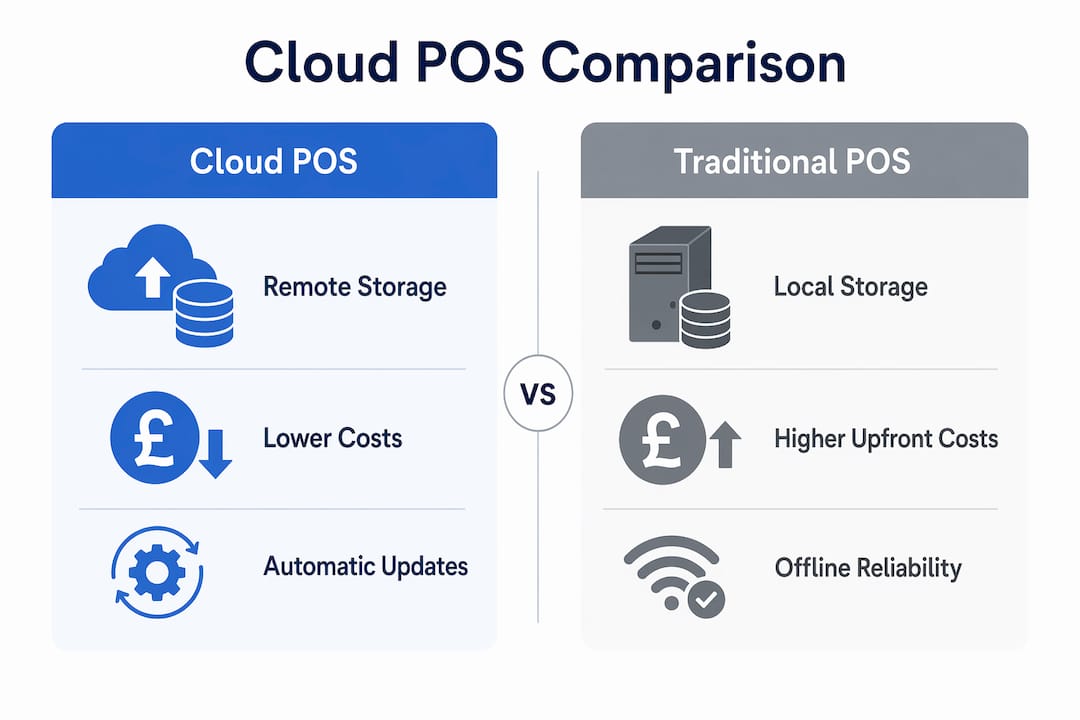
Cloud POS typically carries lower upfront costs because you do not need to purchase a dedicated local server or pay for specialist installation. Traditional systems demand significant capital expenditure before you process a single sale. The trade-off is that subscription fees accumulate over time, and costs rise as you add terminals or features.
Traditional systems retain one genuine advantage: they function fully without internet. A busy restaurant or retail shop that loses connectivity mid-service faces a serious problem with a cloud system if offline mode is absent or limited. That is not a reason to avoid cloud POS. It is a reason to ask the right questions before signing a contract.
Pro Tip: Ask every cloud POS vendor to demonstrate their offline mode in a live environment, not just describe it. Request documentation on exactly which features remain available without internet and how long the local cache holds data.
What are the benefits of cloud POS for retail and hospitality?
Cloud POS delivers measurable operational advantages that go well beyond processing payments faster. The most significant gains appear in stock management, customer experience, and the ability to act on data quickly.
- Faster service: Tableside ordering in restaurants using tablet-based cloud POS reduces the time between a customer’s decision and the kitchen receiving the order. In retail, queue-busting with mobile terminals cuts waiting times during peak periods.
- Centralised stock control: Every sale updates inventory in real time across all locations. A convenience store group running five sites can see stock levels across all outlets from one screen, without phoning each manager.
- Instant pricing and promotion changes: Cloud POS enables real-time pricing adjustments across multiple locations, which is critical for responding to competitor activity or managing end-of-day promotions in hospitality.
- Scalability without major IT projects: Adding a new terminal or a new site means activating a subscription and connecting a device. There is no server installation, no engineer visit, and no week-long project.
- Data-driven decisions: Sales reports, peak trading hours, best-selling products, and staff performance data are all available in real time. Operators who use this data consistently make better purchasing and staffing decisions.
“Cloud POS systems empower businesses to respond rapidly to market trends and seasonal demands by providing real-time insights and control.” — Salesforce
Security is another area where cloud POS holds a genuine edge over most small business on-premises setups. Top-tier cloud POS vendors invest in enterprise-grade security including encryption, automated backups, and active threat detection. A small independent retailer running a local server rarely has the budget or expertise to match that level of protection. The caveat is that you remain responsible for securing user access: strong passwords, role-based permissions, and staff training are your responsibility, not the vendor’s.
For hospitality operators, the ability to integrate cloud POS with kitchen display systems, reservation platforms, and loyalty programmes creates a genuinely connected operation. For retail, integration with e-commerce platforms means your online and in-store stock are always aligned. These integrations are far easier to build and maintain in a cloud environment than with legacy local systems.
Cost considerations and choosing the right cloud POS solution
Subscription fees are the most visible cost, but they are not the whole picture. Total cost of ownership includes peripheral hardware, network infrastructure, integration fees, and subscription increases as you scale. Budgeting only for the monthly software fee is a common mistake that leads to unpleasant surprises six months after go-live.
Follow this process when evaluating the true cost of a cloud POS solution:
- List every terminal you need. Subscription fees are per terminal. A five-till retail shop at £80 per terminal per month is £400 monthly before anything else.
- Audit your hardware requirements. Tablets, receipt printers, barcode scanners, cash drawers, and card readers all carry separate costs. Verify compatibility with your chosen software before purchasing.
- Assess your network. Cloud POS requires a reliable, fast internet connection. Budget for a dedicated business broadband line and a backup 4G router if your trading environment is critical.
- Check integration fees. Connecting your POS to accounting software like Xero or Sage, or to an e-commerce platform, often carries a one-off setup fee and sometimes an ongoing monthly charge.
- Review the contract terms. Understand the notice period, what happens to your data if you leave, and whether the vendor charges for data exports.
Pro Tip: Request a full written breakdown of all costs before signing, including what triggers a price increase. Vendors who are reluctant to provide this in writing are a warning sign.
Vendor security assessment matters as much as price. Cloud POS vendors invest extensively in cybersecurity, but you remain responsible for user access controls. Ask vendors directly about their data centre certifications, backup frequency, and incident response procedures. A vendor who cannot answer these questions clearly is not ready to hold your business data.
For UK retail and hospitality businesses, software options like SAMTOUCH and EZEEPOS are built specifically for the operational demands of this market, with features designed around the realities of British trading environments rather than generic global templates. Choosing sector-specific software reduces the gap between what the system does out of the box and what your business actually needs.
Key takeaways
Cloud POS is the most practical and cost-effective point of sale architecture for retail and hospitality businesses that need real-time data, multi-location control, and the flexibility to scale without major IT investment.
| Point | Details |
|---|---|
| Core definition | Cloud POS stores and processes data on remote servers accessed via the internet. |
| Offline capability | Always verify offline mode before purchase to protect trading continuity. |
| True cost of ownership | Budget beyond subscription fees to include hardware, network, and integration costs. |
| Security responsibility | Vendors manage infrastructure security; you manage user access and permissions. |
| Operational advantage | Real-time stock, pricing, and reporting across all locations from one dashboard. |
What I have learned from watching businesses adopt cloud POS
Most operators I speak with underestimate what a cloud POS system actually is. Many business owners view POS as a digital cash register, when in reality a well-configured cloud POS is the central nervous system of the entire operation, connecting sales, inventory, customer data, and staff management in one place. That misunderstanding leads to underinvestment in setup, training, and network infrastructure.
The businesses that get the most from cloud POS treat the go-live as a process, not an event. They spend time mapping their menu or product catalogue correctly, training staff properly, and testing offline mode before they need it. The ones who struggle are those who plug in a tablet, create a few products, and expect the system to do the rest.
Internet reliability is the single most underestimated risk in cloud POS adoption. A busy Saturday lunchtime service is not the moment to discover your offline mode does not support card payments. I recommend every business running cloud POS invests in a 4G backup router that activates automatically on primary connection failure. The cost is negligible compared to the revenue risk.
My honest view on vendor selection: prioritise support quality and UK-specific expertise over headline price. A system that costs £20 less per month but takes four hours to get a response from support will cost you far more in lost trading time over a year.
— John
Explore cloud POS solutions from Ycr

Ycr has supplied POS hardware and software to UK retail and hospitality businesses for over three decades. Whether you are setting up a new site or replacing an ageing legacy system, Ycr offers the full stack: software, terminals, printers, and scanners, all from one supplier with next-day delivery and same-day dispatch. For hospitality operators, SAMTOUCH POS software delivers a purpose-built cloud-ready solution with the hardware to match. Retail businesses can explore TOUCHPOINT software for a flexible, scalable setup. Ycr also stocks compatible peripherals including thermal receipt printers and barcode scanners to complete your setup. Contact Ycr directly for a tailored recommendation based on your site count, sector, and budget.
FAQ
What is a cloud-based POS system?
A cloud-based POS system processes transactions and stores business data on remote servers accessed via the internet, rather than on a local machine. It allows operators to manage sales, stock, and reporting from any connected device.
How does cloud POS differ from a traditional POS system?
Traditional POS systems store data locally on an on-premises server, requiring higher upfront hardware costs and manual software updates. Cloud POS uses a subscription model, updates automatically, and allows remote access from any device.
What happens to a cloud POS system if the internet goes down?
Many modern cloud POS systems include an offline mode that caches transactions locally and syncs them automatically once connectivity is restored. Always verify the scope of offline functionality with your vendor before purchase.
How much does a cloud POS system cost in the UK?
Subscription fees typically range from $60 to $200 per terminal monthly, covering software updates, cloud storage, and support. Total costs are higher once you include hardware, network infrastructure, and integration fees.
Is cloud POS secure enough for retail and hospitality businesses?
Cloud POS vendors invest in enterprise-grade encryption, automated backups, and threat detection that typically exceeds what small businesses can achieve on-premises. Businesses remain responsible for managing user access controls and staff permissions.