
Role of digital signage in restaurants: 2026 guide
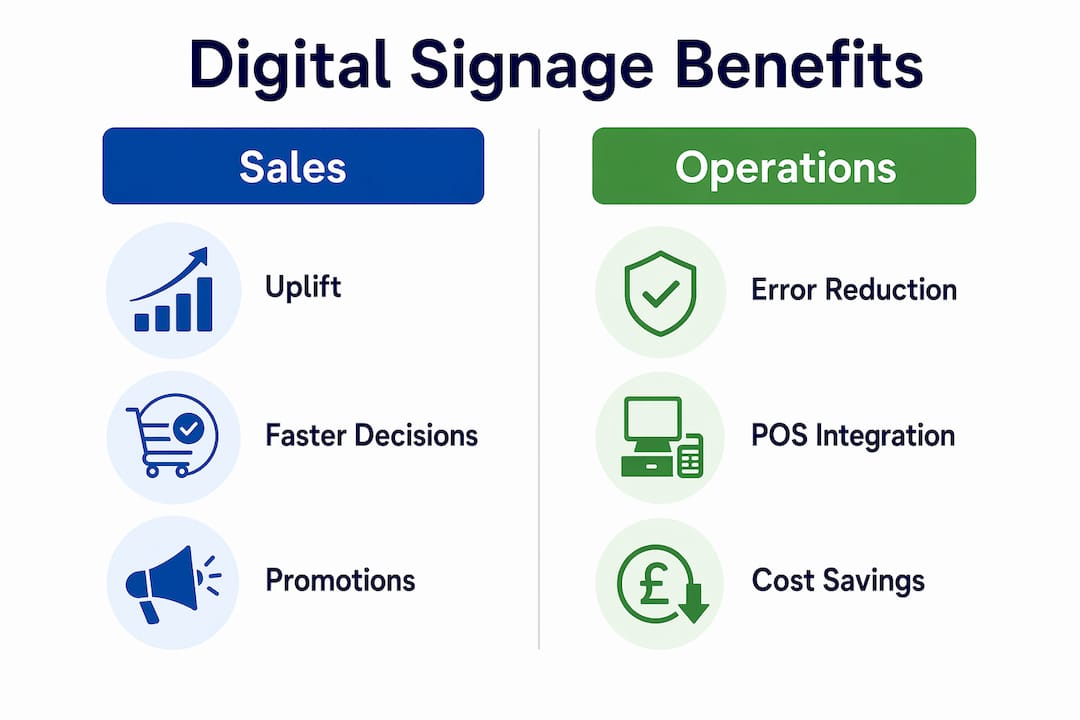
Digital signage in restaurants is defined as networked display technology used to present menus, promotions, and operational information to customers and staff in real time. The role of digital signage in restaurants extends well beyond replacing printed menus. Across 237 campaigns, digital signage delivered an average 8.1% lift in sales for advertised products. That figure comes with an important caveat: results depend heavily on product type, message quality, and how well the content fits the moment. This guide covers the sales impact, operational gains, screen types, and content practices that determine whether your investment pays off.
How does digital signage drive sales in restaurants?
The sales case for restaurant display technology is grounded in behavioural science, not just aesthetics. Screens influence 97% of consumer decisions subconsciously, even when customers are not actively watching. That means a well-placed screen above the counter is working on your customer’s decision before they open their mouth to order.
Dynamic menu boards are the most direct sales tool. They highlight high-margin items, new additions, and limited-time offers at exactly the moment a customer is deciding what to buy. A QSR chain case study published by MediaSignage recorded a 6% overall sales increase, a 9% rise in combo meal attachments, and an 11% lift in dinner sales after deploying digital menu boards with supporting screens. Those are not marginal gains. They represent a material shift in revenue from the same customer footfall.
The mechanism behind these numbers is impulse influence. A static printed menu cannot change based on time of day, stock levels, or weather. A digital board can. Showing a warm soup promotion when it is raining outside, or pushing a dessert upsell at 7pm, targets the customer at the right psychological moment. The impact of digital signage on purchasing behaviour is strongest when content is specific, timely, and visually clear.
- Highlight high-margin items prominently during peak service periods to increase average transaction value.
- Use countdown timers on limited-time offers to create urgency without pressure.
- Rotate promotional content by daypart so breakfast, lunch, and dinner customers each see relevant offers.
- Feature new products with short video clips or animated images to attract attention faster than static text.
Pro Tip: Run a single promoted item per screen zone rather than rotating five items at once. Customers make faster decisions when presented with fewer choices, and a focused promotion consistently outperforms a carousel of offers.
What are the operational benefits of integrating digital signage with POS systems?
The operational case for restaurant display technology is arguably stronger than the marketing case. The same MediaSignage case study that recorded the sales lifts also found that order errors reduced by 15% and customer disputes dropped by 67%. Drive-thru order time decreased by 14%. These are measurable workflow improvements, not soft benefits.
The cost savings from removing printed menus are substantial. One QSR chain reduced its printing and materials costs from £540,000 to £45,000 annually. Menu update deployment time fell from several weeks to under one hour. The return on investment for that deployment arrived in approximately 10 months.
Synchronising digital menus with POS and Kitchen Display Systems is the most operationally valuable use of the technology. When a menu item sells out, the POS flags it and the customer-facing board removes it automatically. When a price changes, it updates across every screen in the building simultaneously. This removes a category of human error that costs restaurants money and customer goodwill every day.
- Connect your digital boards to your POS system so that price changes and 86’d items update automatically across all screens.
- Add a kitchen display system to merge online, counter, and drive-thru orders into a single queue, reducing ticket errors.
- Set up dayparting schedules in your content management system so menus switch between breakfast, lunch, and dinner automatically.
- Audit your print spend before deployment to establish a clear baseline for calculating cost savings post-installation.
- Measure order accuracy rates before and after installation to quantify the operational improvement for stakeholders.
Pro Tip: Ask your signage provider whether their content management system has a direct API connection to your POS. A native integration is significantly more reliable than a manual export-import workflow, and it removes the need for staff to update screens manually during busy service.
Which screen types suit different restaurant formats?
Not every screen serves the same purpose. Screen roles should be designed with specific content and permissions that match the customer journey stage and the physical location within the venue. A window display that attracts passing trade needs entirely different content from a counter board that converts a customer who is already inside.
| Screen location | Primary purpose | Content type | Typical format |
|---|---|---|---|
| Window or entrance display | Attract passing footfall | Promotional imagery, daily specials | Large format, high brightness |
| Counter or overhead menu board | Drive ordering decisions | Full menu, upsell prompts | Landscape, multi-zone layout |
| Queue or waiting area screen | Reduce perceived wait time | Brand content, entertainment, offers | Mid-size, eye-level mounting |
| Kitchen display system | Communicate orders to kitchen | Order tickets, timing alerts | Compact, wall-mounted |
| Drive-thru lane display | Confirm orders, promote add-ons | Order confirmation, upsell prompts | Weatherproof, high brightness |
Restaurant format also shapes the right hardware choices. A quick service restaurant needs high-brightness commercial displays that can handle rapid content changes and heavy daily use. A fine dining venue may use smaller, discreet screens near the entrance to display the evening’s menu or wine list, prioritising elegance over volume. Coffee shops often benefit most from a single overhead board behind the counter combined with a window-facing display to attract customers from the street.
Budget planning varies significantly by installation type. Indoor menu boards and a window display for an independent site typically cost between £5,000 and £11,000 fully installed. Drive-thru lane displays cost between £14,000 and £22,000. Payback at a location level typically occurs within 6–14 months, depending on sales uplift and print cost savings.
What are the best practices for digital signage content and setup?
The most common mistake restaurant managers make with display technology is treating it as a “set and forget” installation. Neglecting dynamic content updates directly reduces effectiveness. A screen showing the same promotion for three months becomes invisible to regular customers. Adapting content to live conditions, including queue length, time of day, and current weather, is what separates high-performing deployments from expensive wallpaper.
ROI depends on integration with real-time workflows such as order status, dayparting, and inventory management. This transforms signage from a static advertising channel into an operational tool that responds to what is actually happening in your restaurant at any given moment.
- Define your success metrics before installation. Decide whether you are measuring basket size, combo attachment rate, order accuracy, or print cost reduction. You cannot improve what you do not measure.
- Use a 60-day pre and post measurement window to accurately capture the impact of new content or screen placements. Shorter windows miss the full effect.
- Specify commercial-grade hardware for all installations. Consumer televisions are not built for 16-hour daily operation and will fail faster in a kitchen-adjacent environment.
- Manage all screens from one content management system connected to your POS. Multiple disconnected systems create content drift and manual update burdens.
- Use self-service kiosks for interactive ordering and quick feedback polls to reduce friction and gather customer experience data simultaneously.
Pro Tip: Set up weather-triggered content rules in your CMS if the platform supports it. Promoting hot drinks when the temperature drops below 10°C, or cold beverages on warm days, requires no manual intervention and consistently lifts sales of those items.
Key takeaways
Digital signage in restaurants delivers measurable sales uplift, significant cost reductions, and operational accuracy improvements when integrated with POS and kitchen display systems.
| Point | Details |
|---|---|
| Sales uplift is real and measurable | Digital signage delivers an average 8.1% sales lift for advertised products across large-scale testing. |
| Operational integration is the priority | Connecting screens to POS and KDS reduces order errors, cuts disputes, and removes manual menu updates. |
| Print cost savings are substantial | One QSR chain cut annual print costs from £540,000 to £45,000 after switching to digital displays. |
| Screen role must match location | Window, counter, queue, and drive-thru screens each need distinct content designed for that customer journey stage. |
| Dynamic content drives performance | Static or rarely updated screens lose effectiveness quickly; dayparting and live triggers maintain impact. |
What I have learned from watching restaurants get this wrong
From my experience working with hospitality businesses across the UK, the operators who get the most from display technology are rarely the ones with the biggest screens. They are the ones who treat content as an ongoing discipline rather than a one-time installation task.
The most common failure I see is a restaurant that invests in good hardware, launches with strong content, and then does nothing for six months. The screens keep running, but the promotions are out of date, the seasonal items are long gone, and regular customers have stopped reading them entirely. The technology did not fail. The content management did.
The second mistake is buying consumer-grade displays to save money upfront. A domestic television running 14 hours a day in a warm kitchen environment will fail within a year. The replacement cost and downtime wipe out the initial saving immediately. Commercial-grade hardware from established suppliers is not a luxury. It is the baseline for a reliable deployment.
What I find genuinely underused is the operational side of the technology. Most restaurant managers think of digital signage purely as a marketing tool. The operators who extract the most value use it to communicate with their kitchen, manage their queue, and reduce the friction between front-of-house and back-of-house. That is where the real efficiency gains sit, and it is the area that most content plans ignore entirely.
If you are evaluating a deployment, start with the POS integration question. If your signage provider cannot connect their system to your existing POS, the operational benefits are largely off the table. Choose a provider who treats the POS connection as a standard feature, not an optional add-on.
— John
How Ycr supports restaurant digital signage deployments
Ycr has supplied POS hardware, software, and display solutions to UK hospitality businesses for over three decades. For restaurant managers ready to act on the benefits covered in this article, Ycr offers a direct path from planning to deployment.

The SAMTOUCH POS software integrates menu management with customer-facing displays, keeping pricing and availability consistent across every screen in your venue. For operators who need flexible software options, TouchPoint POS software provides the same integration capability with a different hardware configuration. Ycr also supplies commercial-grade digital display hardware suited to indoor, window-facing, and outdoor restaurant environments, with next-day delivery and same-day dispatch available for most products.
FAQ
What is the average sales uplift from restaurant digital signage?
Digital signage delivers an average 8.1% sales lift for advertised products, based on data from 237 campaigns. Results vary by product type, message quality, and how well content is tailored to the moment.
How does digital signage reduce order errors in restaurants?
Connecting digital menu boards to a POS and Kitchen Display System removes manual update steps and merges all order channels into a single queue. One QSR chain recorded a 15% reduction in order errors after deployment.
What does a restaurant digital signage installation cost in the UK?
An indoor menu board and window display for an independent site typically costs between £5,000 and £11,000 fully installed. Drive-thru lane displays range from £14,000 to £22,000, with payback typically within 6–14 months.
Do I need commercial-grade screens or can I use consumer televisions?
Commercial-grade screens are necessary for restaurant environments. Consumer televisions are not designed for continuous daily operation in warm, high-humidity conditions and will fail significantly faster, negating any upfront cost saving.
How often should restaurant digital signage content be updated?
Content should be updated at minimum by season, but ideally by daypart and in response to live conditions such as weather or stock levels. Static content that never changes loses customer attention quickly and reduces the return on your investment.