

Why use POS for compliance: a guide for retailers

A Point of Sale system is a compliance tool as much as it is a sales device. For retail and hospitality business owners, understanding why use POS for compliance is no longer optional. Regulations such as PCI DSS v4.0, HMRC VAT obligations, and the UK GDPR all place direct demands on how you capture, store, and report transaction data. A well-configured POS system automates these obligations, reduces human error, and creates the audit-ready records that regulators expect. This guide explains exactly how that works in practice.
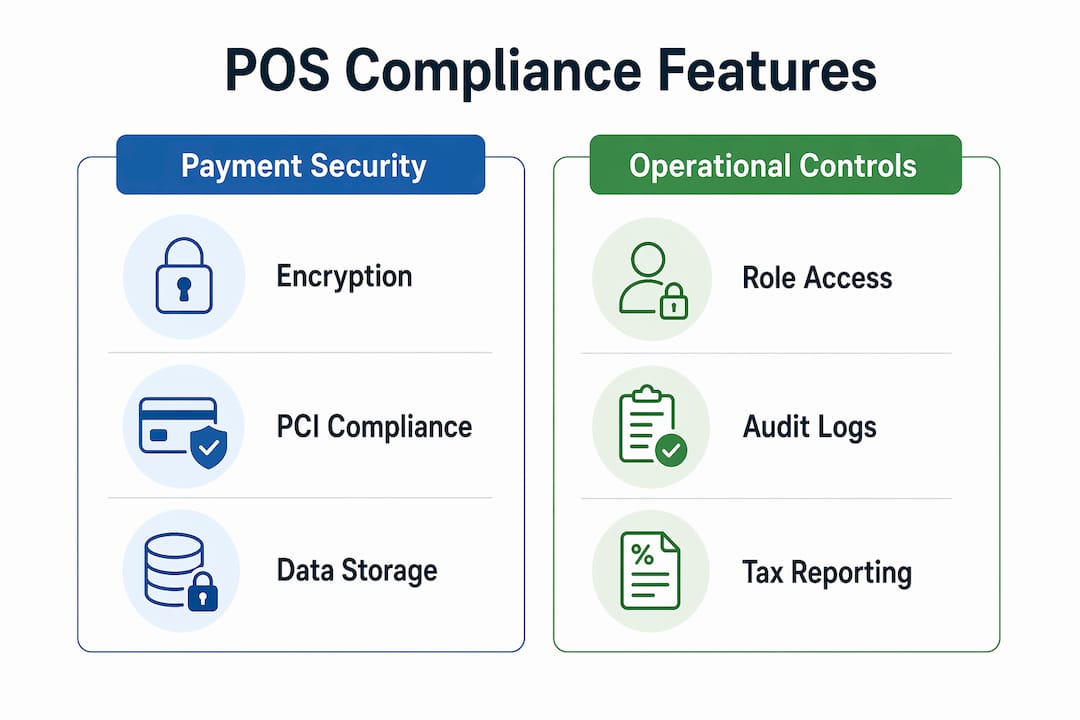
Why use POS for compliance: payment security and PCI DSS
PCI DSS, the Payment Card Industry Data Security Standard, defines the security requirements every business must meet when accepting card payments. PCI DSS v4.0 requires annual validation and encryption of all cardholder data at rest. That means every POS terminal, every connected back-office system, and every piece of software that touches card data falls within the Cardholder Data Environment (CDE) and must be secured.
One critical point that catches many business owners off guard: encryption alone does not remove your POS system from PCI scope. The entire CDE must be secured, including inventory and back-office software that connects to card data. Businesses often assume that encrypting the terminal is sufficient. It is not.
The most effective way to reduce your PCI scope is to limit what data your system stores. Avoiding storage of full card numbers or CVVs after authorisation significantly reduces breach risk and the cost of any forensic investigation. A POS system configured to discard sensitive authentication data immediately after a transaction is processed gives you far less to protect.

Non-compliance carries serious financial consequences. Data breaches at non-compliant businesses can trigger escalating monthly penalties, card brand fines, and the loss of the ability to accept card payments entirely. For a hospitality or retail business, losing card acceptance is effectively losing the business.
Key PCI DSS obligations your POS system must support:
- Encrypt cardholder data both in transit and at rest
- Restrict access to the CDE to authorised personnel only
- Avoid storing CVV or full Primary Account Numbers post-authorisation
- Complete annual PCI compliance validation
- Maintain logs of all access to cardholder data
Pro Tip: Choose a POS vendor that is themselves PCI compliant. Working with a PCI compliant vendor reduces your own breach liability and narrows the scope of your annual validation.
How does POS support accurate tax reporting and audit readiness?
A POS system automates VAT and sales tax calculations at the point of transaction. This matters because retail and hospitality environments often involve multiple tax rates applied simultaneously, for example, hot food at 20% VAT alongside cold food at 0%. Manual calculation at this level of complexity produces errors. Automated POS tax engines do not.
The audit readiness benefit goes deeper than accurate figures. Automated POS reports align transaction records with regulatory expectations, reducing the stress of HMRC enquiries. The system captures every sale with a timestamp, a user attribution, and a tax breakdown. That level of detail is exactly what an auditor needs to verify your returns.
The strongest defence against auditor scrutiny is automated, timestamped transaction logs with strict user-level attribution. This means every void, refund, or discount is recorded against the employee who processed it. Anomalies become visible immediately, rather than surfacing months later during a manual reconciliation.
A practical comparison of manual versus POS-driven tax reporting:
| Approach | Tax calculation | Audit trail | Error risk |
|---|---|---|---|
| Manual recording | Calculated by staff | Paper-based, incomplete | High |
| Basic spreadsheet | Semi-automated | Fragmented across files | Medium |
| Integrated POS system | Fully automated | Timestamped, user-attributed | Low |
Integrating your POS with your accounting software adds another layer of reliability. When sales data flows directly into your finance system, there is no manual re-entry step where figures can be altered or lost. Fragmented data from unintegrated systems is one of the most common causes of audit failure. Integration closes that gap.
Steps to build audit-ready records with your POS:
- Configure your POS to apply the correct VAT rate to each product category at setup.
- Enable end-of-day Z reports and archive them automatically to your accounting software.
- Assign individual login credentials to every member of staff, so every transaction is attributed.
- Review exception reports weekly to catch voids, refunds, and discounts that fall outside normal patterns.
- Back up transaction data to a secure, off-site location at least daily.
What POS features enforce operational compliance beyond payments?
Payment security and tax reporting are the most visible compliance obligations. A well-specified POS system also enforces several operational compliance requirements that are easy to overlook until an audit or incident forces the issue.
Role-based access controls prevent staff from performing actions outside their authorised scope. A cashier should not be able to process a refund above a set threshold without manager approval. A junior employee should not have access to sales reports or customer data. These permission settings are not just good practice. They are a direct compliance requirement under UK GDPR’s principle of data minimisation.
Receipt formatting is another area where POS systems carry a legal function. Consumer protection regulations in the UK require receipts to include specific information: the business name, transaction date, items purchased, and VAT number where applicable. A correctly configured POS generates compliant receipts automatically, removing the risk of staff omitting required details.
Operational compliance features to look for in a POS system:
- Role-based permissions: Restrict voids, refunds, and report access by employee role.
- Automated tax table updates: Cloud-based POS software updates tax rates automatically, preventing overcharging or underpaying.
- Compliant receipt templates: Pre-configured to include all legally required fields.
- Secure customer data storage: Encrypted storage with access restricted to authorised users only.
- Audit log generation: Every system action recorded with timestamp and user ID.
Pro Tip: Review your POS permission settings every six months. Staff roles change, and outdated permissions are a common source of both internal fraud and data protection breaches. A retail POS compliance review should include a full permissions audit.
What are the most common POS compliance pitfalls?
The most expensive compliance mistakes are not dramatic failures. They are quiet, structural problems that accumulate over months until an audit or a breach makes them visible.
The most common pitfall is failing to integrate POS with back-office systems. When your POS and your accounting software do not communicate, you create two separate records of the same transactions. Reconciling them manually invites discrepancies. Auditors treat inconsistent records as a red flag, regardless of whether the underlying figures are correct.
A second common error is misunderstanding the scope of PCI DSS. Many business owners believe that using a third-party payment processor removes all PCI obligations. It reduces them, but it does not eliminate them. Your POS terminal, your network, and any system that touches cardholder data still falls within scope.
Common compliance pitfalls and how to address them:
- Unintegrated systems: Connect your POS directly to your accounting and inventory software to maintain a single, consistent record.
- Excessive data retention: Configure your POS to delete sensitive card data immediately after authorisation. Do not store what you do not need.
- Neglected software updates: Unpatched POS software is a primary attack vector. Enable automatic updates or schedule monthly manual checks.
- Shared login credentials: Every staff member must have an individual login. Shared accounts make user-attributed audit trails impossible.
- Ignoring exception reports: Voids and refunds processed outside normal hours or above normal values are compliance signals. Review them regularly.
The underlying principle across all of these pitfalls is the same. Compliance is a daily operational habit, not an annual exercise. A secure transactions guide for retailers covers many of these configuration steps in practical detail.
Practical steps to use your POS system for compliance
Choosing the right POS system is the first decision. Configuring and maintaining it correctly is where compliance is actually won or lost.
-
Select software with built-in PCI compliance features. Look for systems that do not store full card data post-authorisation and that work with PCI-compliant payment processors. SAMTOUCH and EZEEPOS, both available through Ycr, are designed with these requirements in mind for UK retail and hospitality environments.
-
Configure tax settings before go-live. Map every product category to the correct VAT rate at setup. Test the configuration with sample transactions before opening to customers.
-
Set up role-based permissions from day one. Define what each staff role can and cannot do in the system. Revisit these settings whenever a member of staff changes role or leaves the business.
-
Enable and review system logs regularly. Most POS systems generate access and transaction logs automatically. Schedule a weekly review to catch anomalies early.
-
Train staff on compliance procedures. Staff who understand why certain actions require manager approval are less likely to attempt workarounds. A short briefing at onboarding and a refresher every six months is sufficient for most businesses.
-
Keep software current. Apply security patches and tax table updates as soon as they are available. Cloud-based POS systems typically handle this automatically. If yours does not, build a monthly update check into your operations calendar.
Key takeaways
A POS system configured correctly is the most practical compliance tool available to retail and hospitality business owners, covering PCI DSS, VAT reporting, data protection, and audit readiness in a single integrated platform.
| Point | Details |
|---|---|
| PCI DSS scope is wider than most expect | The entire Cardholder Data Environment must be secured, not just the terminal. |
| Limit data retention to reduce risk | Avoid storing full card numbers or CVVs post-authorisation to minimise breach impact. |
| Automated logs are your audit defence | Timestamped, user-attributed transaction records are the strongest evidence in any audit. |
| Integration prevents record inconsistencies | Connect POS to accounting software to eliminate manual reconciliation and audit risk. |
| Compliance requires ongoing maintenance | Update software, review permissions, and train staff regularly, not just at setup. |
The compliance habit most business owners skip
I have spoken with a lot of retail and hospitality owners over the years, and the pattern is almost always the same. Compliance gets attention when something goes wrong: a failed audit, a card scheme fine, a data incident. Between those moments, it gets ignored.
The uncomfortable truth is that the businesses that handle compliance best are not the ones with the most sophisticated systems. They are the ones that treat it as a routine operational task, like cashing up or ordering stock. They review their exception reports on a Tuesday morning. They check their permission settings when a member of staff leaves. They apply software updates the week they arrive.
What I have found genuinely changes outcomes is limiting data exposure from the start. The less cardholder data your system holds, the smaller your PCI scope, the lower your breach liability, and the shorter your annual validation process. That is not a technical argument. It is a business one.
The other thing I would stress is that integrated systems are not a luxury. When your POS and your accounting software share the same data, you have one version of the truth. When they do not, you have two versions that will eventually disagree at the worst possible moment. The retail POS data security question and the audit readiness question are the same question. Answer it once, with the right system, and you stop answering it repeatedly under pressure.
— John
POS solutions built for compliance from Ycr
Ycr has supplied POS hardware and software to UK retail and hospitality businesses for over three decades. The compliance requirements covered in this article are built into the solutions Ycr distributes, not added as an afterthought.

SAMTOUCH POS software includes automated VAT handling, role-based access controls, and audit-ready reporting, making it a practical choice for businesses that need to meet HMRC and PCI DSS obligations without managing compliance manually. For hospitality operators, TOUCHPOINT software offers the same compliance-focused feature set with configurations suited to restaurants, cafes, and takeaways. Contact Ycr directly to discuss a tailored POS package for your business.
FAQ
What is PCI DSS and why does it apply to POS systems?
PCI DSS is the Payment Card Industry Data Security Standard. It applies to any business that accepts card payments, including every device and system in the Cardholder Data Environment, which includes your POS terminal.
Does using a third-party payment processor remove PCI obligations?
No. Using a third-party processor reduces your PCI scope but does not eliminate it. Your POS terminal and connected systems still require annual validation and must meet encryption and access control requirements.
How does a POS system help with HMRC VAT audits?
A POS system generates timestamped, user-attributed transaction records with automatic VAT breakdowns. These records give HMRC auditors the verifiable evidence they need, reducing the risk of penalties for incomplete or inconsistent reporting.
What data should a POS system not store after a transaction?
A POS system should not store full card numbers (Primary Account Numbers) or CVV codes after a transaction is authorised. Removing this data limits breach liability and reduces the scope of PCI compliance obligations.
How often should POS compliance settings be reviewed?
Review role-based permissions and system logs at least every six months, and apply software updates as soon as they are released. Staff changes and tax rate updates are the two most common triggers for a compliance configuration review.