

Step by step hospitality checkout workflow guide

A step by step hospitality checkout workflow is the systematic sequence of guest departure actions and back-end operational updates that a property must complete to close a stay correctly. In industry terms, this is often called the front office departure procedure or guest departure SOP (standard operating procedure). A well-run hospitality checkout process directly shapes the final impression a guest carries away, and checkout delays affect reviews even when the rest of the stay was excellent. This guide covers every step, from pre-departure reminders through to room status updates, with practical tips to help hospitality managers and front desk staff run a faster, cleaner departure process.
What are the essential prerequisites for an effective checkout workflow?
The right tools and preparation make or break the hospitality checkout process before a single guest reaches the front desk. Three systems sit at the core: a Property Management System (PMS) to hold guest folios and room status, payment processing equipment to handle card settlements, and a communication tool to send pre-departure reminders. Without all three working together, even well-trained staff will face delays.
Pre-departure communication is the most underused preparation step. Sending a reminder the evening before checkout, whether by text, in-room tablet, or printed note, gives guests time to query their bill privately rather than at the desk during peak hours. This single action reduces queue congestion and billing disputes at the same time.

Staff training is the third pillar. Front desk teams need to know the property’s billing policies, departure window, and escalation path for disputes before they handle a single checkout. Hospitality staff training that covers these specifics produces consistent results across shifts and reduces reliance on supervisors for routine queries.
| Tool or prerequisite | Purpose | Impact on checkout |
|---|---|---|
| Property Management System (PMS) | Holds guest folio, room status, and billing data | Central to every step of the departure procedure |
| Payment terminal | Processes card and contactless settlements | Eliminates manual billing errors |
| Pre-departure reminder system | Alerts guests to departure time and billing options | Reduces desk congestion and disputes |
| Staff training programme | Builds consistent knowledge of policies and escalation | Reduces supervisor dependency during busy periods |
| Key drop box | Allows key return without staff interaction | Speeds up departures during peak checkout windows |
Key prerequisites at a glance:
- PMS access for all front desk staff, with real-time folio visibility
- Payment terminals tested and reconciled at the start of each shift
- Pre-departure reminders scheduled automatically for the evening before checkout
- Clear written policy on departure time, typically 11:00 AM to 12:00 PM, displayed in rooms and on booking confirmations
- Staff briefed on the day’s expected departure volume before the shift begins
What are the detailed steps in the hospitality checkout workflow?
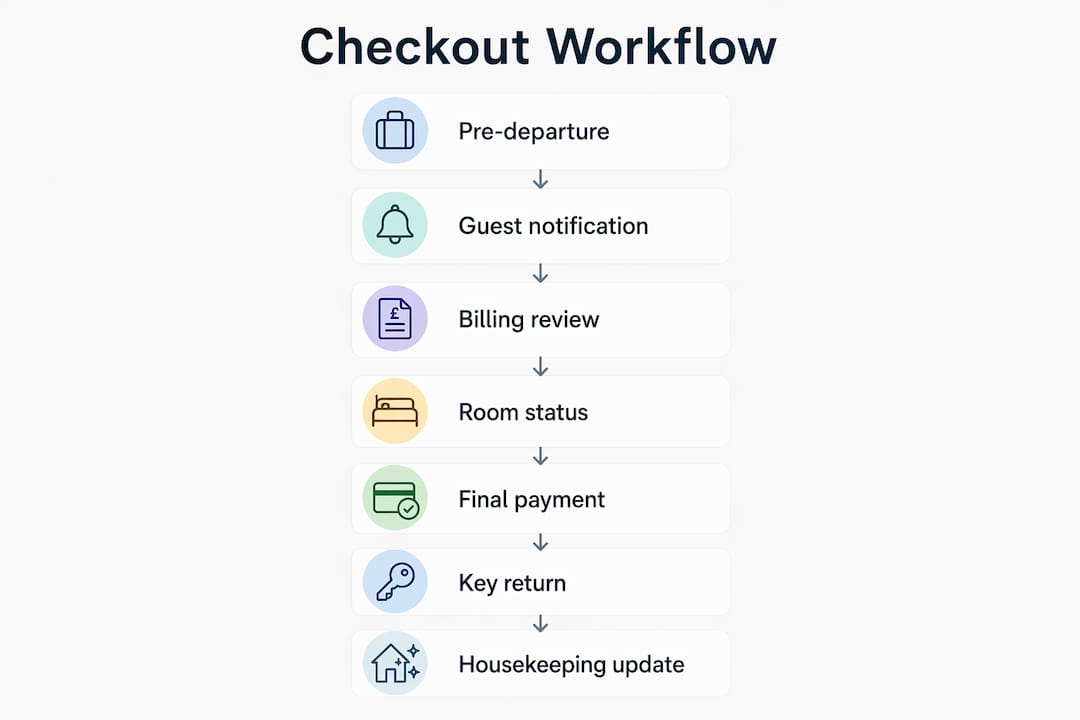
A standard checkout procedure covers 7–8 distinct operational steps. Each one has a specific purpose, and skipping any step creates problems downstream, from unpaid charges to delayed room availability.
-
Pre-departure reminder. Send a reminder the evening before or early on the morning of departure. Include the checkout time, billing summary, and any outstanding balance. This gives guests time to raise queries before they reach the desk.
-
Guest greeting and identity verification. When the guest arrives at the front desk, greet them by name and confirm their room number and identity. This step prevents billing errors caused by processing the wrong folio.
-
Account retrieval and review. Pull up the guest’s folio on the PMS and display or print a full itemised bill. Walk the guest through every charge line by line. Billing disputes arise mainly from unexpected incidental charges, not the total amount, so transparency here prevents most complaints.
-
Late charge check. Before settling the account, ask the guest directly whether they have used any services that morning, such as room service, the minibar, or the spa. Recovering charges after departure is difficult and often impossible, so this proactive question is the single most effective way to prevent the late charge trap.
-
Payment settlement. Process the agreed payment by card, cash, or direct billing. Confirm the amount with the guest before processing. Issue a receipt immediately.
-
Final invoice issuance. Provide a printed or emailed invoice. Guests who need the invoice for business expenses will ask for it at this point, so having the option to send it digitally saves time.
-
Key collection and access deactivation. Collect room keys or key cards. Key drop boxes paired with automated key deactivation allow guests to leave without queuing, which is particularly valuable during the 11:00 AM peak.
-
Room status update. Immediately update the room status in the PMS from ‘occupied’ to ‘vacant dirty.’ This triggers the housekeeping queue and starts the clock on room turnaround.
Pro Tip: Offer Express Check-Out (ECO) forms the evening before departure for guests with pre-authorised credit cards. They sign to authorise final charges, drop their key, and leave without visiting the desk. This method cuts desk congestion significantly during peak checkout periods.
A quick reference summary of the workflow steps:
- Send pre-departure reminder
- Greet and verify guest identity
- Retrieve and review folio
- Check for late charges
- Settle payment and issue receipt
- Provide final invoice
- Collect keys and deactivate access
- Update room status in PMS
How does technology improve the guest checkout experience?
Technology does not replace a well-trained front desk team. It removes the manual steps that slow that team down. Real-time billing sync and automatic room status changes are the two integrations that deliver the most measurable impact on checkout speed and accuracy.
Mobile and online checkout options let guests review and settle their bill from their phone before they leave the room. The guest arrives at the desk, or simply drops their key, with the account already closed. This is the digital equivalent of the ECO form and works well for business travellers who want a fast, paperless departure.
Self-service kiosks integrated with the PMS give guests full control over the checkout process without staff involvement. They display the folio, accept payment, print or email the invoice, and trigger the room status update automatically. Properties that deploy kiosks report shorter queues at the front desk during the 11:00 AM to 12:00 PM peak window.
Key technology features and their direct impacts:
- Mobile checkout portal: Guests settle bills remotely, reducing desk contact time to under one minute
- PMS real-time sync: Charges post to the folio instantly, eliminating manual entry errors
- Automatic room status update: Housekeeping receives the alert the moment checkout completes
- Digital invoice delivery: Invoice sent by email at point of settlement, removing the need for printed copies
- Automated key deactivation: Key card access ends at checkout, removing a manual step for front desk staff
The most common pitfall is deploying technology that does not integrate with the PMS. A mobile checkout app that runs separately from the PMS creates a two-system problem: staff must manually reconcile payments and update room status, which defeats the purpose entirely. Always verify PMS integration before committing to any checkout technology.
Pro Tip: When evaluating checkout technology, test the room status update trigger specifically. Ask the vendor to demonstrate that a completed checkout in the app or kiosk immediately changes the room status in the PMS. If there is a delay or a manual step required, the integration is incomplete.
For a broader view of how checkout workflows apply across service environments, the principles of real-time sync and staff role clarity translate directly from hospitality to retail settings.
What operational mistakes cause checkout failures?
The most damaging checkout errors are predictable and preventable. Understanding them gives managers a clear target for staff training and process design.
The late charge trap is the most financially costly mistake. A guest checks out, the account is settled, and then a room service charge or minibar bill posts to the folio an hour later. Recovering that payment after departure is difficult. The fix is step four of the workflow: asking the guest directly about morning charges before processing payment. Proactive late charge inquiry during the greeting phase prevents this in the vast majority of cases.
Delayed room status updates create a cascade of operational problems. Housekeeping cannot prioritise a room they do not know is vacant. The next guest’s room may not be ready on time, which creates a new complaint at check-in. Updating room status promptly in the PMS is the single most operationally critical action in the entire checkout procedure.
Billing disputes at the desk slow the queue and damage the guest’s final impression. The cause is almost always a charge the guest did not expect. Transparent, line-by-line bill review in step three prevents most disputes before they escalate. For handling incidental charge queries, having a clear escalation path, such as a duty manager authorised to waive minor charges, keeps the queue moving.
| Common error | Root cause | Recommended response |
|---|---|---|
| Late charges posted after departure | No proactive inquiry during checkout | Ask about morning charges before settling payment |
| Delayed room status update | Manual update skipped under pressure | Automate status change via PMS integration |
| Billing dispute at the desk | Unexpected incidental charges on folio | Walk guest through every line item before payment |
| Queue congestion at peak time | All guests processed at the desk | Introduce ECO forms and key drop boxes |
| Wrong folio processed | Identity not verified at greeting | Confirm room number and name at every checkout |
For guidance on handling incidental charges and billing clarity in hospitality environments, clear communication protocols at the billing step are the most effective control.
A troubleshooting checklist for front desk managers:
- Is the PMS folio up to date before the guest reaches the desk?
- Has the team been briefed on today’s expected departure volume?
- Are ECO forms available for pre-authorised card holders?
- Is the key drop box positioned clearly near the exit?
- Is there a duty manager available for billing escalations during peak hours?
Key takeaways
A well-executed hospitality checkout workflow requires preparation, a clear sequence of steps, and technology that integrates directly with the PMS to remove manual errors and delays.
| Point | Details |
|---|---|
| Standard timing | Target 3–5 minutes per guest with departure windows between 11:00 AM and 12:00 PM. |
| Seven to eight steps | Follow the full departure SOP from pre-departure reminder through to room status update without skipping steps. |
| Late charge prevention | Ask guests about morning charges before settling payment to avoid unrecoverable post-departure billing. |
| PMS integration is critical | Automated room status updates and real-time billing sync remove the manual steps that cause delays. |
| Transparent billing reduces disputes | Walk guests through every line item on the folio before processing payment to prevent complaints. |
What I have learned from watching checkout processes fail
The checkout is the last moment a property has to leave a positive impression, and a poor departure experience can undo an otherwise excellent stay in the guest’s memory. I have seen this play out repeatedly, and the pattern is always the same: the failure is not dramatic. It is a three-minute queue that becomes ten minutes, a charge the guest did not expect, or a room that is not ready because housekeeping was not notified.
What most training programmes miss is the human layer. The step-by-step checkout procedure is correct on paper, but staff under pressure skip the late charge inquiry because it feels awkward to ask. They rush the bill review because the queue is growing. These are not process failures. They are confidence failures, and they are fixed through role-play training, not procedure manuals.
The other thing I would push back on is the assumption that technology solves everything. A self-service kiosk that does not integrate with the PMS creates more work, not less. The properties that run the fastest checkouts are the ones that chose fewer, better-integrated tools rather than the most feature-rich platform available.
Speed matters, but not at the cost of the personal moment. A guest who has stayed three nights deserves a genuine farewell, not a transactional thirty-second dismissal. The best front desk teams I have observed complete the full procedure in under five minutes and still make the guest feel valued. That balance is the real skill, and it comes from practice, not from the procedure document.
— John
How Ycr supports your hospitality checkout operations

Ycr supplies the POS hardware and software that hospitality businesses use to run faster, more accurate checkout procedures. SAMTOUCH, available as a complete POS solution with hardware, integrates billing, payment processing, and reporting into a single system designed for hospitality environments. For properties that need software only, SAMTOUCH without hardware connects to existing terminals. Ycr also stocks a full range of barcode scanners that speed up item verification at the point of settlement. With over three decades of experience supplying UK hospitality and retail businesses, Ycr offers next-day delivery and same-day dispatch on stocked items.
FAQ
What is the standard checkout time in hotels?
Standard hotel departure windows run between 11:00 AM and 12:00 PM, with a target processing time of 3–5 minutes per guest at the front desk.
How many steps are in a hotel checkout procedure?
A complete hotel checkout procedure covers 7–8 distinct steps, from the pre-departure reminder through to the PMS room status update.
What causes most billing disputes at checkout?
Billing disputes arise mainly from unexpected incidental charges rather than the total bill amount, which is why line-by-line folio review is the most effective prevention step.
What is Express Check-Out and when should it be used?
Express Check-Out (ECO) allows guests with pre-authorised credit cards to sign an authorisation form, drop their key, and leave without visiting the front desk. It works best during peak departure periods to reduce queue congestion.
Why is updating room status immediately so important?
Delayed room status updates prevent housekeeping from prioritising vacant rooms, which delays room readiness for incoming guests and creates complaints at check-in.