
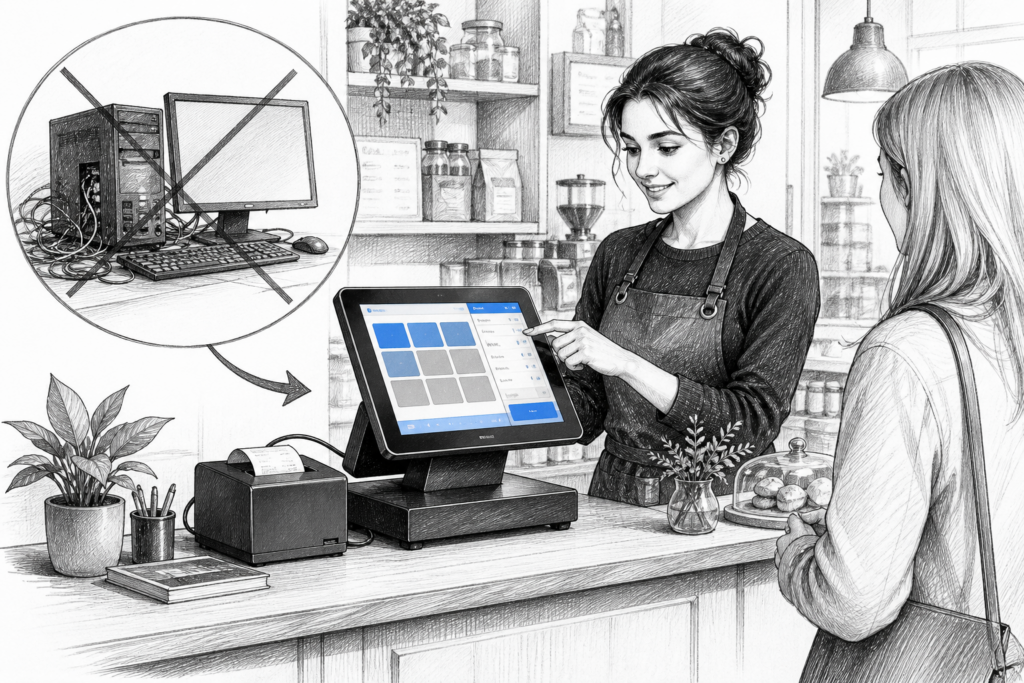
For many UK retailers and hospitality operators, the old habit of using a standard office PC at the till is becoming harder to justify. As EPOS systems take on more day-to-day work, the hardware behind the counter needs to be dependable, space-efficient and easier to support.
That is why Windows POS terminals continue to play such an important role in point of sale UK installations. They are designed for the checkout environment rather than the desk, and that difference matters when a business depends on fast service, accurate transactions and minimal disruption.
Why a purpose-built Windows POS terminal makes sense
A conventional desktop PC can run EPOS software, but it is not built with the same priorities as commercial POS hardware. In a busy shop, café or restaurant, the terminal has to cope with regular operator use, constant peripheral connection and limited counter space. A Windows POS terminal is generally designed with those conditions in mind.
For UK business owners, this can translate into a neater installation and a more practical setup. The machine is usually intended to sit naturally at a checkout or service point, with the screen, ports and accessories arranged for point-of-sale use rather than general office work. That can make the estate easier to standardise across multiple sites too.
What businesses often need from EPOS hardware
Selecting EPOS hardware is not just about the software platform. It is also about how the system will be used during trading hours. Retail EPOS and hospitality EPOS environments often ask different things from the same terminal.
- Retailers often need a clean checkout layout with barcode scanning, receipt printing and customer-facing operation.
- Cafés, restaurants and bars may need hardware that supports quick order entry, table service and efficient front-of-house operation.
- Multi-site businesses often need consistent equipment that can be supported and replaced more easily across locations.
In each case, a Windows POS terminal can help create a more reliable working environment than a general-purpose office computer. The advantage is not only in performance, but in how the hardware is packaged and deployed.
Where Windows POS terminals are particularly useful
Windows POS is still a strong choice where a business already relies on Windows-based EPOS software or other established back-office tools. Many installers and dealers prefer it because it fits neatly into existing support models and is familiar to staff who manage onsite technology.
Common uses include:
- fashion, convenience and speciality retail checkouts
- cafés, quick-service restaurants and pubs
- garden centres and farm shops with mixed retail requirements
- businesses replacing ageing desktop tills
- new EPOS installations where the reseller wants consistent, supportable hardware
The key point is that the terminal should match the way the site really operates. A compact touchscreen terminal with the right connectivity and mounting options can be far more practical than a tower PC under the counter.
Why serviceability matters in the real world
Every EPOS installer knows that hardware support is just as important as the initial sale. When a till point is out of action, the cost is measured in lost time, awkward workarounds and pressure on staff. That is why serviceable POS hardware matters.
Windows POS terminals are often chosen because they can be easier to integrate into a managed installation. They can sit alongside receipt printers, scanners, cash drawers and customer displays as part of a planned checkout design. For resellers and installers, that makes rollouts and replacements more straightforward. For end users, it can mean fewer surprises when equipment needs to be maintained or upgraded.
Windows POS versus a standard office PC
The difference between a Windows POS terminal and a standard office PC is not just cosmetic. A regular computer may have the right operating system, but the wrong shape, ports or footprint for a retail counter. It can also look out of place in front-of-house areas where presentation matters.
Windows POS terminals are typically chosen because they are built for commercial use and intended to live at the point of sale. That brings benefits such as a cleaner layout, easier integration with peripherals and a more professional appearance for customer-facing areas. Just as important, they help reduce the temptation to repurpose office IT in a role it was never meant to occupy.
How YCR Distribution supports POS hardware choices
YCR Distribution works with EPOS resellers, installers and business customers across the UK, helping them source POS hardware that fits the installation rather than forcing the installation to fit the hardware. If you are planning a new setup or replacing ageing equipment, it is worth reviewing the wider Windows POS hardware options available through YCR, including the Windows POS terminals collection.
That support is often valuable when a project needs more than a single terminal. A checkout solution can involve the terminal itself, customer display requirements, printers and other POS peripherals, so having a distributor that understands the whole EPOS picture can save time during planning and deployment.
For more information about point-of-sale hardware and EPOS solutions, contact YCR Distribution on 01924 438238 or visit www.ycr.co.uk.
Choosing hardware that will last through daily trading
Replacing an ageing till is often an opportunity to simplify the whole checkout. Rather than keeping a familiar but unsuitable office PC in service, many businesses use the upgrade to move to a more focused Windows POS terminal arrangement. That can improve reliability, make the counter easier to use and give staff a more professional system to work with every day.
For UK businesses planning a POS system refresh, the best starting point is to think about the working environment first and the hardware second. Once the operational needs are clear, the right terminal choice becomes much easier to make.