

Cloud migration for POS systems: a practical 2026 guide

Cloud migration for POS systems is the process of moving point of sale software, transaction data, and management tools from on-premises hardware to cloud-based platforms. For retail and hospitality businesses, this shift delivers real-time data access, remote management, and the ability to scale across multiple locations without replacing physical infrastructure every few years. The industry has moved decisively in this direction, with cloud POS adoption now standard practice across UK retail. The decision is no longer whether to migrate, but how to do it without disrupting trade.
What are the benefits of migrating POS systems to the cloud?
Cloud-based POS migration consolidates customer management, employee tools, and transaction processing into a single platform accessible from anywhere. That consolidation directly reduces the overhead of maintaining separate systems for stock, sales, and staff scheduling.
The core advantages for retail and hospitality operators are:
- Scalability across locations. Adding a new site to a cloud POS platform takes hours, not weeks. There is no need to procure and configure a separate server for each outlet.
- Real-time data access. Managers can view live sales figures, stock levels, and staff performance from any device. This is particularly valuable for multi-site operators who currently rely on end-of-day reports.
- Automatic software updates. Cloud platforms push updates centrally. Your terminals run the latest version without manual intervention at each site.
- Reduced maintenance burden. On-premises servers require physical upkeep, backup management, and periodic replacement. Cloud infrastructure shifts that responsibility to the platform provider.
- Faster transaction processing. Cloud POS systems reduce the lag associated with locally hosted databases, improving checkout speed during peak periods.
The trade-offs are real. Monthly subscription fees replace one-off licence costs, and ongoing connectivity quality directly affects performance. Businesses in areas with unreliable broadband must factor this into their architecture choice.
Pro Tip: Before committing to a cloud POS platform, run a connectivity audit across all your sites. A single location with poor WAN performance can undermine the entire rollout.
What architectural options exist for POS cloud migration?
Three primary architectures apply to POS system cloud solutions: cloud-native, hybrid edge-plus-cloud, and retained on-premises.
| Architecture | How it works | Best for | Offline capability |
|---|---|---|---|
| Cloud-native | All processing and data storage in the cloud | Stable connectivity, single-site operators | Limited without fallback |
| Hybrid edge-plus-cloud | Local edge device handles transactions; cloud syncs centrally | Multi-site retail, hospitality with variable connectivity | Strong, transactions continue during outages |
| On-premises | Server hosted locally, no cloud dependency | Highly regulated environments, poor connectivity areas | Full |
Hybrid edge-plus-cloud architectures provide the best resilience by supporting local transaction processing during internet outages. That matters enormously in hospitality, where a network interruption during a Friday evening service cannot mean a frozen till.
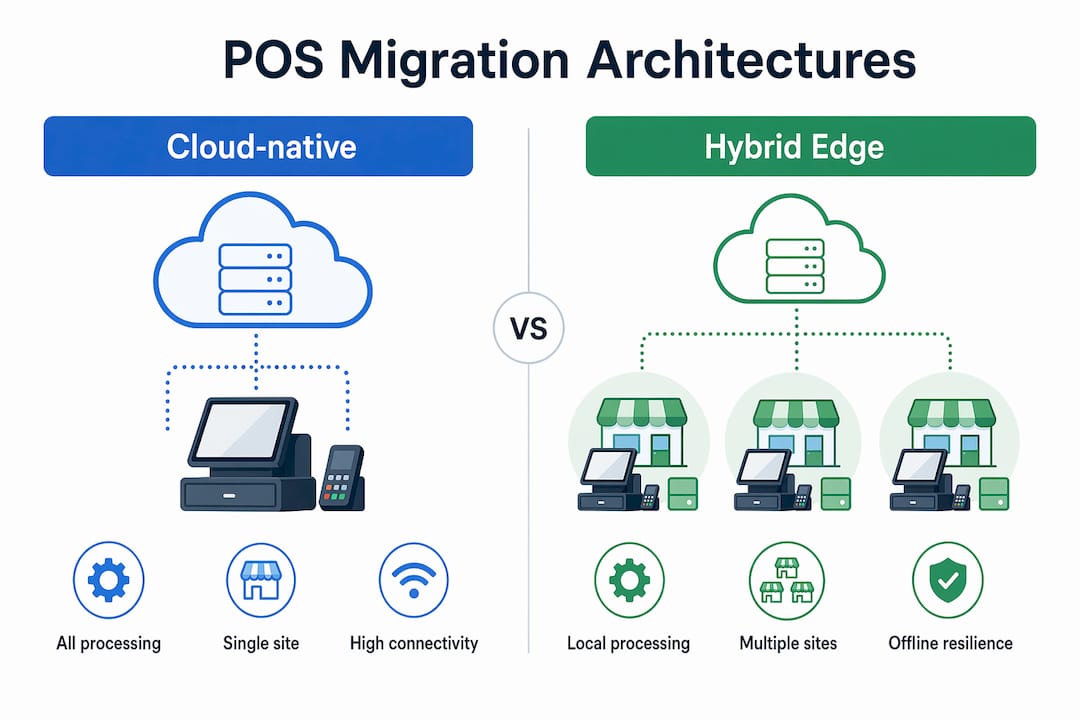
Cloud-native deployments suit businesses with reliable, high-speed connectivity and a single location. They offer the simplest management overhead and the fastest access to new features. The risk is total dependency on internet availability.
Retained on-premises architecture is increasingly rare but remains relevant for businesses in areas with consistently poor connectivity, or where data sovereignty requirements restrict cloud storage. The management burden is highest with this model.
For most UK retail and hospitality operators, hybrid POS infrastructure is the practical answer. It gives you central visibility and cloud-based reporting while keeping the till running if the broadband drops.
Pro Tip: When evaluating hybrid solutions, ask vendors specifically how the edge device handles a 30-minute WAN outage. The answer reveals whether offline mode is a genuine feature or a marketing footnote.
How should you plan and sequence a POS cloud migration?
Sequencing the migration correctly reduces risk more than any other single factor. Retail technology analysts recommend separating the infrastructure migration from the application upgrade into distinct phases. Attempting both simultaneously is the most common cause of costly rollbacks.
A practical phased approach works as follows:
- Assess and map your current environment. Document every integration point: ERP connections, loyalty programmes, ecommerce feeds, and payment gateways. Gaps discovered mid-migration cause the most expensive delays.
- Migrate infrastructure first. Move your network, data storage, and backup systems to cloud or hybrid architecture before touching the POS application itself. This gives you a stable foundation.
- Run a pilot at 3–5 stores. Choose locations that represent different formats: a high-volume site, a quieter site, and one with connectivity challenges. Run the new system in parallel with the legacy POS for a defined period.
- Resolve issues before expanding. Use the pilot phase to identify integration breaks, staff training gaps, and performance issues. Do not advance to the next wave until the pilot stores are stable.
- Roll out in waves. Expand to larger groups of locations incrementally. Maintain legacy rollback capability at each wave until the new system is proven.
- Decommission legacy systems last. Only retire on-premises infrastructure once the cloud platform has operated without incident through at least one peak trading period.
A phased rollout starting with pilot stores running parallel legacy and new systems minimises risk and allows for training and issue resolution before wider deployment. Typical pilots span 3–5 stores representing varied formats, with waves expanded after confirmed success.
Pro Tip: Build your rollback plan before you start, not after something goes wrong. Define the exact trigger conditions that would cause you to revert a wave, and make sure your team knows them.
Data synchronisation deserves particular attention. Retail POS migrations involving ERP and ecommerce interdependencies require careful management of data synchronisation to avoid transactional disruptions. Logical replication and change data capture techniques are the preferred methods for database transition, as they limit downtime to minutes rather than hours.
What costs and hidden factors should you account for?
Cost is where cloud POS migration most frequently surprises business owners. Annual costs for a three-location retail operation using cloud POS can range from approximately £4,464 to £10,404 depending on the platform selected. That range reflects the difference between entry-level cloud platforms and enterprise-grade solutions with advanced analytics and integrations.
The headline subscription figure is rarely the full picture. Hidden costs that frequently catch operators off-guard include:
- Integration maintenance. Connecting your POS to accounting software, stock management, or online ordering platforms requires ongoing technical work as APIs change.
- Data storage fees. High-volume transaction data accumulates quickly. Storage costs scale with your data volume, not your store count.
- Training. Staff turnover in hospitality is high. Budget for recurring training, not just an initial onboarding session.
- Support contracts. Entry-level plans often include limited support hours. Out-of-hours cover costs more.
Approximately 60% of organisations underestimate the total cost of ownership for cloud POS systems before migration, missing hidden costs like data storage and integration maintenance. Cloud cost parity with legacy systems typically arrives after operating three or more store locations, where the savings on hardware, maintenance, and IT staffing begin to outweigh subscription fees.
For single-site operators, the financial case for cloud migration is primarily about capability, not cost reduction. For multi-site operators running five or more locations, the operational savings are material.
What risks arise during POS cloud migration and how do you reduce them?
Downtime is the most visible risk. Five minutes of downtime in a high-volume retail environment can cause significant revenue loss. Offline fallback modes in hybrid systems are the primary defence against this.
The most common risks and their mitigations are:
- WAN outages during migration. Schedule cutovers during low-traffic periods. Use hybrid architecture so local edge devices continue processing transactions if connectivity drops.
- Integration breaks. Test every connected system in a staging environment before going live. ERP feeds, loyalty platforms, and payment gateways all need individual validation.
- Data mismatches. Run parallel systems long enough to verify that transaction totals, stock counts, and customer records match between old and new platforms.
- Staff adoption failures. A technically successful migration can still fail if staff revert to workarounds. Invest in hands-on training, not just written guides.
- Rollback gaps. Advanced migration practice employs blue-green or canary deployments paired with data replication and rollback gating to avoid business-critical downtime. Define rollback triggers before each wave, not during an incident.
Maintaining offline transaction capability and quick failover to on-premises processing during network interruptions saves significant revenue and protects customer satisfaction during peak hours. This is not optional for hospitality operators running dinner service or retailers trading on a Saturday afternoon.
Key takeaways
Successful cloud migration for POS systems requires phased sequencing, hybrid architecture for resilience, and honest total cost of ownership planning before committing to a platform.
| Point | Details |
|---|---|
| Sequence the migration | Migrate infrastructure before upgrading the POS application to reduce rollback risk. |
| Choose hybrid architecture | Edge-plus-cloud models keep tills running during internet outages, critical for hospitality. |
| Plan for hidden costs | Budget for integration maintenance, data storage, training, and support beyond the subscription fee. |
| Pilot before scaling | Run 3–5 pilot stores in parallel with legacy systems before expanding to the full estate. |
| Build rollback capability | Define rollback triggers for each wave before migration begins, not during an incident. |
What I have learned from watching POS migrations go wrong
The businesses that struggle most with cloud migration are not the ones with the oldest hardware. They are the ones that treat migration as a single event rather than an orchestrated sequence of smaller changes.
I have seen operators attempt to migrate infrastructure, upgrade their POS application, and retrain staff simultaneously across all locations in a single weekend. The result is always the same: a chaotic Monday morning, a frantic call to the vendor, and a rollback that costs more than the migration itself. The phased approach feels slower, but it is the only one that works reliably.
The other pattern I consistently observe is underinvestment in staff training. Technology teams focus on the technical cutover and assume the front-of-house team will adapt. In hospitality especially, that assumption is wrong. A new POS interface during a busy lunch service is a genuine operational risk. Parallel running periods exist precisely to give staff time to build confidence before the legacy system disappears.
My honest view is that hybrid architecture is the right default for the vast majority of UK retail and hospitality businesses in 2026. Pure cloud-native deployments are elegant in theory, but the UK’s broadband infrastructure outside major cities is not reliable enough to stake your entire trading operation on it. The cloud POS benefits are real and worth pursuing. Getting the architecture right is what determines whether you actually capture them.
— John
Ycr’s POS solutions for cloud-ready retail and hospitality
Ycr has supported UK retail and hospitality businesses with POS hardware and software for over three decades. Whether you are planning a full cloud migration or moving to a hybrid architecture, the right software and hardware combination makes the difference between a smooth transition and a costly one.

Ycr’s SAMTOUCH POS software is built for retail and hospitality environments, with cloud and hybrid deployment options and compatibility with a wide range of terminals and peripherals. For multi-location operators, TOUCHPOINT software offers cloud-ready management across your entire estate. Ycr also supplies the hardware to match, from SAM4S terminals to iMin devices, with next-day delivery and credit accounts available. Speak to the Ycr team to discuss your migration requirements and find the right solution for your operation.
FAQ
What is cloud migration for POS systems?
Cloud migration for POS systems is the process of moving point of sale software, transaction data, and management functions from on-premises servers to cloud-based platforms. It enables remote access, central management, and automatic updates across multiple locations.
Is a hybrid POS architecture better than full cloud?
For most UK retail and hospitality businesses, hybrid edge-plus-cloud architecture is the more resilient choice. It keeps transactions processing locally during internet outages, which pure cloud-native systems cannot guarantee.
How long does a POS cloud migration take?
Migration timelines vary by estate size and complexity. A phased approach with a 3–5 store pilot followed by incremental waves is the standard practice, and the full process typically spans several months for multi-site operators.
What are the biggest hidden costs in cloud POS migration?
Integration maintenance, data storage fees, recurring staff training, and out-of-hours support contracts are the costs most frequently missed in initial budgets. Around 60% of organisations underestimate total cost of ownership before migrating.
How do you avoid downtime during a POS migration?
Use a hybrid architecture with offline fallback capability, schedule cutovers during low-traffic periods, run parallel legacy and new systems during the pilot phase, and define rollback triggers before each migration wave begins.