

Cloud printing in POS systems: a practical guide

Cloud printing in POS systems is the process of transmitting print jobs from point-of-sale software to printers through cloud-based servers rather than direct local connections. This approach replaces the traditional model of tethering a printer to a single terminal via USB or a local network driver. Instead, your POS software sends print data to a cloud server, which queues and delivers it to the correct printer wherever it sits. For retail and hospitality businesses managing multiple terminals, multiple sites, or both, this shift in how printing works changes what your team can do and how quickly they can do it. Understanding the technology behind it is the first step to using it well.
How does cloud printing work in POS systems?
Cloud printing in POS systems follows a clear communication flow. Your POS terminal sends a print job to a cloud server via a REST API or a protocol such as CloudPRNT. The printer, registered to that cloud account, polls the server at regular intervals, typically every two seconds, to check for waiting jobs. When it finds one, it pulls the data and prints immediately. That two-second polling interval is what gives cloud printing its near-real-time feel despite routing through the internet.
Setting up a cloud-connected printer follows a consistent process across most systems:
- Confirm network compatibility. The printer must connect to a stable Wi-Fi or Ethernet network with reliable internet access.
- Access the printer’s IP utility page. This is where you set the cloud server URL the printer will poll.
- Enable cloud print mode within the printer’s settings and set the polling interval.
- Register the device in your POS admin console using the printer’s serial number or MAC address.
- Run a test print to confirm the full communication loop is working before going live.
For businesses with older hardware, CloudPRNT adapters bridge the gap between legacy ESC/POS or impact printers and modern web-based POS platforms. These adapter boxes sit between the printer and the network, translating cloud print commands into formats the older device understands. This means you do not need to replace working hardware just to adopt a cloud-based workflow.
Pro Tip: Set your polling interval to two seconds during initial setup. A longer interval, such as ten seconds, creates a noticeable delay between a customer completing a transaction and their receipt printing. In a busy queue, that delay adds up.

What are the key benefits of cloud printing in retail and hospitality?
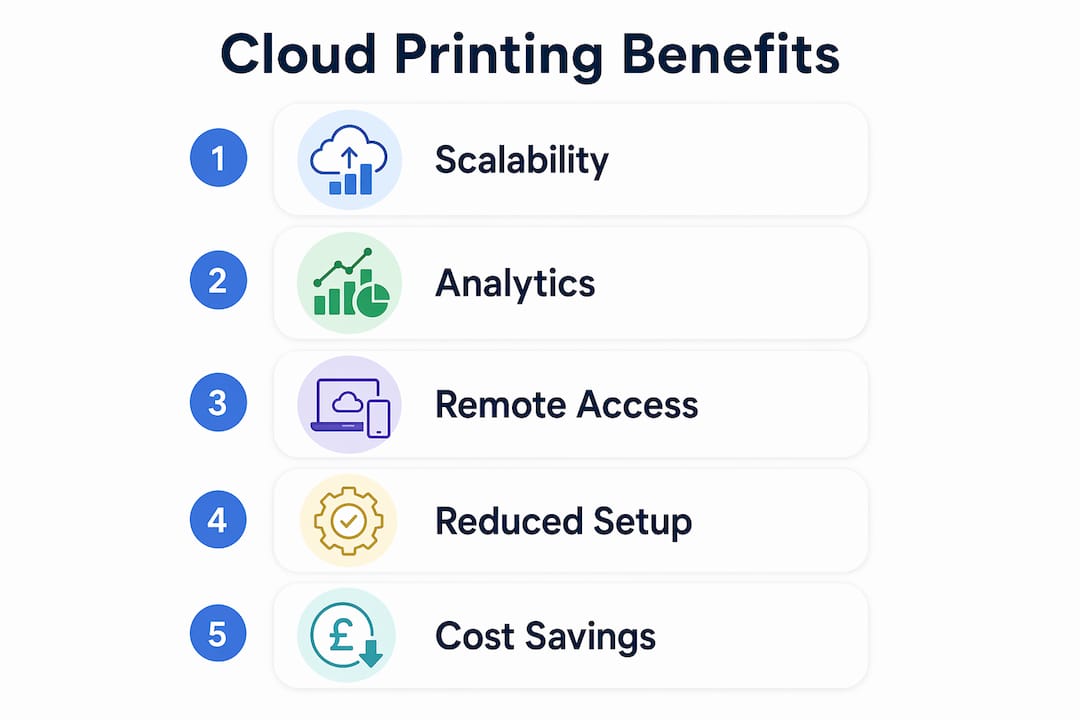
The operational advantages of cloud-based printing go well beyond convenience. Here is what business owners in retail and hospitality consistently gain:
- Reduced hardware and maintenance costs. Cloud printing removes the need for a dedicated local print server at each site. There is no server to maintain, patch, or replace.
- Centralised fleet management. Centralised printer monitoring lets you push firmware upgrades and check printer health across all locations from a single dashboard, without visiting each site.
- Consistent branding across locations. Multi-site chains can update receipt templates, order dockets, and branding elements once and have the change apply everywhere instantly. This eliminates the manual errors that come with updating local driver settings site by site.
- Faster service at the counter. With print jobs routed and queued in the cloud, kitchen printers and receipt printers respond quickly regardless of how many terminals are active simultaneously.
- Operational analytics. Print data analytics reveal patterns in inventory use and peak service periods, giving managers real information to guide staffing and stock decisions.
The scalability point deserves particular attention. A single-site café and a ten-site restaurant group face very different printing challenges. Cloud printing solves both with the same architecture. Adding a new location means registering new printers to the existing cloud account, not installing new servers or reconfiguring local networks from scratch. For growing businesses, that difference in setup time is significant.
The analytics benefit is one that many business owners overlook at first. Print volume data tells you when your busiest periods actually are, not when you think they are. That information directly informs how many staff you schedule and how much stock you order before a peak period. You can read more about retail technology in practice to see how these data-driven decisions play out across different business types.
What challenges should you expect with cloud printing implementation?
Cloud printing is not without its failure points. Knowing them in advance saves you from discovering them during a busy Friday evening service.
The most common failure is neglecting the requirement for an always-on device. The polling handshake between your printer and the cloud server depends on a bridge device or server machine that stays powered, logged in, and connected to the internet at all times. If that device goes to sleep, logs out, or loses its connection, print jobs queue up in the cloud but never reach the printer. In a restaurant, that means kitchen orders stop arriving silently.
Other challenges to plan for include:
- Manual IP and MAC address configuration. Entering these details by hand across multiple printers at multiple sites creates errors. One wrong digit and the printer cannot connect.
- Legacy printer compatibility. Not every older printer supports CloudPRNT natively. Without an adapter, it simply will not work with a cloud-based POS.
- Network instability. A printer on a weak Wi-Fi signal will drop its polling connection intermittently. Wired Ethernet connections are more reliable for high-volume environments.
- Security of print job transmission. Print data travelling through the internet must be encrypted. Confirm your chosen cloud printing service uses HTTPS and secure authentication before going live.
Pro Tip: Before deployment, test your internet connection at the printer’s physical location, not just at the router. Signal strength varies significantly across a restaurant or shop floor, and a printer tucked behind a counter may sit in a weak spot.
How to implement cloud printing efficiently in your POS system
Efficient implementation comes down to choosing the right hardware approach and reducing manual configuration wherever possible.
Choosing between native cloud printers and adapters
Native cloud-capable printers support protocols like CloudPRNT out of the box. They are the cleaner option for new installations because there are no additional adapter boxes to manage. If you already have working thermal or impact printers, a CloudPRNT adapter extends their life without a full hardware refresh. The adapter approach costs less upfront but adds a component to your setup that can itself become a failure point.
Using serial-number onboarding to cut setup time
Serial-number-based registration removes the need to manually enter IP addresses and MAC addresses for each printer. You enter the printer’s serial number into your cloud admin console, and the system handles the rest automatically. Across a ten-site rollout, this difference in setup method saves hours and eliminates a category of configuration errors entirely.
Matching your service plan to print volume
Cloud printing service plans range from free tiers limited to around 50 print jobs per month, through to paid plans starting at roughly $5–$10 per printer per month, scaling up to 200,000 prints monthly for approximately $100. A single-site café with moderate traffic sits comfortably on a low-cost plan. A multi-site hospitality group processing hundreds of kitchen dockets daily needs a higher-volume tier. Underestimating your print volume means hitting plan limits at the worst possible time.
| Consideration | Recommendation |
|---|---|
| New installation | Choose native cloud-capable printers to avoid adapter complexity |
| Existing hardware | Use CloudPRNT adapters to extend printer life |
| Multi-site rollout | Use serial-number onboarding to reduce setup errors |
| High-volume service | Select a paid plan rated above your peak monthly print count |
| Network reliability | Use wired Ethernet at the printer wherever possible |
Understanding the role of printers in modern POS helps you make better decisions about which hardware tier suits your operation before you commit to a setup approach. Managed cloud printing services also free your internal team from maintaining proprietary printing infrastructure, letting them focus on core platform development rather than hardware upkeep.
Key takeaways
Cloud printing in POS systems delivers the greatest value when you combine native cloud hardware, serial-number onboarding, and a service plan matched to your actual print volume.
| Point | Details |
|---|---|
| Always-on device is non-negotiable | Any bridge device or server must stay powered and connected to maintain the polling handshake. |
| Serial-number onboarding saves time | Entering a serial number instead of IP and MAC addresses eliminates configuration errors across multi-site rollouts. |
| Adapters extend legacy hardware | CloudPRNT adapters let older printers join cloud workflows without costly full replacements. |
| Match plan to print volume | Free tiers cap at around 50 jobs per month; high-volume sites need paid plans to avoid service interruptions. |
| Analytics add operational value | Print data reveals peak periods and inventory patterns, informing staffing and stock decisions. |
Why cloud printing is worth getting right from day one
Having worked with retail and hospitality businesses across the UK for years, I have seen the same mistake repeated: operators treat cloud printing as a simple plug-and-play upgrade, then discover its dependencies the hard way during a busy service.
The always-on device requirement catches people out more than any other issue. A tablet used as a bridge device gets picked up by a member of staff, the screen locks, and suddenly the kitchen printer goes quiet. Nobody notices for ten minutes. In a restaurant, ten minutes of missed kitchen orders is a serious problem. The fix is straightforward: dedicate a device to the bridge role and lock it down so it cannot be used for anything else.
The analytics angle is genuinely underused. Most business owners I speak to are aware that cloud printing generates data, but very few have connected that data to their staffing rotas or stock orders. Knowing that your receipt printer fires 300 jobs between noon and 1pm every Saturday tells you something concrete about when to have your full team on the floor. That is not a minor operational detail. It is the kind of information that used to require expensive business intelligence tools.
My honest view is that cloud printing is not a technology decision. It is an operational decision. The technology is mature and the setup is well-documented. The question is whether your team understands the infrastructure it depends on and has planned for the failure modes. Get that right and cloud printing becomes one of the quietest, most reliable parts of your POS setup.
— John
Ycr’s POS solutions with cloud printing support
Ycr has supplied POS hardware and software to UK retail and hospitality businesses for over three decades. If you are ready to move to a cloud-based POS setup that supports modern printing workflows, Ycr offers integrated options built for exactly this environment.

The SAMTOUCH POS software with hardware package combines a proven POS platform with compatible hardware, giving you a complete setup that works from day one. For hospitality operators, TOUCHPOINT software offers a purpose-built solution designed around the demands of fast-paced service environments. Ycr provides same-day dispatch and next-day delivery across the UK, so your setup timeline does not have to wait.
FAQ
What is cloud printing in a POS system?
Cloud printing in a POS system is the process of sending print jobs from POS software to a printer via a cloud server rather than a direct local connection. The printer polls the server at regular intervals, typically every two seconds, and pulls waiting jobs to print in near real time.
Does cloud printing work without an internet connection?
Cloud printing requires a live internet connection to function. If the connection drops, print jobs queue on the cloud server but do not reach the printer until connectivity is restored.
Can I use my existing printers with a cloud POS system?
Many existing printers can connect to cloud POS systems using CloudPRNT adapters, which translate cloud print commands into formats older hardware understands without requiring a full replacement.
How much does a cloud printing service cost?
Pricing varies by volume. Free plans typically cap at around 50 print jobs per month, while paid plans start at roughly $5–$10 per printer per month and scale to higher volumes for larger operations.
What is the biggest risk when setting up cloud printing?
The primary risk is failing to maintain an always-on device for the polling connection. If the bridge device loses power or internet access, print jobs stop reaching the printer, which can disrupt service without any visible error message at the POS terminal.