
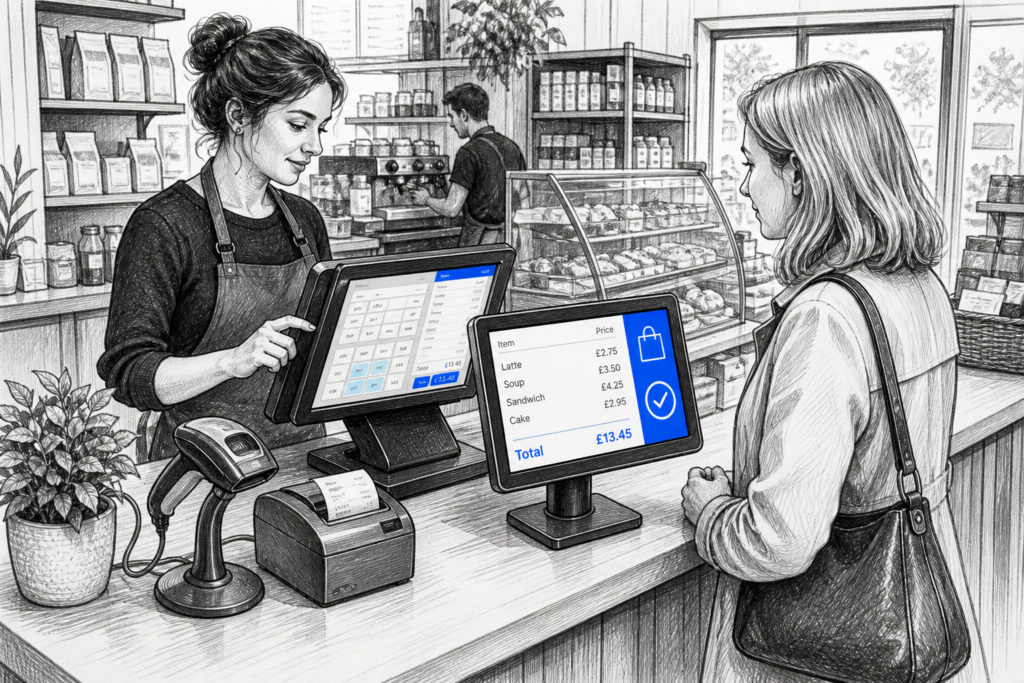
A busy checkout leaves little room for confusion. If the customer cannot easily see what is being scanned, what the total is, or whether a discount has been applied, small mistakes can quickly turn into delays, refunds and awkward conversations. A customer-facing display gives both sides of the transaction the same information at the same time, making the checkout feel clearer and more controlled.
For independent retailers, cafés, takeaways and similar businesses, a customer-facing display is often a simple addition that improves the way the till works without changing the whole setup. It can help customers follow the sale, reassure them that items are being processed correctly and reduce the number of questions staff have to answer at the counter. For resellers and installers, it is also a practical feature to include when planning a complete POS system.
What a customer-facing display does at the till
A customer-facing display is the screen that faces the shopper rather than the member of staff. It can show item descriptions, prices, discounts, the running total and payment prompts. In some setups, it may also display loyalty messages, receipt choices or other useful customer information.
The main benefit is visibility. Instead of the sale being something that only the cashier can see, the customer can follow it in real time. That matters in shops and hospitality venues where transactions need to move quickly, because visible information often prevents avoidable interruptions.
Why visibility reduces mistakes
If a customer spots an item entered incorrectly, a missing modifier or an unexpected price before payment is completed, the issue can usually be corrected immediately. That is faster than dealing with a refund or void after the payment has already gone through. It also reduces the chance of customer dissatisfaction caused by misunderstandings at the till.
- Customers can check item names and prices as they are scanned.
- Staff can confirm that discounts or offers have been applied correctly.
- Payment prompts are easier to understand, especially during busy periods.
- The checkout feels more transparent, which can build trust.
When a customer-facing display makes the biggest difference
Not every business needs a customer-facing display, but many benefit from one once transactions become more frequent or more complex. It is particularly useful where staff are handling multiple item types, weighed goods, special requests or busy counter service.
Retail counters
In retail, a customer-facing display is helpful in shops with mixed product ranges, variable pricing or frequent promotions. If a customer is buying a few different items, being able to see each one appear on screen can reduce uncertainty and stop the queue building up while staff explain the bill.
Cafés, takeaways and counter service
In hospitality, clear on-screen information helps customers understand orders as they are entered. This can be especially useful if a business takes hot drinks, deli items, snacks or made-to-order food at the counter. Even when the kitchen process is separate, the customer-facing display helps the person paying at front-of-house feel involved and informed.
What to consider before adding one
The right customer-facing display should fit the way the counter works. It does not need to be complicated, but it should be easy to read and placed where customers can naturally see it without leaning across the counter.
Screen placement and angle
Visibility matters more than size alone. The display should sit where most customers can see it clearly, even if they are shorter, standing in a queue or approaching from one side of the counter. Poor placement can undermine the benefit of having the display in the first place.
Clarity of the information shown
The display should present information in a simple, readable way. If the screen is overcrowded with details, customers may ignore it or misunderstand what they are seeing. For many businesses, the most useful setup is the simplest one: clearly listed items, totals and the next action required.
Reliability during busy service
A customer-facing display is part of the everyday checkout process, so it needs to work consistently alongside the till system. If the screen freezes, goes blank or is difficult to configure, it becomes another source of disruption rather than a help. That is why the wider POS hardware package matters, not just the display itself.
Customer-facing display benefits beyond error reduction
Although reducing mistakes is the obvious advantage, there are other benefits worth considering. A good display can improve the rhythm of service and make the checkout feel more professional.
- Faster corrections: staff and customers can spot issues before payment is completed.
- Better communication: customers know what is happening without repeated explanation.
- Cleaner checkout flow: money handling and order checking become more streamlined.
- More confidence: customers often feel safer when totals are visible.
These benefits are especially important in small businesses where the same person may be serving, scanning and taking payment. In that setting, a customer-facing display acts as a quiet support tool rather than a flashy extra.
Matching the display to the rest of the POS setup
A customer-facing display works best when it is considered alongside the rest of the POS system. The terminal, printer, cash drawer, card machine and software layout all have an effect on how easily the counter operates. If the display is added late in the process, it can sometimes be awkward to position or integrate neatly.
For retailers and hospitality operators planning a new setup, it is worth thinking about the whole counter area together. For resellers, that means asking how the display will be used day to day, who will see it, and what information the customer actually needs. A simple, repeatable configuration is usually more effective than a complicated one.
Planning a clearer checkout experience
If your current till setup relies on staff reading out totals or turning the screen towards the customer, it may be worth considering a dedicated customer-facing display. It is a small change, but it can improve clarity at the exact point where mistakes are most costly: the final step before payment.
For businesses reviewing their POS hardware or working through a new installation, YCR Distribution can help you think through the wider setup as well as the display itself. If you are exploring hardware options, the YCR online store is a useful place to review the equipment categories available for retail and hospitality counters.
Contact YCR Distribution at sales@ycr.co.uk or call 01924 438238.