
Mobile catering technology checklist for UK operators
A mobile catering technology checklist is a targeted list of hardware, software, and compliance tools that every UK mobile caterer needs to operate efficiently, pass inspections, and serve customers at speed. Whether you run a food truck, a festival trailer, or an event catering operation, the gap between a profitable day and a chaotic one often comes down to whether your technology stack is built for the road. Tools like EZEEPOS, CloudCateringManager, and Square each address different parts of that stack, and knowing which to prioritise is the difference between scaling up and scrambling to keep up.
1. Your mobile catering technology checklist: start here
The mobile catering technology checklist divides into two layers: physical hardware and digital software. Both must work together before you serve your first customer at any event. Operators who treat these as separate decisions almost always end up with systems that do not talk to each other, causing duplicated data, missed orders, and compliance gaps. The checklist below covers both layers in the order you should address them.
2. Cooking and holding equipment matched to your menu
Your cooking equipment defines your menu, and your menu defines everything else on your tech list. Griddles, fryers, and bain-maries must be sized to your throughput, not your ambition. Undersized equipment creates bottlenecks that no software can fix.
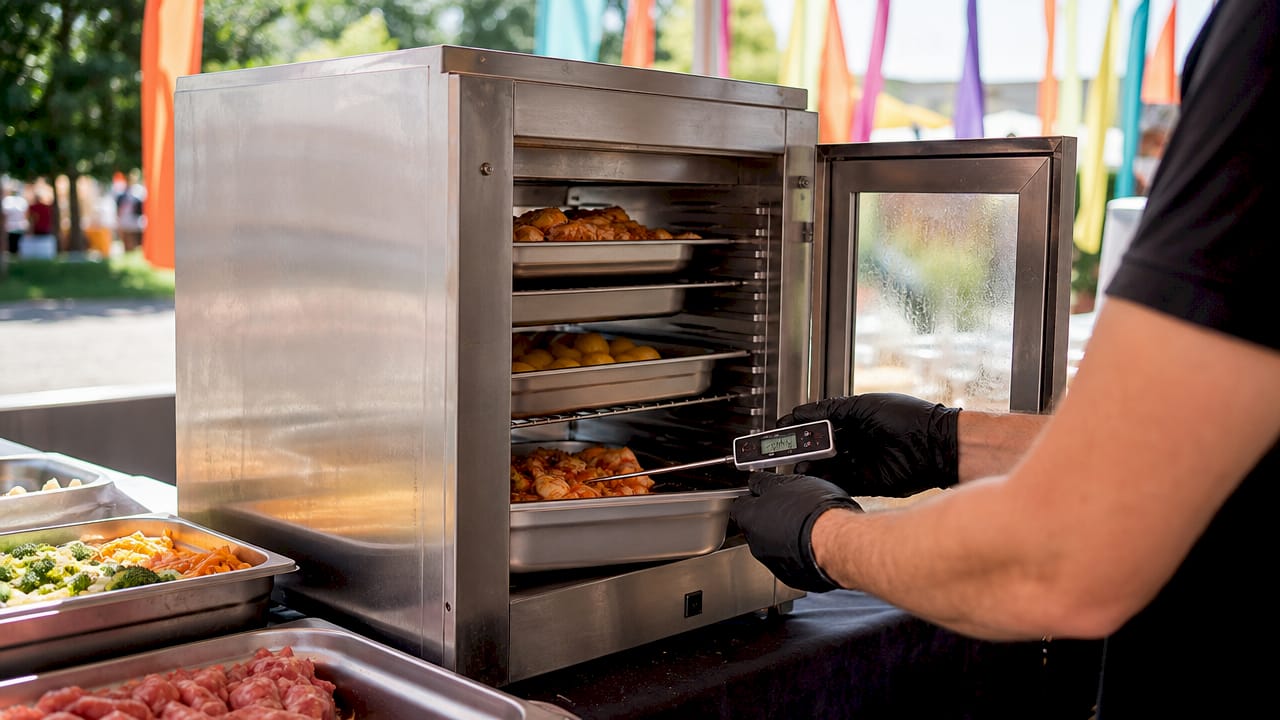
UK food safety law requires hot food holding at 63°C minimum and cold storage at 8°C maximum. Digital temperature probes that log readings automatically satisfy Environmental Health Officer (EHO) requirements without relying on paper records. Pairing physical equipment with digital logging tools is the foundation of compliant mobile catering.
3. Portable refrigeration and cold chain management
Cold chain failure is one of the most common reasons mobile caterers receive conditional trading approvals from EHOs. Portable refrigeration units must maintain 8°C or below consistently, even in summer heat or when the unit is opened frequently during a busy service.
Invest in a unit with a built-in digital thermometer that connects to your compliance logging software. Some operators use standalone Bluetooth temperature sensors that feed data directly into apps like Navitas Safety or similar digital hygiene platforms. This removes the human error of manual logging during a rush and creates an auditable record that EHOs can review on the spot.
4. Hand washing stations that meet UK legal standards
Portable hand washing stations with fresh water tanks, waste water tanks, soap, and paper towels are a legal requirement inspected by EHOs at every visit. Buckets with soap do not meet UK standards and risk conditional trading approval or an outright closure notice.
A compliant hand washing station is non-negotiable hardware on any mobile food technology list. Budget for a unit with at least a 15-litre fresh water capacity for a full-day event. Some operators mount these directly to their trailer or vehicle to save setup time and reduce the risk of forgetting them at base.
5. POS hardware built for mobile environments
Standard countertop POS terminals are not designed for outdoor events, market stalls, or festival pitches. You need hardware that handles gloved hands, rain, dust, and the occasional knock. Rugged touchscreen tablets with integrated card readers, such as those in the iMin range distributed by Ycr, are purpose-built for exactly these conditions.
Key features to look for in mobile POS hardware include offline transaction capability, fast boot times, and a battery life that covers a full service without needing a mains connection. Multi-channel ordering consolidates sales from a service window, QR codes, and online pre-orders into one dashboard, which is critical when you are managing a queue of 50 people and cannot afford to miss a ticket.
Pro Tip: Before purchasing any POS terminal, test it in gloves and in direct sunlight. Many touchscreens become unresponsive in bright conditions or with nitrile gloves, which are standard in food preparation.
6. Connectivity solutions and payment resilience
Dedicated cellular hotspots with carrier failover are the single most underrated item on any event catering tech guide. Venue Wi-Fi is unreliable at best and non-existent at worst. Losing card payment capability at a busy event means losing customers who will not queue again once they have walked away.
A dual-SIM hotspot that switches between networks automatically costs far less than a single lost hour of card transactions. Some larger operators are now trialling Starlink Mini for remote festival sites where cellular coverage is poor. Whatever solution you choose, test it at the venue before the event day, not on the morning of service.
7. Software for POS, bookings, and compliance
The software layer of your catering software checklist must cover three core functions: point of sale, event booking management, and compliance recordkeeping. Trying to cover all three with a single tool usually results in compromise. Most successful operators use two or three integrated platforms rather than one all-in-one solution.
CloudCateringManager lists lead tracking, booking calendar, menu planning, quotes, contracts with e-signatures, invoicing, staff scheduling, and inventory tracking as must-have features for event catering software. These functions remove daily friction across selling, planning, and delivery workflows. For POS, EZEEPOS from Ycr handles offline mode, multi-channel ordering, and payment compliance in a single interface designed for hospitality operators.
Pro Tip: Map your existing workflow before choosing any software. Write down every step from enquiry to payment, then select tools that address your three biggest pain points first. Feature wishlists lead to overspending on tools you will never use.
8. Inventory and food cost tracking
Food cost is the margin killer that most mobile caterers underestimate until they review their accounts at year end. Real-time inventory tracking software that integrates with your POS system tells you exactly what you have used, what you have wasted, and what your cost per dish is on any given day.
Tools like MarketMan or the inventory modules within CloudCateringManager connect directly to your sales data, so every item sold automatically reduces your stock count. This removes the need for manual stock checks between events and flags when a supplier delivery does not match what was ordered. For operators running multiple vehicles or pitches simultaneously, centralised inventory visibility is not a convenience. It is a financial control.
9. Compliance documentation and digital hygiene records
Combining documented safety practices with digital recordkeeping is the standard EHOs expect in 2026. Paper-based systems are still legal, but digital records are faster to produce during an inspection and harder to lose. Your compliance tech stack should include temperature logging, cleaning schedule records, allergen documentation, and staff training certificates.
Level 2 Food Hygiene certification and CP44 gas safety certificates must be accessible during any inspection. Store digital copies in a cloud folder that your team can access from a mobile device. Apps like Navitas Safety or the compliance modules within dedicated catering management platforms automate much of this recordkeeping, sending alerts when a temperature log is overdue or a certificate is approaching its renewal date.
10. Integrating your systems end to end
Disconnects between sales, booking tools, and production or invoicing systems cause the most damaging failures in event catering. An order taken through your booking platform that does not automatically update your production schedule or trigger an invoice creates manual work, errors, and occasionally lost revenue.
The integration priority list for most mobile caterers runs in this order:
- Connect your POS to your accounting software (Xero or QuickBooks are the most common choices in the UK).
- Link your booking platform to your invoicing tool so deposits and final payments are tracked automatically.
- Sync your inventory system with your POS so stock levels update in real time.
- Connect your compliance logging tools to a cloud storage system for instant EHO access.
- Set up user permissions so staff can access only the functions relevant to their role.
Connecting POS with accounting, email, payment, and scheduling prevents lost or inconsistent data across your operation. Test every integration with a simulated order before your first live event.
Pro Tip: Run a full end-to-end test the week before any major event. Place a test order, process a test payment, check it appears in your accounting software, and verify your stock count has updated. This takes 20 minutes and prevents hours of firefighting on the day.
11. Booking deposits and revenue protection
Collecting a non-refundable deposit on every catering booking protects your margin and reduces last-minute cancellations. Platforms like HoneyBook automate deposit collection at the point of booking, removing the awkward follow-up conversation and the risk of a client cancelling the week before an event with no financial consequence to them.
Set your deposit at a level that covers your ingredient pre-order and any venue fees you have committed to. For most mobile caterers, 25 to 30 per cent of the total booking value is the standard range. Make the deposit terms clear in your contract, use e-signature software to confirm acceptance, and store the signed document in your booking platform for reference.
12. Comparing the top tools for UK mobile caterers
The table below compares the leading options across the key categories in a mobile food technology list.
| Category | Tool | Strengths | Best for |
|---|---|---|---|
| POS software | EZEEPOS (Ycr) | Offline mode, hospitality-focused, UK support | Food trucks, takeaways, event caterers |
| Event booking | CloudCateringManager | End-to-end booking, contracts, invoicing | Mid to large event caterers |
| POS hardware | iMin (via Ycr) | Rugged, compact, glove-friendly | Outdoor and festival operators |
| Connectivity | Dual-SIM hotspot | Carrier failover, reliable card payments | All mobile operators |
| Compliance | Navitas Safety | Temperature logging, audit trails | Operators with EHO scrutiny |
| Payments | Square Terminal | Easy setup, no monthly fee | Smaller or newer operators |
Cloud-based software with mobile-friendly interfaces allows your team to access event details from anywhere, which reduces calls to a base office and speeds up decision-making during a live service. For operators just starting out, Square Terminal combined with a free-tier booking tool covers the basics without a large upfront investment. As volume grows, migrating to EZEEPOS and CloudCateringManager gives you the depth of integration that a growing operation requires.
Key takeaways
A complete mobile catering technology checklist combines compliant hardware, integrated software, and tested connectivity to protect revenue, pass inspections, and serve customers without operational failure.
| Point | Details |
|---|---|
| Compliance hardware is non-negotiable | Hand washing stations, temperature probes, and digital logs are legal requirements, not optional extras. |
| Software must cover three functions | POS, booking management, and compliance recordkeeping each need dedicated tools that integrate with each other. |
| Connectivity determines payment resilience | A dedicated cellular hotspot with failover prevents card payment failure at events where venue Wi-Fi is absent. |
| Map workflow before buying software | Selecting tools based on your actual pain points prevents overspending on features you will never use. |
| Deposits protect your margin | Collecting a non-refundable deposit at booking reduces cancellations and covers pre-event costs. |
What I have learned from fitting technology to catering workflows
The most common mistake I see mobile caterers make is buying software based on a feature list rather than their actual daily workflow. A platform with 40 features sounds impressive until you realise you only needed five of them and the interface is so complex that your staff avoid using it. The technology that actually improves your operation is the technology your team uses consistently, not the technology with the longest feature catalogue.
Compliance-critical technology deserves your budget before anything else. A digital temperature logging system and a proper hand washing station are not glamorous purchases, but they are the ones that determine whether you trade or not. I have seen operators spend heavily on customer-facing tech like digital menu boards while running paper temperature logs that would not survive an EHO visit.
The detail that genuinely surprises most operators is how much offline functionality matters. POS systems for mobile catering that cannot process payments without an internet connection are a liability at any outdoor event. Test your offline mode before you need it, not during a queue of 80 people.
— John
How Ycr supports mobile catering operators
Ycr has supplied POS hardware and software to UK hospitality and catering businesses for over 30 years. If you are building or upgrading your technology stack, the EZEEPOS for takeaways platform handles offline ordering, multi-channel sales, and payment compliance in a single system designed for operators on the move.

For hardware, Ycr distributes rugged POS terminals and compact devices from SAM4S and iMin, all available with next-day delivery and same-day dispatch. Browse the full POS hardware range or explore POS software options to find the right fit for your operation. If you need guidance on building a complete technology stack, the Ycr team is available to advise on bespoke configurations for mobile catering businesses of any size.
FAQ
What must a mobile catering technology checklist include?
A mobile catering technology checklist must cover compliant hardware (hand washing stations, temperature probes, rugged POS terminals), connectivity (dedicated cellular hotspot with failover), and software for POS, booking management, and digital compliance recordkeeping.
Which POS software works best for food trucks in the UK?
EZEEPOS, available through Ycr, is designed for hospitality operators and includes offline mode, multi-channel ordering, and payment compliance, making it well suited to food trucks and mobile catering units operating at events.
Are portable hand washing stations legally required for mobile caterers?
Yes. UK EHOs require portable hand washing stations with fresh water, waste water tanks, soap, and paper towels at every mobile catering inspection. Buckets with soap do not meet the legal standard and risk conditional trading approval.
How do I choose catering software without overspending?
Map your existing workflow from enquiry to payment before evaluating any platform. Identify your three biggest operational pain points and select software that addresses those specifically, rather than choosing the tool with the most features.
What connectivity solution is best for card payments at events?
A dedicated dual-SIM cellular hotspot with automatic carrier failover is the most reliable solution for maintaining card payment capability at events where venue Wi-Fi is absent or overloaded.