
Mobile vendor transaction process: a 2026 guide
TL;DR:
- Getting transactions wrong can damage customer trust and significantly impact your revenue beyond a single sale. Ensuring reliable connectivity, proper hardware, and security measures is essential for successful mobile vendor transactions. Accurate execution, reconciliation, and understanding settlement timing help maintain healthy cash flow and operational efficiency.
Getting transactions wrong costs you more than a single sale. A failed payment at a busy market stall, a queue forming at a festival bar, or a card reader going offline mid-service — these moments erode customer trust quickly and hurt your bottom line in ways that rarely show up on a single day’s report. The mobile vendor transaction process sits at the centre of how hospitality and retail businesses trade today, and 31% of consumers now use mobile wallets in-store, up from 14% in 2024. If your payment setup is not built to handle that volume reliably, you are already behind.
Table of Contents
- Key takeaways
- The mobile vendor transaction process: core components
- How to execute the vendor transaction flow
- Troubleshooting common transaction issues
- Verifying transactions and managing cash flow
- My honest take on getting mobile payments right
- How Ycr can support your payment setup
- FAQ
Key takeaways
| Point | Details |
|---|---|
| Connectivity is foundational | Cellular failover or dual network setups prevent costly transaction failures when Wi-Fi drops. |
| Authorisation and settlement differ | Funds confirmed in seconds take 1 to 3 business days to settle; plan your cash flow accordingly. |
| Offline mode carries real risk | Store-and-forward payments can decline after acceptance, leaving the merchant out of pocket. |
| Reconciliation prevents surprises | Matching daily sales against actual deposits catches discrepancies before they compound. |
| Keep your payment stack simple | A single payment service provider covers most mobile vendor needs until you scale significantly. |
The mobile vendor transaction process: core components
Before you can optimise anything, you need to understand what the mobile vendor transaction process actually involves at each layer. There are three distinct components: hardware, connectivity, and security. Getting all three right means payment acceptance that holds up under pressure.
Hardware that fits the environment
For hospitality and retail vendors operating away from a fixed till, the hardware choice shapes everything downstream. Mobile POS terminals, handheld tablets with card readers, and all-in-one Android-based devices are the most common options. If you need to understand POS hardware terminology before selecting equipment, that groundwork will save you significant time and money later.
The key consideration is whether your terminal supports NFC (near-field communication) for tap-to-pay, chip-and-PIN, and magnetic stripe as fallback. As mobile wallet adoption accelerates, a terminal without NFC acceptance is already losing you sales at the point of payment.
| Hardware type | Best for | Connectivity |
|---|---|---|
| Handheld mobile terminal | Market stalls, pop-ups, table service | 4G/5G SIM or Wi-Fi |
| Tablet with card reader | Counter service, events, cafés | Wi-Fi with cellular backup |
| All-in-one Android POS | Fixed mobile unit, food trucks | Dual SIM or eSIM |
Connectivity options and backup strategies
Connectivity is where most mobile vendor transaction problems begin. Wi-Fi at events is notoriously unreliable, especially when hundreds of devices compete for bandwidth. The better approach for most outdoor or mobile environments is a 4G or 5G SIM card built directly into the terminal, with a backup eSIM or a secondary MVNO. A dual network approach using a primary line with a backup eSIM vastly improves reliability in congested environments such as festivals or markets.
Pro Tip: Test your connectivity setup at your actual trading location before a busy service. A signal check in your office tells you nothing about what happens in a packed marquee or underground food hall.
Security: tokenisation and PCI compliance
Tokenisation replaces card numbers with device-specific tokens, meaning that even if data is intercepted during transmission, it is useless outside its original transaction context. This makes mobile payments materially safer than older magnetic stripe methods. PCI DSS compliance remains non-negotiable regardless of terminal type. Your payment service provider (PSP) should handle PCI scope on your behalf, but you need to confirm this before trading, not after a breach.
How to execute the vendor transaction flow
Understanding the digital payment methods your customers prefer is one thing. Executing the transaction process reliably, every time, is another. Here is how the process runs from first tap to settled funds.
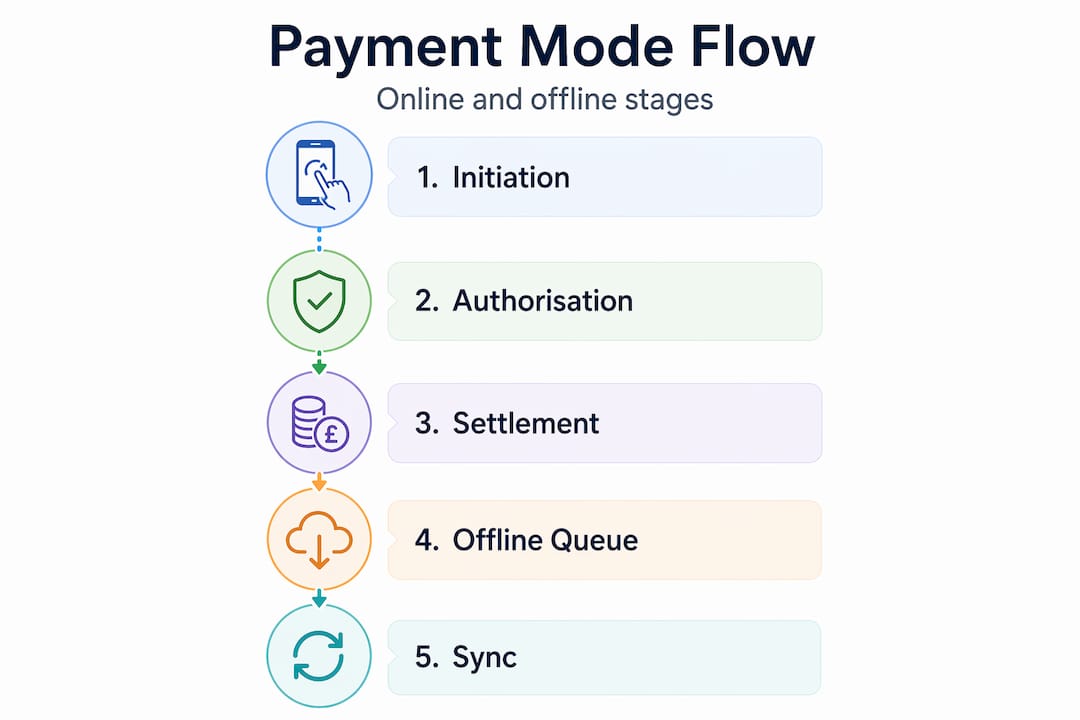
- Payment initiation. The customer presents a card, mobile wallet, or NFC-enabled device. The terminal reads the payment credential and sends an authorisation request to the acquiring bank via your PSP.
- Authorisation. The acquiring bank forwards the request to the card network (Visa, Mastercard), which contacts the issuing bank. Approval or decline returns in seconds. Authorisation confirms that funds are held but does not move money.
- Capture. Once the transaction is approved and the sale is confirmed, the terminal captures the authorised amount. On most mobile POS systems, this happens automatically at the point of approval.
- Batching. Transactions are grouped into a batch, typically submitted at the end of the trading day. Missing the batch cutoff can delay settlement by 24 hours or more.
- Clearing and settlement. The batch is processed through the card networks. Settlement typically takes 1 to 3 business days after the batch closes, though some processors offer next-day or same-day settlement at a premium.
- Reconciliation. Deposits from your PSP land in your bank account. You match these against your sales reports to confirm every transaction settled correctly.
Pro Tip: Always close your batch manually at end of trade if your terminal does not do so automatically. An unclosed batch sitting overnight can cause settlement delays that affect the following day’s cash position.
Online versus offline mode
When connectivity drops entirely, many terminals switch to offline mode. There are two distinct versions of this: offline EMV, where the card chip and terminal negotiate approval locally, and store-and-forward, where transactions are queued and submitted when connectivity returns. The merchant bears full risk for any transactions that decline after acceptance in store-and-forward mode. That is your money, not the customer’s problem. Cellular failover is a far safer alternative because it maintains real-time authorisation, eliminating the uncertainty entirely.
Troubleshooting common transaction issues
Even a well-configured mobile commerce process will encounter problems. The difference between a minor inconvenience and a lost sale often comes down to whether you have protocols in place before something goes wrong.
The most common issues mobile vendors face, and how to address them:
- Connectivity loss mid-transaction. If your terminal loses signal during authorisation, the transaction is not completed. Do not assume it went through. Check your terminal screen and PSP dashboard before handing over goods. A cellular failover SIM eliminates this scenario for the majority of events.
- Declined transactions. A decline does not always mean insufficient funds. Fraud filters, foreign cards, and contactless limits all trigger declines. Ask the customer to try chip-and-PIN as a fallback before concluding the card is unavailable.
- Missing batch cutoffs. If your system is set to auto-batch but fails due to connectivity, transactions can sit unsubmitted. Set a calendar reminder to verify batch closure daily.
- Chargebacks. A chargeback occurs when a customer disputes a charge with their bank. Keep transaction receipts and, where possible, collect a signature or PIN confirmation for high-value sales. Your PSP will require evidence if you wish to contest a chargeback.
- Hardware faults mid-service. A terminal that freezes or reboots during a busy period is a genuine operational risk. Review the POS hardware troubleshooting guide from Ycr to build a pre-service checklist that catches most faults before they occur.
“Offline payments and their risks are often underestimated. Offline EMV is distinct from store-and-forward modes, and the merchant bears the risk for declined offline transactions. Offline payment limits and controls are critical.”
Pro Tip: Set a maximum transaction cap for any offline mode your terminal supports. Most POS systems allow you to restrict the value of transactions accepted offline, which limits your financial exposure if connectivity fails.
Verifying transactions and managing cash flow
Processing payments correctly is only half the job. The other half is confirming that the money you expected to receive actually arrives, and that your cash flow is not held hostage by settlement timing differences.

Authorisation and settlement are separate events. One confirms funds are held; the other moves them. The gap between the two can be anywhere from same day to three business days depending on your PSP and card network. Processors may batch deposits daily or weekly, and this timing has direct implications for how you manage operating expenses.
| Payment method | Typical settlement time | Recommendation |
|---|---|---|
| Debit card (domestic) | Next business day | Use as primary cash flow indicator |
| Credit card (domestic) | 1 to 2 business days | Factor in 2-day lag for expense planning |
| Mobile wallet (Apple Pay, Google Pay) | 1 to 2 business days | Treat same as card settlement timing |
| International card | 2 to 3 business days | Maintain a buffer if trading internationally |
A three-account structure works well for mobile vendors with regular volume: one account for settlements, one for operating expenses, and one for tax reserves. This setup makes it immediately visible whether your daily receipts cover your costs, without needing to cross-reference multiple reports.
Key performance indicators worth tracking regularly:
- Authorisation rate. The percentage of attempted transactions that receive approval. Anything below 95% warrants investigation.
- Settlement accuracy. Deposits received versus total sales processed. Discrepancies indicate either a missed batch or a PSP error.
- Chargeback rate. Industry thresholds vary, but most card schemes flag rates above 1% of monthly transactions.
- Average transaction time. Slower transactions at peak service indicate either hardware performance issues or connectivity problems worth addressing.
Monitoring your retail payment workflow through a single reporting dashboard, rather than logging into multiple systems, significantly reduces the time it takes to catch and correct discrepancies.
My honest take on getting mobile payments right
I have worked with enough hospitality and retail businesses to know that most payment headaches come from two sources: over-engineering the setup at the start, or under-investing in connectivity and calling it done.
The over-engineering trap is real. For most local mobile vendors, a single PSP with a reliable terminal is all you need. Complex orchestration layers, multi-acquirer setups, and routing logic are tools for businesses with multi-region operations and high transaction volumes. If you are running a café, a market stall, or a festival bar, adding layers of technology does not make you more resilient. It gives you more things to troubleshoot during a Saturday rush.
The connectivity issue is where I see the opposite problem. Business owners invest in good hardware, then rely on venue Wi-Fi to handle everything. That is a false economy. A dedicated SIM in your terminal costs very little monthly and eliminates the single most common cause of transaction failures at outdoor events. Cellular failover is not a luxury for mobile vendors. It is the baseline.
The other thing I would tell any operator starting out: understand your settlement timing before you have a cash flow problem, not after. Many business owners are surprised to discover that standard settlement takes 1 to 3 days, particularly when they are relying on card receipts to pay suppliers the following morning. Set up that three-account structure early and you will never be caught out.
— John
How Ycr can support your payment setup
If you are re-evaluating your mobile payment setup or building out a new one, the hardware and software you choose will define how reliably the transaction process runs day to day.

Ycr supplies a full range of mobile POS terminals and accessories suited to hospitality and retail environments, including portable terminals from SAM4S and iMin designed for high-volume mobile trading. Whether you need a compact handheld unit for table service or a robust countertop device for a food truck, Ycr’s catalogue covers the hardware side in full. For the software layer, the POS software solutions available through Ycr, including SAMTOUCH and EZEEPOS, are built specifically for the vendor transaction flow challenges that hospitality and retail operators face. Ycr offers next-day delivery and same-day dispatch, so your trading operation does not stall waiting for equipment.
FAQ
What is the mobile vendor transaction process?
The mobile vendor transaction process covers every step from payment initiation by the customer through authorisation, capture, batching, and settlement into the merchant’s bank account. It applies to any retail or hospitality vendor accepting payments via mobile POS terminals, card readers, or NFC-enabled devices.
How long does mobile payment settlement take?
Settlement typically takes 1 to 3 business days after the transaction batch closes, though some processors offer next-day or same-day settlement at a higher rate. Domestic debit card payments generally settle the fastest.
Is offline mode safe for mobile vendors?
Offline mode carries financial risk. In store-and-forward mode, transactions queued while connectivity is down can decline after acceptance, and the merchant absorbs the loss. Cellular failover is the safer option because it maintains real-time authorisation throughout.
What security features should a mobile POS terminal have?
At minimum, your terminal should support tokenisation and comply with PCI DSS standards. Tokenisation replaces card data with device-specific tokens, making intercepted data worthless. Your PSP should manage PCI compliance scope on your behalf.
How do I prevent missing batch cutoffs?
Set your terminal to auto-batch at a fixed time each evening, and manually verify batch closure as part of your end-of-day routine. Missing a batch cutoff delays settlement by at least one business day and can create reconciliation discrepancies that take time to resolve.