

TL;DR:
- Portable POS devices enable faster transactions and improve customer experience through mobility.
- They are ideal for flexible, outdoor, or pop-up trading environments where traditional fixed tills are limiting.
- Successful deployment depends on reliable connectivity, staff training, and clear process management.
Portable POS (point of sale) devices are quietly changing how British shops and venues handle payments, and the numbers behind the shift are hard to ignore. Benchmarks show 25-40% faster transactions when portable systems replace traditional fixed tills, along with measurable improvements in customer satisfaction. Yet many business owners still assume that a fixed terminal bolted to the counter is the gold standard. This article sets the record straight. We will explain exactly what portable POS is, break down the real benefits, weigh the genuine drawbacks, and give you a clear framework for deciding whether it suits your operation.
Table of Contents
- What is a portable POS device and how does it work?
- Core benefits of choosing portable POS devices
- Portable POS vs fixed POS: which is right for your business?
- Key considerations before switching to a portable POS
- What most POS buyers overlook: insights from the field
- Discover portable POS solutions for your business
- Frequently asked questions
Key Takeaways
| Point | Details |
|---|---|
| Faster transactions | Portable POS can deliver 25-40% quicker service than traditional systems. |
| Major flexibility boost | You can take payments anywhere—tableside, at events, or market stalls. |
| Connectivity is crucial | Test your venue’s real-world WiFi/data coverage before choosing portable POS. |
| Not always best for high volume | Fixed POS is often more reliable for large retail, but portable wins in flexible settings. |
| Pilot before full rollout | Trial portable POS on a small scale to reveal staff and operational issues early. |
What is a portable POS device and how does it work?
A portable POS device is a battery-powered, wireless payment and order management system that lets you process transactions from anywhere on your premises, or even beyond them. Unlike a traditional fixed POS that is hardwired to a counter and dependent on a permanent connection, a portable unit communicates over WiFi or mobile data. You can walk a payment terminal to a table, carry it around a market stall, or use it beside a beer garden bar without trailing cables or routing customers through a queue.
These devices typically run a dedicated POS application on tablet or handheld hardware. The most widely used examples in UK hospitality and retail include Android-based handhelds, iPad setups with card readers, and purpose-built all-in-one POS tablets. They connect wirelessly to cloud-based or local server software, synchronise inventory in real time, and print receipts either via a paired wireless printer or by sending digital receipts directly to a customer’s phone.
Flexible operations such as pubs, markets, and pop-up shops benefit most from this setup because their trading environment simply cannot accommodate rows of fixed terminals. A busy Friday night beer garden, a craft fair stand, or a café with pavement seating are all scenarios where the freedom to roam transforms the way service works.
Here is a quick comparison of portable versus fixed POS systems:
| Feature | Portable POS | Fixed POS |
|---|---|---|
| Location flexibility | High | Low |
| Power source | Battery + charging dock | Mains powered |
| Connectivity | WiFi or mobile data | Ethernet or WiFi |
| Transaction speed | Up to 40% faster in flexible settings | Faster under high-volume, stable conditions |
| Ideal use case | Pubs, cafés, outdoor markets, pop-ups | Supermarkets, large retail, high-footfall counters |
| Setup complexity | Low to moderate | Moderate to high |
| Typical upfront cost | Lower per unit | Higher per terminal |
Common hardware you will find in a portable POS setup includes:
- Handheld Android or iOS payment terminals
- Compact Bluetooth or WiFi receipt printers
- Barcode scanners (wired or cordless)
- Tablet stands and protective cases for busy environments
- Cloud or hybrid POS software licences
You can find examples of POS hardware for retail that show just how varied the configurations can be, from lean single-device setups to multi-unit portable networks spanning an entire floor.
Core benefits of choosing portable POS devices
With the basics covered, it is time to see why so many UK hospitality and retail businesses are making the switch. The benefits go well beyond faster payments.
1. Speed at the point of transaction
The most headline-grabbing advantage is speed. Industry benchmarks consistently show 25-40% faster transactions with portable POS compared to asking customers to walk to a fixed terminal. For a restaurant serving 80 covers in one sitting, shaving three minutes off the payment process per table means you could realistically turn tables faster and serve more guests in the same number of hours. For a market trader, faster payments mean shorter queues and fewer abandoned sales.
2. Flexibility across trading locations
Fixed tills only work where you install them. A portable device works wherever your customers are. Think of a street food operator who needs to serve from a van at a weekend market on Saturday and from a permanent kitchen unit on Monday. One portable solution travels with the business.
3. Improved customer experience
Customers notice when staff come to them rather than summoning them to a till. Pay-at-table, for example, removes the awkward wait for the bill, gives customers more control, and reduces the chance they will walk out without paying. Impulse sales also increase when staff can process transactions wherever a buying moment happens, beside a display, at a tasting table, or mid-conversation. Investing in retail technology benefits like portable POS is one of the most direct ways to shift a customer from satisfied to delighted.

4. Staff efficiency and morale
When a team member carries a device, they stop doing laps between the till and the customer. That reduces physical fatigue over a long shift, speeds up service during rush periods, and gives staff more time to focus on conversation and upselling rather than transactional back-and-forth. The POS benefits for UK retailers from a staffing efficiency standpoint alone can justify the switch for many operators.
5. Upselling and impulse buying
There is strong evidence in retail psychology that buying intent drops sharply the moment a customer has to move away from where they made their decision. A portable device lets staff capture that decision right on the spot. A customer eyeing a bottle of wine at a dining table is far more likely to order it when the server taps it into the device right there and then.
Pro Tip: Before going live with a portable POS system, walk your entire venue or trading area with a test device. Note any dead zones where the WiFi or mobile signal is weak. Fixing those spots before launch day saves significant headaches during your busiest service.
Portable POS vs fixed POS: which is right for your business?
While the benefits are compelling, not every business is best served by a portable system. Here is how to make the side-by-side call for your operation.
| Criteria | Portable POS | Fixed POS |
|---|---|---|
| Performance in high-volume settings | Moderate | High |
| Flexibility for outdoor or mobile trading | Excellent | Poor |
| Reliability on stable mains connection | Good | Excellent |
| Risk during connectivity outages | Moderate to high | Low |
| Customer interaction quality | High | Moderate |
| Physical counter space required | Minimal | Significant |
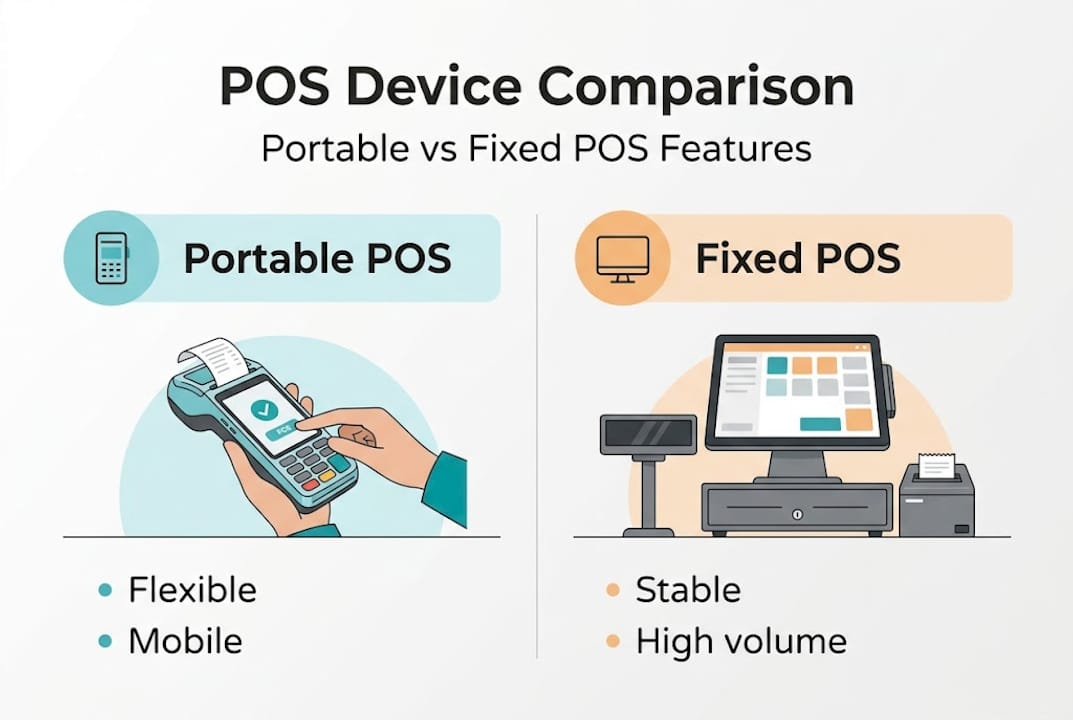
For most independent pubs, restaurants, cafés, farm shops, pop-up retailers, and market traders, a portable device is an obvious fit. The business model depends on flexibility, and the fixed terminal works against that. A large supermarket or a high-volume fast-food counter is a different matter entirely. Those environments require consistent, high-throughput processing where fixed POS is superior for high-volume stability and predictable uptime.
Understanding the latest POS technology trends makes it clear that the industry is moving towards hybrid models, where businesses run a small number of fixed terminals for peak counter queues and supplement them with portable devices for table service, queue busting, and offsite trading.
“Test for connectivity in edge cases like festivals and outages before committing to a portable-only setup.”
Common pitfalls to avoid when deploying portable POS:
- Underestimating connectivity gaps: A courtyard, basement, or thick-walled listed building can kill your signal. Do not assume your indoor coverage extends outdoors.
- Ignoring battery management: Devices left uncharged during a busy service will die at the worst moment. Build a charging routine into your daily opening procedure.
- Skipping staff training: Handing a new device to a team member five minutes before service opens is a recipe for errors and frustration.
- No fallback plan: Always have a contingency for when the system goes offline, even if it is just a manual card imprinter or a note-pad record.
- Buying on price alone: The cheapest handheld terminal may lack the processing speed, screen quality, or software compatibility your operation actually needs.
Key considerations before switching to a portable POS
Knowing when portable POS works best gives you direction, but before you switch, make sure you are set up for success by working through these practical factors carefully.
Connectivity is everything
This point deserves to sit at the top of the list. You must test connectivity in your actual trading areas, not just in the main room. Outdoor seating, garden bars, basement function rooms, upper-floor private dining, and festival pitches all present real challenges. If your WiFi does not reach those zones reliably, you need a cellular backup or a signal booster before you go live.
Integration with existing systems
Your portable POS needs to talk to your stock management, accounting software, and potentially your loyalty programme. If the device you choose runs on a closed platform that does not integrate with your existing tools, you will create more work, not less. Look at retail POS examples that show how different businesses have handled multi-system integrations successfully.
Total cost of ownership
Hardware cost is only part of the picture. Factor in:
- Software licence fees (monthly or annual)
- Payment processing transaction charges
- Ongoing support contracts
- Replacement or spare devices for breakages
- Potential savings from faster table turns and reduced staffing hours
When you look at the full picture, portable POS often delivers a return within the first trading year for hospitality operators running busy service periods.
Staff training and change management
People resist change, even when that change makes their job easier. Build a simple onboarding process. This does not have to be a full training day. A 30-minute session with a printed quick-reference guide and a practice run before service opens is usually enough to get staff comfortable. Peer training, where a confident team member coaches colleagues, tends to work better than top-down instruction. For guidance on specifying the right equipment for your team, the choosing POS hardware guide covers the decision-making process in practical terms.
Start with a pilot
Pro Tip: Roll out portable POS to one section of your business first, a single floor, one market stall, or table service only. This lets you identify any issues with connectivity, charging, software behaviour, and staff process before committing the whole operation. A pilot that runs for two or three busy service shifts gives you honest data.
The 2026 POS system checklist is a useful tool for working through every specification point before you sign any contracts or take delivery of hardware.
What most POS buyers overlook: insights from the field
Having covered the technical and business angles, here is an insider perspective on what genuinely determines whether portable POS succeeds or quietly causes more problems than it solves in real British environments.
The single biggest reason portable POS deployments stall or fail is not the hardware. It is the WiFi check that never happened. We see it repeatedly. An operator falls in love with a sleek handheld device at a trade show, buys six units for their gastro pub, and on opening night discovers that the signal collapses the moment the beer garden fills with people. Smartphones are eating up bandwidth, the router is at the front of the building, and the garden is at the back. The result? Queued transactions, frustrated staff, and embarrassed managers.
The second most common failure is over-optimism about adoption speed. Business owners who have used a particular system for years forget what it felt like to learn it. For a new team member working their first Saturday night shift, an unfamiliar device under pressure is not an upgrade. It is a source of panic. The answer is not more technology. It is simpler processes. Build a daily charging checklist. Laminate a pairing guide on the back-of-house wall. Give staff a way to flag device problems without stopping service.
Here is a perspective shift that most articles will not offer you. The businesses that get the most from portable POS are not necessarily the ones with the best hardware. They are the ones who decided in advance exactly which tasks the device would handle, who would carry it, and what happens when it does not work. The mobile POS transformation stories that end well all share one quality: the owner treated the technology as a business process change, not just a hardware swap.
Do not choose your POS in a boardroom or at a desk. Test it in the kitchen doorway. Test it in the cellar. Test it when three staff members are all on the same WiFi network at once during a mock service rush. The device that performs brilliantly in those conditions is the one worth buying.
Discover portable POS solutions for your business
Portable POS is only as effective as the hardware and software backing it up. Understanding which device suits your venue, your software requirements, and your budget requires more than a quick browse online.

At YCR Distribution, we supply purpose-built portable POS hardware from trusted brands like SAM4S and iMin, chosen specifically for UK retail and hospitality environments. If you want to understand the terminology before you start comparing options, the POS hardware terminology guide will give you a solid grounding. When you are ready to look at the software layer, our range of POS software options includes solutions like SAMTOUCH and EZEEPOS, built for the operational realities of British businesses. Same-day dispatch and next-day delivery mean you are never far from getting your new system up and running.
Frequently asked questions
Are portable POS devices secure for customer payments?
Yes, most portable POS devices use end-to-end encrypted transactions and comply with UK payment standards for cardholder data protection, including PCI DSS (Payment Card Industry Data Security Standard) requirements.
Will a portable POS system work if my WiFi drops out?
Portable POS systems require reliable connectivity to function fully, but some models offer an offline mode for temporary outages. Always test connectivity in edge cases before you rely on the system for live service.
How much battery life can I expect from a portable POS device?
Most portable POS devices are built to last a full service shift of eight to ten hours with normal use, but always check the manufacturer’s battery specifications and ensure you have a charging dock in place for between-service top-ups.
Is portable POS suitable for high-volume retail environments?
Fixed POS systems are superior for high-volume stability in large retail settings, but portable devices are an excellent complement for queue busting, outdoor trading, and mobile payment scenarios even within busy environments.