

Real-time reporting in POS: a 2026 manager’s guide

Real-time reporting in POS is defined as the immediate or near-immediate delivery of transactional and operational data from a point of sale system to a manager’s dashboard, enabling decisions within minutes rather than days. The role of real-time reporting in POS goes far beyond faster numbers on a screen. Top-quartile companies using live data access achieve 62% higher revenue growth and 97% higher profit margins compared to those relying on delayed data. MIT CISR research confirms those same businesses are 22% better at operational efficiency. For hospitality and retail managers, that gap is not theoretical. It shows up in stock-outs, missed upsell moments, and slow responses to queues.
What benefits does real-time reporting bring to POS operations?
Live POS data changes how managers run a shift. Instead of reviewing yesterday’s figures at 9AM, you see what is happening right now and act before a problem compounds.

The most direct benefit is inventory control. When a fast-moving item drops below a set threshold, a live alert fires before the shelf empties. That single capability reduces lost sales from stock-outs, which are among the most common and avoidable revenue leaks in retail. Retail analytics platforms that feed from live POS data make this kind of proactive replenishment standard practice.
Staff scheduling is the second major gain. Live sales volume data shows a manager when footfall is spiking 20 minutes before the kitchen or till queue backs up. That window is enough to call in a reserve member of staff or redistribute the team on the floor. Without live data, that decision always comes too late.
The benefits extend across the full operation:
- Faster detection of cash discrepancies and transaction failures
- Up-to-date revenue tracking by payment type, table, or product category
- Immediate visibility of fulfilment times in restaurant or café environments
- Reduced reliance on end-of-day reports that are already stale by the time they are read
- Quicker identification of underperforming product lines or menu items
Pro Tip: Focus your live dashboard on three to five metrics that directly trigger a decision. Displaying 20 figures at once creates noise, not clarity. Identify the metrics that change your behaviour within the hour and build the dashboard around those.
The impact of reporting on POS performance is clearest when managers move from reviewing data to acting on it within the same shift.
How does real-time reporting technically function in POS systems?
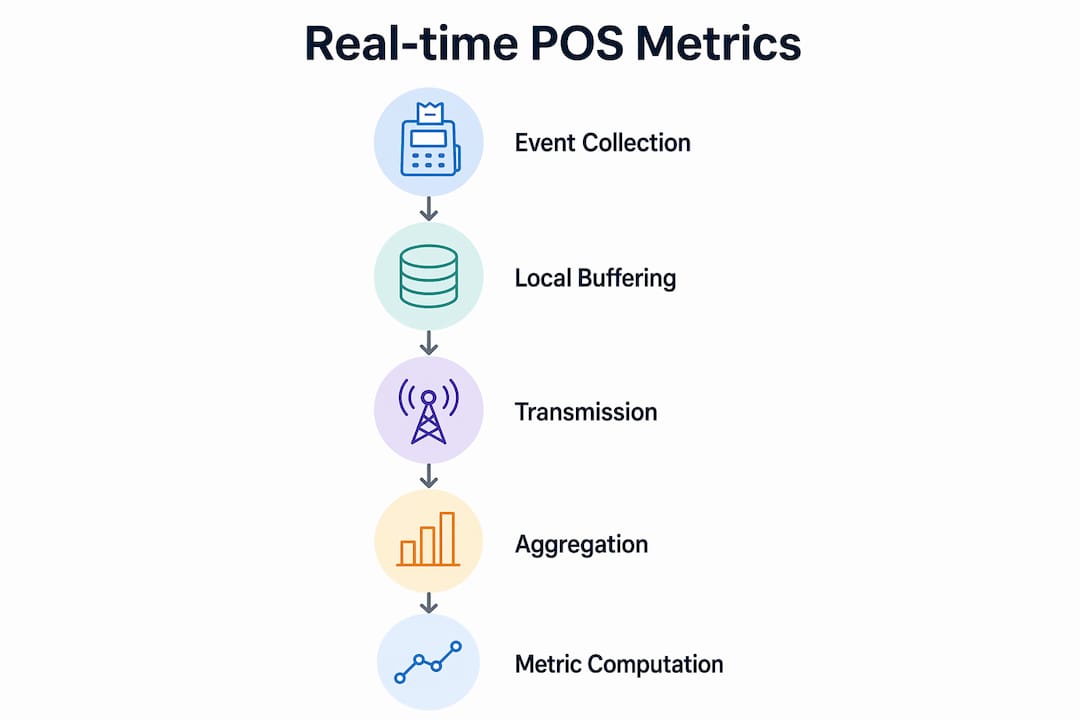
Understanding the mechanics helps managers ask the right questions when evaluating or upgrading their POS setup. The data pipeline behind a live dashboard has three distinct stages: collection, transmission, and aggregation.
Data collection and local buffering
Every transaction, void, refund, and table update generates an event at the terminal. POS systems handling intermittent connectivity buffer these events locally with timestamps and sequence numbers. When the connection drops, no data is lost. When it resumes, the central system processes events in order, keeping dashboards accurate after any outage. This local buffering with idempotency keys also prevents duplicate transactions from appearing when a connection restores.
Transmission and aggregation
Once events reach the central system, raw transaction tables are not queried directly. Pre-aggregated rollups or materialised views are maintained as data lands, enabling sub-second query times even during high-volume service periods. Without this approach, every dashboard refresh would run an expensive query against millions of raw rows, slowing the system precisely when it is needed most.
Metrics and refresh cycles
Operational metrics are computed every 60 seconds in well-built POS pipelines. Those metrics include order counts, fulfilment times, revenue by payment type, and cash movements. A 60-second refresh cycle is fast enough for shift-level decisions without the infrastructure cost of true sub-second streaming.
The table below compares the two main technical approaches to real-time POS data delivery:
| Method | How it works | Best suited for | Trade-off |
|---|---|---|---|
| Event streaming | Transactions pushed to dashboard as they occur | Busy QSR or high-volume retail | Higher infrastructure cost and complexity |
| Pre-aggregated rollups | Metrics recalculated on a set cycle (e.g. every 60 seconds) | Most hospitality and retail operations | Slight data lag, but far lower cost |
For the majority of UK hospitality and retail businesses, pre-aggregated rollups deliver the right balance of speed and cost. POS infrastructure built on this model keeps dashboards fast without requiring enterprise-level data engineering.
When is real-time reporting essential versus near-real-time?
Not every decision needs data from the last 30 seconds. Matching your reporting speed to your actual decision cycle is the most cost-effective approach to POS analytics.
Operational decisions require minute-level or hourly updates. Tactical decisions, such as weekly promotions or staffing rotas, need daily data. Strategic decisions around supplier contracts or menu redesigns require weekly or monthly figures. Investing in sub-second streaming infrastructure for a decision that only happens once a week wastes budget and adds unnecessary complexity.
CFO Upgrade research makes this point clearly. Reducing a mid-market financial close from 15 days to 5 days adds more business value than switching to real-time streaming for financial reporting. Speed only adds value when the decision has a time window measured in minutes.
The practical distinction for managers:
- Real-time (seconds to minutes): Queue management, cash discrepancy alerts, stock-out warnings, live revenue tracking during a busy service
- Near-real-time (minutes to hours): Hourly sales summaries, staff performance by shift, category-level revenue comparisons
- Daily or weekly: Menu engineering decisions, supplier order quantities, promotional effectiveness reviews
Pro Tip: Before investing in any live reporting upgrade, map your most time-sensitive decisions and ask how quickly you actually need the data to act. If the answer is “by end of shift,” near-real-time reporting at a 15-minute refresh cycle is sufficient and far cheaper to run.
POS data reporting works best when the refresh rate matches the rhythm of the decisions it supports, not the fastest rate the technology can achieve.
How to apply real-time POS insights for better management
Knowing the data is available is not enough. The real-time reporting advantages only materialise when managers build habits and processes around the live feed.
-
Set role-specific dashboards. A floor manager needs live queue length and table turnover. A head chef needs fulfilment times and item-level order counts. A retail supervisor needs live stock levels and hourly revenue. One generic dashboard serves no one well.
-
Configure push alerts for critical thresholds. WhatsApp notifications and push alerts on order queues or cash discrepancies trigger faster manager responses than passive report checks. An alert that fires when a till is £20 short gets attention in two minutes. A report reviewed at close of business gets attention 10 hours later.
-
Use live sales trends to adjust staffing mid-shift. If revenue per hour drops sharply at 1:30PM on a Tuesday, that pattern repeats. Live data lets you spot it in the moment and act. Over time, the same data builds a reliable staffing model for each day part.
-
Trigger inventory replenishment from live item alerts. Set minimum stock thresholds for your top 20 fastest-moving items. When the live count hits the threshold, the alert fires and the order is placed. This removes the manual stock check from the manager’s daily task list.
-
Review live data at fixed points during the shift. A 10-minute dashboard review at the start of each hour is more effective than a continuous passive watch. Structure the habit, and the data becomes a management tool rather than background noise.
-
Audit your metrics quarterly. Business conditions change. A metric that drove decisions in january may be irrelevant by april. Remove stale metrics from dashboards and replace them with figures that reflect current priorities.
Using real-time metrics for sales and operations requires discipline as much as technology. The managers who gain the most from live POS data are those who treat the dashboard as a decision trigger, not a reporting formality. Shopify merchants applying a similar discipline to analytics-driven decisions report measurable gains in both conversion and stock efficiency, a pattern that translates directly to physical retail and hospitality environments.
Key takeaways
Real-time reporting in POS delivers its full value only when reporting speed matches decision speed, dashboards are role-specific, and managers act on alerts rather than passively reviewing figures.
| Point | Details |
|---|---|
| Match speed to decision type | Operational alerts need minute-level data; strategic decisions only need weekly figures. |
| Use pre-aggregated rollups | Materialised views keep dashboards fast without expensive raw-table queries during busy periods. |
| Configure push alerts | WhatsApp or push notifications on cash or queue thresholds cut response times from hours to minutes. |
| Role-specific dashboards work best | A floor manager and a head chef need different live metrics to make effective shift decisions. |
| Data quality beats data speed | Fast but inaccurate data causes worse decisions than slower, validated reporting. |
The real advantage is not speed, it is alignment
I have seen managers invest in live dashboards and then check them once a day at closing time. The technology was right. The habit was wrong. Real-time reporting only changes outcomes when the organisation adjusts its decision rhythm to match the data.
The research from MIT Sloan Management Review makes this explicit. Empowered employees with real-time data and simplified governance drive business agility. The word “empowered” matters. A floor supervisor who can see live queue data but has no authority to call in extra staff gains nothing from the dashboard. The technology investment must come with a management structure that lets people act on what they see.
The other pitfall I see regularly is chasing speed over accuracy. Fast but inaccurate real-time data causes worse decisions than slower, validated reporting. A cash discrepancy alert that fires incorrectly three times a week trains managers to ignore it. Data governance, not just data speed, is what makes live reporting trustworthy.
My honest view is that most hospitality and retail businesses in the UK do not need sub-second streaming. They need a 60-second refresh cycle, three to five role-specific dashboards, and a clear process for acting on alerts. That combination, done well, delivers the competitive edge that the MIT CISR research describes. The technology to achieve it is available and affordable. The organisational discipline to use it is the harder and more valuable investment.
— John
Ycr’s POS software for live reporting
Ycr has supplied POS hardware and software to UK hospitality and retail businesses for over three decades. Two software products sit at the centre of their live reporting offer.
![SAMTOUCH POS SOFTWARE [WITH HARDWARE]](https://cdn.shopify.com/s/files/1/1079/9743/0098/files/f9d63eed-2435-4aa3-a0af-94e3db2dfdaf.png?v=1780317502)
SAMTOUCH POS software combines hardware and software in a single package designed for restaurants, cafés, and retail stores, with built-in reporting dashboards that update throughout the trading day. TOUCHPOINT software delivers role-specific dashboards and real-time data features suited to managers who need live visibility across multiple terminals or sites. Both solutions are available with next-day delivery and full implementation support from the Ycr team.
FAQ
What is real-time reporting in a POS system?
Real-time reporting in a POS system is the immediate delivery of transactional data, such as sales, stock levels, and fulfilment times, to a manager’s dashboard, typically updated every 60 seconds or faster.
How does live POS data improve operational efficiency?
Live POS data lets managers adjust staffing, trigger stock replenishment, and resolve cash discrepancies within the same shift rather than reacting to problems the following day.
Do all businesses need true real-time POS reporting?
No. Operational decisions need minute-level data, but tactical and strategic decisions only require daily or weekly figures. Matching reporting speed to decision type avoids unnecessary infrastructure cost.
What technical approach keeps POS dashboards fast during busy periods?
Pre-aggregated rollups and materialised views maintain dashboard responsiveness by computing metrics as data lands, avoiding slow queries against raw transaction tables during peak trading.
What happens to POS data when the internet connection drops?
POS systems buffer events locally with timestamps and sequence numbers, then sync accurately with the central system when connectivity resumes, preventing data loss or duplicate transactions.