

Step-by-step catering payment workflow for UK hospitality

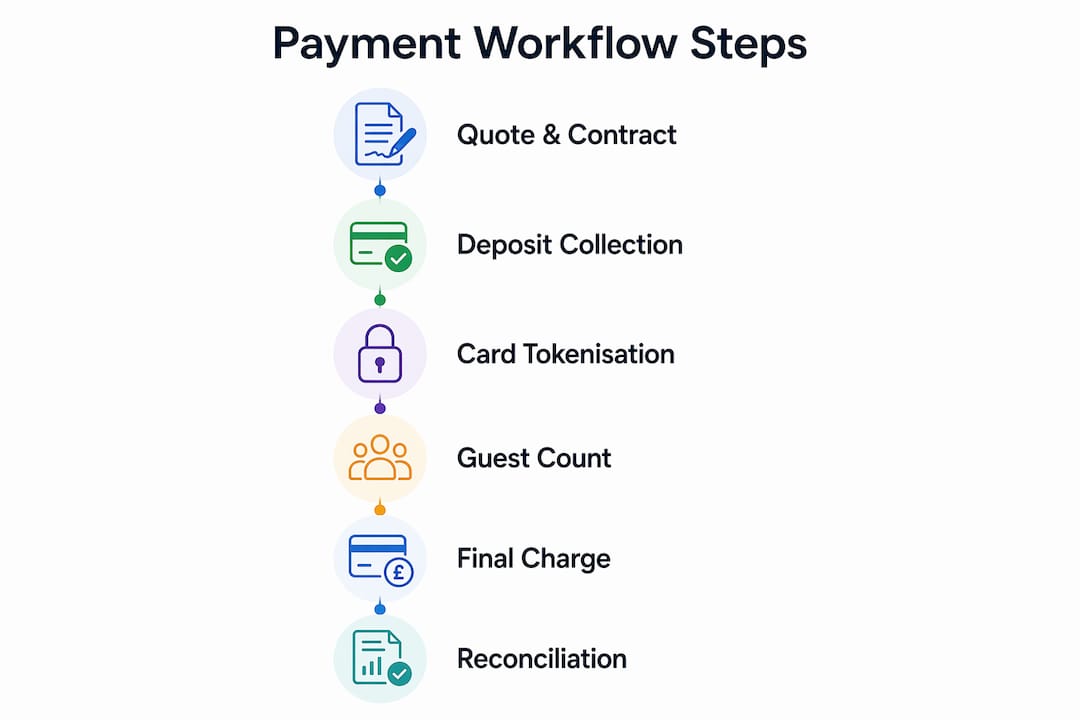
A reliable catering payment workflow runs in six stages: issue a quote and contract, collect a staged deposit upfront, confirm the booking in your POS, lock in the final guest count 7–14 days before the event, charge the balance automatically or via virtual terminal, then reconcile POS records against your merchant account and bank statement. Following this sequence, mapped to the right POS hardware and software, protects your margins, reduces disputes, and keeps cash flow predictable from first enquiry to final settlement.
The workflow at a glance:
- Quote & contract — issue a detailed quote with deposit terms and a signed contract
- Booking deposit — collect 25–50% upfront via card terminal, virtual terminal, or invoice pay link
- Confirmation — send a deposit receipt and booking confirmation; tokenise card details for future milestone charges
- Final count deadline — set a hard deadline (7–14 days before the event); adjust the invoice to the confirmed headcount
- Final balance — charge the outstanding balance automatically or via emailed invoice link
- Reconciliation — match POS transactions to merchant reports and bank settlements; export for VAT/accounting
Table of Contents
- What does the step-by-step catering payment workflow look like in practice?
- Which POS hardware and software do you actually need?
- UK compliance: what you must get right
- How to automate reminders, retries, and failed payments
- How to reconcile POS, merchant, and bank records
- How do you handle late payments, chargebacks, and failed authorisations?
- Key takeaways
- Why the payment workflow is where most catering businesses lose money
- Ycr has the POS kit to run this workflow from day one
- Useful sources
What does the step-by-step catering payment workflow look like in practice?
Step 1: Quote, contract, and payment terms
Send a detailed quote that itemises per-head food costs separately from flat fees (staffing, equipment hire, setup). Attach a signed contract before any work begins. The contract must state the deposit percentage, the final count deadline, and a clause confirming that headcount can only increase after that date. Final count deadlines protect pre-ordered ingredient costs and should be non-negotiable.
Step 2: Collect the booking deposit
A three-stage payment model is the industry standard: a non-refundable deposit at booking, a milestone payment at guest-count confirmation, and the final balance on or immediately after the event. Use the thresholds below as a starting point.
| Order value | Recommended structure |
|---|---|
| Under £200 | Full payment at booking |
| £200–£1,000 | Staged deposit (25–50%) + balance before event |
| Over £1,000 | 25–50% deposit; final balance 48 hours to 14 days before event |
Accept the deposit via chip-and-PIN terminal, contactless, virtual terminal (phone payment), or an emailed invoice with a pay link. Virtual terminals and invoice pay links support multiple payment methods and create a clear paper trail for tax purposes.
Step 3: Confirmation and card tokenisation
Send a deposit receipt and booking confirmation immediately. Where your POS or payment gateway supports it, tokenise the customer’s card in a PCI-compliant vault. Card tokenisation removes the need to re-collect card details at each milestone and enables automatic charging on agreed dates — no friction, no chasing.
Step 4: Guest-count confirmation and revised invoice
At the final count deadline, send a revised invoice showing the original estimate alongside the adjusted total. Specialised hospitality software that links bookings, invoices, and kitchen schedules reduces disputes here because every change is traceable. Never adjust below the guaranteed minimum headcount stated in the contract.

Step 5: Final balance charge
Charge the outstanding balance automatically via the tokenised card, or send an emailed invoice with a pay link if the customer prefers. Bill within 48 hours of the event while the experience is fresh. Include a summary of what was served, the final headcount, and any event-day extras (overtime staffing, last-minute additions) as separate line items with approval notes.
Step 6: Post-event reconciliation
Match each invoice to its merchant transaction, then to the bank settlement. Update your deposit ledger to mark the booking as fully paid. Export the transaction data for VAT accounting. Any chargebacks or refund requests should be flagged immediately and handled with the evidence pack from the booking (signed contract, guest list, delivery photos).
Pro Tip: Assign a unique reference code to every booking and carry it through the contract, every invoice, and every POS transaction. Reconciliation that relies on reference codes takes minutes; reconciliation that relies on amounts and dates alone takes hours.
Which POS hardware and software do you actually need?
Hardware checklist
- Card terminals and tablets — chip-and-PIN and contactless for card-present transactions at the counter or on-site
- Receipt printers — the HPRT TP80R Thermal Printer (USB/Serial/Ethernet) handles receipts and event paperwork reliably at counter or mobile setups; the BIXOLON SRP-Q200EWDK (USB/Ethernet/WLAN) adds wireless flexibility for flexible venue layouts; the HPRT POS80H 5-in-1 Thermal Printer reduces compatibility issues across mixed hardware setups
- Barcode scanners — the Zebra DS9308 USB Scanner suits order packing and event check-in; the Honeywell MS7190G USB 2D Scanner handles high-volume packing stations; the Honeywell Youjio HF600 USB 2D Scanner offers a compact alternative for mobile event check-in
- Digital signage — a 75" freestanding outdoor digital poster displays menus and order numbers at large outdoor events; the 22" wall-mounted outdoor display works for smaller venue installations
Software feature checklist
- Deposit ledger and staged invoicing
- Virtual terminal for phone and remote payments
- Invoice pay links sent by email
- Card-on-file tokenisation (PCI-compliant vault)
- CRM and booking integration
- Automated reminders and retry rules
- Reporting with export to Xero or Sage
SAMTOUCH and EZEEPOS, both available through Ycr, cover the core hospitality POS features caterers need: deposit tracking, invoice templates, and reporting exports. For contract catering operations specifically, SAMTOUCH’s integration with booking and kitchen management makes it a natural fit.
Pro Tip: Open a trade account with Ycr and order spare accessories (printer rolls, scanner cables) before the event. A single hardware failure on the day costs more in disruption than a spare part costs in advance. Ycr offers same-day dispatch and next-day delivery across the UK.
UK compliance: what you must get right
UK law bans merchants from adding a surcharge on consumer credit or debit card payments under the Consumer Rights (Payment Surcharges) Regulations 2012, so do not add card fees to consumer invoices. Business-to-business surcharging remains permitted, but must be disclosed clearly in the contract and on the invoice.
For VAT, every invoice must carry: a unique invoice number, your business name and VAT registration number, the customer’s name and address, the invoice date, the supply date, a description of goods or services, the net amount, the VAT rate, and the VAT amount. Deposits must be invoiced separately and the VAT accounted for at the point of receipt, not at the point of final settlement.
Catering invoices are more complex than standard retail invoices because they must document event specifics: venue, guest counts, staffing, and any change orders. Keeping these details on every invoice satisfies both customer disclosure requirements and HMRC audit needs.
On data security, PCI DSS requires that you never store raw card numbers (PANs) in your own systems. Use a PCI-compliant tokenisation vault through your payment gateway. This removes the compliance burden from your own infrastructure and enables automatic milestone charging without re-collecting card details.
Pro Tip: Prefer tokenised card-on-file flows for all milestone charges. It reduces your PCI scope, eliminates re-collection friction, and makes automated charging on agreed dates straightforward.
How to automate reminders, retries, and failed payments
Chasing payments after delivery is the primary driver of cash-flow problems in catering. Moving to policy-driven, automated milestones fixes this at the source. Automation across the order flow saves meaningful time each week compared with manual follow-up.
| Trigger | Action | Timing |
|---|---|---|
| Booking confirmed | Send deposit invoice + pay link | Immediate |
| Deposit received | Send receipt + booking confirmation | Immediate |
| Final count deadline approaching | Send reminder with revised invoice | 7 days before deadline |
| Final balance due | Send payment reminder | 3 days before due date |
| Final balance due | Send final reminder | 1 day before due date |
| Payment fails | Auto-retry, then notify customer | Retry within 24 hours |
Sample message templates:
-
Confirmation: Subject: “Your [Event Name] booking is confirmed — deposit receipt attached.” Body: “Thank you for booking. Your deposit of £[amount] has been received. Your event reference is [REF].”
-
Reminder: Subject: “Final balance due in 3 days — [Event Name] [REF].” Body: “Your balance of £[amount] is due on [date]. Pay securely here: [pay link].”
-
Failed payment: Subject: “Action needed — payment unsuccessful for [REF].” Body: “We were unable to process your payment. Please update your card details or call us on [number].”
-
Set your POS or payment gateway to auto-retry failed payments within 24 hours before sending a customer notification
-
Use scheduled invoices for milestone charges rather than manual sends
-
Escalate high-value overdue accounts (over £1,000) to a named contact after two failed automated retries
Pro Tip: After two failed automated retries on a high-value booking, move to a named contact call rather than a third automated message. Automated retries beyond that point often trigger fraud flags on the customer’s bank account.
How to reconcile POS, merchant, and bank records
Reconciliation is a daily habit, not a month-end task. For each booking, the process is: match the invoice total to the merchant transaction record, match the merchant transaction to the bank settlement, then update the deposit ledger to reflect the correct outstanding balance.
| CSV export field | Purpose |
|---|---|
| Date | Match to bank statement date |
| Transaction ID | Unique identifier for dispute resolution |
| Invoice reference | Links transaction to booking |
| Gross amount | Total charged to customer |
| Processing fee | Deducted by merchant provider |
| Net amount | Amount settled to bank |
| Payment method | Card type, contactless, virtual terminal |
| Settlement date | Date funds appear in bank account |
Export this data daily from your POS or payment gateway and import it into Xero or Sage using the invoice reference as the matching key. Good invoicing practices — clear due dates, deposit records, and automated numbering — reduce reconciliation errors significantly.
Flag chargebacks and refunds immediately. A chargeback window is typically 120 days from the transaction date (Visa and Mastercard rules), so evidence must be gathered and submitted promptly.
Pro Tip: Automate daily batch exports into your accounting package and reconcile by reference code. Manual matching by amount and date is where errors accumulate.
How do you handle late payments, chargebacks, and failed authorisations?
Customer fails authorisation at balance charge
Check the decline reason code from your payment gateway first. Soft declines (insufficient funds, temporary hold) warrant an automatic retry within 24 hours. Hard declines (lost card, fraud flag) require immediate customer contact. Send the failed payment message template above and offer an alternative payment method.
Corporate client delays invoice payment
Send the reminder sequence above. If payment is still outstanding after the due date, issue a formal overdue notice referencing the contract terms and any late payment fee stated therein. Under the Late Payment of Commercial Debts (Interest) Act 1998, UK businesses can charge statutory interest on overdue B2B invoices.
Chargeback or dispute after the event
Gather your evidence pack immediately: signed contract, deposit receipt, revised invoice with guest count, delivery confirmation, and any signed approval for event-day extras. Submit to your acquiring bank within their stated response window. Keep a standardised evidence pack per booking so this takes minutes, not hours.
Duplicate charge or refund request
Cross-reference the transaction ID in your POS export against the merchant statement. If a duplicate is confirmed, issue a refund through the original payment method. Document the refund with the original invoice reference and note it in the deposit ledger.
Pro Tip: Keep a single named contact at your acquiring bank for chargeback queries. Generic support queues add days to dispute resolution; a named relationship contact can cut that to hours.
Key takeaways
A catering payment workflow built on staged deposits, tokenised card storage, automated reminders, and daily reconciliation protects margins, reduces disputes, and keeps cash flow predictable at every stage from booking to settlement.
| Point | Details |
|---|---|
| Use a three-stage deposit model | Collect 25–50% at booking, a milestone at guest-count confirmation, and the balance within 48 hours of the event. |
| Tokenise card details at booking | Store cards in a PCI-compliant vault to enable automatic milestone charging without re-collecting details. |
| Automate the reminder cadence | Schedule confirmations, reminders, and retries so no payment milestone relies on manual follow-up. |
| Reconcile daily by reference code | Export POS and merchant data daily; match by invoice reference to catch errors and chargebacks early. |
| Ycr supplies the full hardware and software stack | SAMTOUCH, EZEEPOS, receipt printers, and scanners are available with same-day dispatch and trade account support. |
Why the payment workflow is where most catering businesses lose money
Most caterers focus on the food and treat the payment process as an afterthought. That is exactly where margin leaks. A client who pays late after a large event can leave a business carrying ingredient and staffing costs for weeks. The fix is not chasing harder; it is building a workflow where the money moves automatically, in stages, before the food is ever prepared.
The three-stage model works because it aligns cash inflows with cost outflows. The deposit covers planning and initial procurement. The milestone payment funds ingredient purchasing once the headcount is confirmed. The final balance settles staffing and any event-day extras. At no point should a caterer be financing a client’s event from their own working capital.
The hardware and software side of this is often underestimated. A receipt printer that fails on event day, a scanner that cannot read a barcode under outdoor lighting, or a POS system with no export function for Xero — these are not minor inconveniences. They are operational risks that a well-specified kit list eliminates before the event begins.
Ycr has the POS kit to run this workflow from day one
Ycr has supplied UK hospitality and catering businesses with POS hardware and software for over 30 years. The practical difference for a caterer is this: you can order a complete, pre-configured bundle, have it on-site the next day, and start taking staged deposits the same week.
For counter and in-venue catering, the SAMTOUCH POS software with hardware bundle covers deposit ledgers, invoice templates, and reporting exports in one package. For mobile and outdoor events, add a Bixolon SRP-Q200EWDK wireless printer and a Honeywell or Zebra scanner for order packing and check-in. Digital signage options, from the 75" freestanding outdoor poster to the compact 22" wall-mounted display, handle on-site menu and order number displays. Trade accounts are available for resellers and integrators, with same-day dispatch on stocked lines. Contact Ycr to configure the right bundle for your catering operation and get the workflow running before your next event.
Useful sources
- GOV.UK — VAT invoicing requirements: the official HMRC guidance on mandatory invoice fields, VAT accounting for deposits, and record-keeping obligations.
- PCI Security Standards Council: the primary reference for PCI DSS compliance, tokenisation standards, and scope-reduction guidance for card-on-file flows.
- GOV.UK — Late Payment of Commercial Debts (Interest) Act 1998: statutory interest rules for overdue B2B invoices in the UK.
- GOV.UK — Consumer Rights (Payment Surcharges) Regulations 2012: the UK ban on consumer card surcharges.
- Ycr POS software range: SAMTOUCH and EZEEPOS product pages, licensing options, and integration details.
- Ycr hardware range: full product catalogue including printers, scanners, terminals, and digital signage with procurement options.
- Ycr setup guides and tutorials: step-by-step configuration guides for POS hardware and software relevant to hospitality workflows.