
TL;DR:
- Fast checkout processes improve customer satisfaction, loyalty, and online reputation.
- Modern POS technology and workflow design significantly reduce transaction times and queue length.
- Ongoing staff training, hardware optimization, and counter organization are key to seamless checkout experiences.
A single slow checkout lane can cost you more than a lost sale. Queues that stretch beyond two minutes push customers to walk away, leave negative reviews, and choose competitors next time. The good news is that modern POS reduces average transaction time from 75 seconds to just 28 seconds, a shift that transforms how your business feels to every customer who walks through the door. This guide walks you through every practical step to redesign your checkout workflow, whether you run a busy café, a convenience store, or a multi-lane retail outlet. The payoff is faster sales, happier customers, and a stronger bottom line.
Table of Contents
- Why checkout workflow matters for your business
- Essential tools and technology for a seamless checkout
- Step-by-step guide to the retail checkout workflow
- Avoiding common pitfalls and troubleshooting tips
- A fresh take: streamlining checkout is less about technology and more about design
- Next steps: upgrade your POS and checkout workflow
- Frequently asked questions
Key Takeaways
| Point | Details |
|---|---|
| Checkout speed matters | Quicker workflows mean shorter queues and happier customers. |
| Modern POS is essential | Upgrading your system can cut average transaction time by over 40%. |
| Tech is not enough | True efficiency comes from blending smart technology with good process design. |
| Ongoing improvement | Test, review, and adapt your checkout to continually lift performance. |
Why checkout workflow matters for your business
Checkout is the last impression your business makes on every customer. Get it right and they leave satisfied, ready to return. Get it wrong and even a brilliant product range cannot save your reputation. The relationship between queue time and customer retention is direct and measurable. Research consistently shows that most shoppers lose patience after two minutes in a queue, and many will abandon their basket entirely before ever reaching the till.
Slow checkouts also generate a disproportionate share of negative online reviews. A customer who waited five minutes at the counter is far more likely to mention that friction than someone who sailed through in seconds. In a market where UK self-checkout market growth is accelerating sharply, businesses that fail to modernise risk being left behind by competitors who have already solved the queue problem.
Payment method alone has a dramatic effect. Contactless payments average under 2 seconds, while chip-and-pin can take 10 to 15 seconds per transaction. At a busy Saturday lunch service, that difference across hundreds of transactions can mean the difference between turning over two sittings or struggling to complete one.
Here is what a well-designed checkout workflow directly improves:
- Queue length: Faster transactions move more customers per hour.
- Revenue per hour: Shorter waits mean more completed sales in the same timeframe.
- Staff confidence: Clear processes reduce errors and stressful moments at the till.
- Customer loyalty: Smooth experiences build the habit of returning.
- Online reputation: Satisfied customers are far less likely to post complaints.
Learning streamlined checkout workflow tips is not just a back-office project. It is a front-line competitive decision. Barcode scanning, contactless payment terminals, and well-configured POS software all serve as accelerators, cutting friction at every stage. Understanding modern POS payment workflows gives you the foundation to make every customer interaction count.
Essential tools and technology for a seamless checkout
Before you can redesign your workflow, you need the right equipment in place. The good news is that modern checkout technology is more accessible and affordable than ever, and the components slot together cleanly when you choose an integrated approach.
Core hardware for any checkout setup:
- POS terminal or tablet with a responsive touchscreen
- Barcode scanner (handheld or fixed-mount depending on your counter layout)
- Receipt printer for paper records and customer confidence
- Card reader with contactless capability
- Cash drawer if you still handle notes and coins
Software requirements:
- Central POS software with an intuitive interface
- Real-time stock management to prevent awkward out-of-stock moments at the till
- Payment integration so card, contactless, and mobile pay all run through one system
For hospitality businesses, the technology needs are slightly more layered. Table management, bill splitting, and kitchen display integration all become part of the checkout journey. A customer asking to split a bill four ways between different payment methods needs your system to handle that without freezing or forcing a manual workaround.
| Feature | Retail POS | Hospitality POS |
|---|---|---|
| Barcode scanning | Essential | Rarely needed |
| Table management | Not required | Core function |
| Bill splitting | Optional | Essential |
| Kitchen display link | Not required | Strongly recommended |
| Stock sync | Critical | Important |
Modern POS and self-checkout can reduce average transaction times by up to 40%, but only when the hardware and software communicate without lag. Follow a clear step-by-step POS retail workflow to configure your system correctly from day one. The role of barcode scanning for efficiency is often underestimated; a scanner that reads first-time, every time, removes one of the most common causes of till-side frustration.
Pro Tip: Run a timed test on your self-checkout lanes during a quiet period. Scan five items and measure how long the screen takes to respond after each scan. If you notice delays above half a second, investigate your device’s processing load before peak trading hours arrive.
Step-by-step guide to the retail checkout workflow
With the right technology in place, a clear sequential process is what separates a smooth checkout from a chaotic one. Every member of staff should be able to follow these steps automatically, even under pressure.
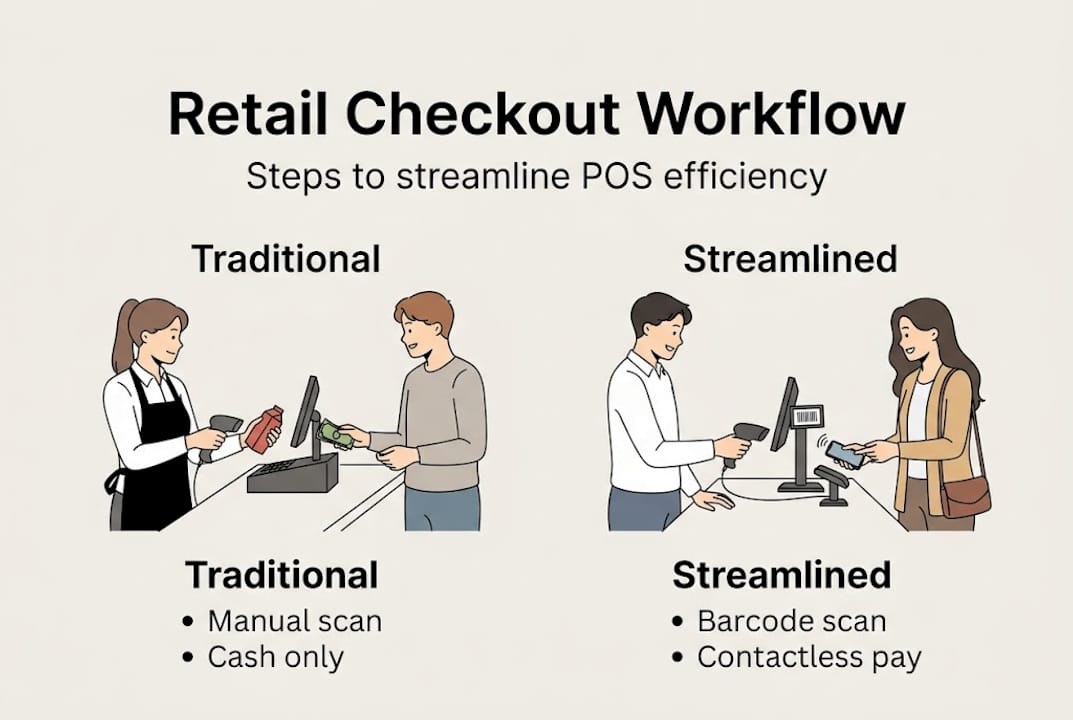
- Greet and prepare: The customer arrives at the till with their items. Staff acknowledge them immediately, reducing perceived wait time.
- Scan items: Each product is scanned using the barcode reader. Items not scanning correctly should be handled by manual entry, never by guessing.
- Apply discounts and offers: Loyalty card discounts, promotional codes, or bulk deal reductions are applied before the total is confirmed.
- Confirm the total: Show the customer the total clearly. A customer-facing display screen removes any doubt and speeds up the payment decision.
- Process payment: Present contactless first. If declined or unavailable, move to chip-and-pin, then cash. Do not linger on any single method.
- Issue the receipt: Ask whether the customer wants a printed or digital receipt. This small question adds a personal touch and keeps the counter tidy.
- Bag and complete: Items are bagged and the transaction is closed. The till is ready for the next customer.
“Self-checkout input latency should be under 400ms for the best customer experience. Delays above 3 seconds actively frustrate shoppers and increase abandonment.”
| Step | Traditional checkout | Modern streamlined checkout |
|---|---|---|
| Item scanning | Manual keying or slow scanner | Fast barcode or RFID scan |
| Discounts | Applied from paper records | Automatic via POS software |
| Payment | Cash or slow chip-and-pin | Contactless under 2 seconds |
| Receipt | Always printed | Customer chooses |
| Total time | 60 to 90 seconds | 20 to 30 seconds |
Using a POS checklist steps approach keeps your team consistent, especially when onboarding new staff. Refer to a POS system setup guide when configuring a new terminal to make sure every setting is optimised before you open for trade.

Pro Tip: Train staff to mentally flag the moment a customer shows impatience. A brief, confident acknowledgement such as “just one moment” costs nothing but keeps the interaction on track.
Avoiding common pitfalls and troubleshooting tips
Even a well-designed checkout system can falter when real-world pressures mount. Knowing where things typically go wrong puts you ahead of the problem before a queue starts building.
Common pitfalls to watch for:
- Input lag on touchscreens: Slow screen response is often caused by background software updates or an overloaded processor. Restart terminals at the start of each shift.
- System freezes: These usually occur when a software update has not completed or a payment integration is out of sync. Keep firmware current.
- Untrained staff on new features: A software update that adds a new payment option can confuse staff if no retraining takes place. Brief team updates after every system change are essential.
- Cluttered counter layouts: Physical clutter around the till slows the bagging step and creates a chaotic impression. Keep the counter clear of unnecessary items.
- Poor Wi-Fi connectivity: A card reader that loses signal mid-transaction is one of the most damaging checkout failures. Always have a wired backup connection available.
“Assisted POS is often preferable for complex hospitality cases, while self-checkout can freeze or prompt unnecessarily, creating friction rather than removing it.”
For continuous improvement, collect feedback actively. A short question to customers after busy periods, or a review of your average transaction times each week, gives you the data to make decisions rather than guesses. Studying retail automation efficiency trends shows that the businesses improving fastest are those measuring checkout performance as carefully as they measure stock levels. Following solid POS best practices ensures your system stays reliable as your business grows.
Pro Tip: Schedule a checkout stress-test once a month during a quiet hour. Process a high volume of mock transactions back-to-back and note where the system slows or staff hesitate. Fix those moments before they happen in front of real customers.
A fresh take: streamlining checkout is less about technology and more about design
Here is something most POS articles will not tell you. The businesses with the fastest, smoothest checkouts are not necessarily the ones with the newest hardware. They are the ones that have thought carefully about flow. It is not just faster machines; it is smarter flow.
Consider this: a high-spec terminal placed on a cluttered, disorganised counter will always underperform a modest setup where the layout, staff scripts, and customer journey have been deliberately designed. Decluttering the counter, positioning the customer-facing screen at the right angle, and scripting a two-second greeting that reassures customers all reduce perceived wait time more than a hardware upgrade alone.
Efficiency is also never finished. The best retail and hospitality operators treat checkout as a living system. They measure, adapt, and retrain on a rolling basis. Building a holistic checkout workflow means combining smart technology with human-centred design thinking. The technology enables the speed; the design thinking sustains it.
Next steps: upgrade your POS and checkout workflow
You now have a clear map from problem to solution, covering the tools, the steps, the pitfalls, and the mindset needed to transform your checkout.

At YCR Distribution, we supply the full range of hardware and software that makes these workflow steps possible in practice. From responsive POS terminals and fast barcode scanners to purpose-built POS software solutions for retail and hospitality, everything is available with next-day delivery and expert support. Browse our full range of POS hardware options or speak to our team for a tailored recommendation. Whether you are upgrading a single till or outfitting an entire venue, we are ready to help you move faster.
Frequently asked questions
What are the key steps in the retail checkout workflow?
The main steps are item scanning, applying discounts, payment processing, receipt issuing, and bagging the items. Each step should be optimised for speed, with empirical benchmarks for scanning and payment guiding your target transaction times.
How can I reduce checkout queue times in my store?
Upgrade to a modern POS system, prioritise contactless payment, and test your terminals regularly for input delays. Contactless and barcode systems cut average transaction times by over 40%, keeping queues well under the two-minute tolerance threshold.
Is self-checkout always better than staffed checkout?
Not always. Self-checkout is faster for simple transactions but can freeze or prompt unnecessarily, particularly in hospitality settings where orders are complex. Staff-assisted checkout remains the better choice when customer needs vary significantly.
What is the ideal transaction time with modern POS?
A well-configured POS workflow targets under 30 seconds per transaction. Modern POS processes transactions in under 28s, with contactless payments completing in under two seconds when the system is properly maintained.