

The role of POS in inventory tracking for retailers

A point of sale system is the frontline data engine that captures every transaction and updates stock levels in real time, making it the most direct inventory tracking solution available to hospitality and retail operators. NetSuite describes POS as the front line data system feeding inventory analysis, not merely a checkout device. That distinction matters enormously. When a barcode is scanned at a till in a busy café or a convenience store, the system does not just record a sale. It simultaneously adjusts stock quantities, updates the cost of goods sold, and can trigger a reorder alert before you even notice a shelf is running low. Tools such as QuickBooks, Stockria, and NetSuite have built entire inventory management workflows around this single moment of capture.
How POS systems integrate with inventory tracking processes
The mechanism behind real-time inventory control with POS is called a perpetual inventory system. Perpetual inventory systems rely on POS capturing sales at the moment of transaction, updating both quantity and cost of goods sold without delay. This means the moment a restaurant sells a portion of chips or a retailer scans a jacket at the till, three things happen simultaneously: revenue is recorded, the stock quantity decreases, and the cost of goods sold is posted to the accounts. There is no waiting for an end-of-day batch run or a weekly stocktake to reflect that movement.
This real-time posting is what separates modern POS technology for tracking from older periodic methods. When your POS software integrates with an ERP system such as NetSuite or a warehouse management platform, the data flows outward from the point of sale into purchasing, finance, and logistics without manual re-entry. The result is a single source of truth across your entire operation, whether you run one site or twenty.
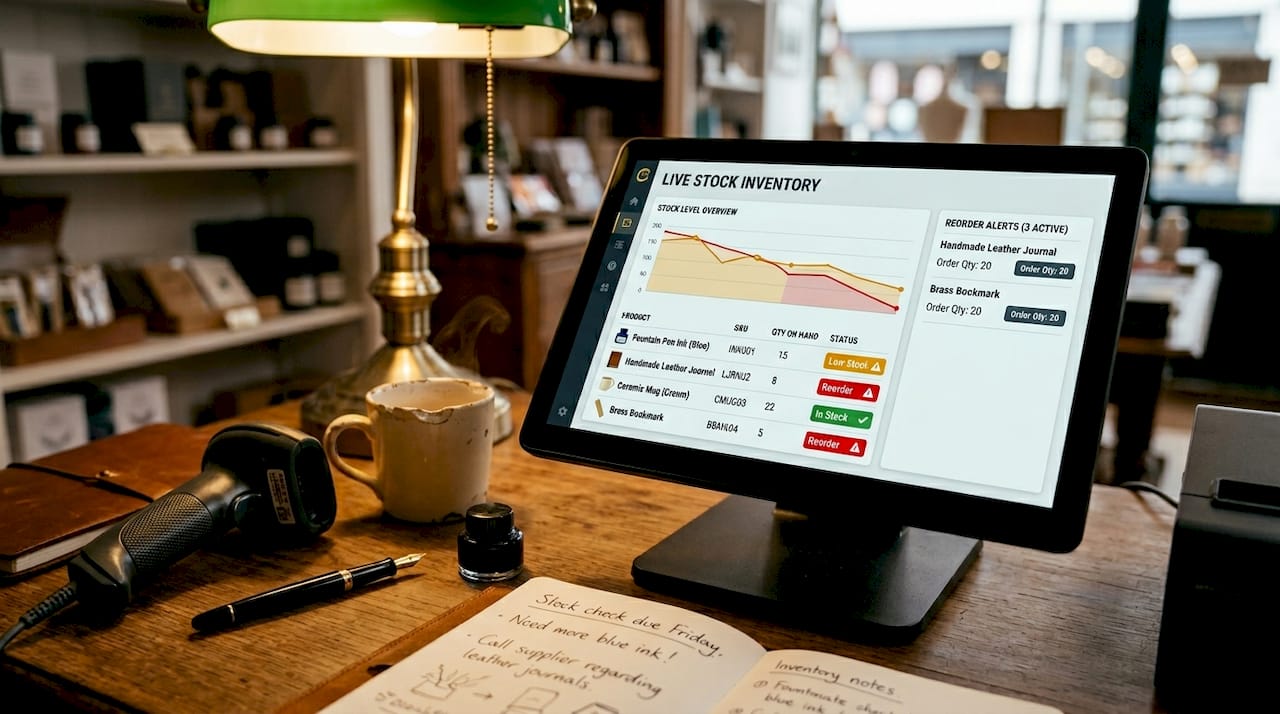
Inventory tracking improves significantly when POS data feeds into overall inventory management systems for forecasting and reorder timing decisions. For a hospitality operator, this means your kitchen management software can flag ingredient shortages before service begins. For a retailer, your buying team can act on live sell-through data rather than guesswork.
Pro Tip: When selecting POS software, confirm it posts both quantity and cost of goods sold simultaneously at the point of sale. Systems that only update quantity leave your margin reporting exposed to inaccuracies.
What are reorder points and how does POS use them?
Reorder points are stock thresholds that trigger an alert or automated purchase order when a product’s quantity falls to a defined level. Reorder points are thresholds triggering stock replenishment alerts and can be set per product and per location. QuickBooks, for example, allows operators to set a low-stock indicator for each SKU and then generate a purchase order list directly from those flagged items. This removes the need for a manager to manually check stock levels before placing supplier orders.
The real power of reorder point logic within POS system inventory management comes from combining it with sales velocity data. Stockria tracks rolling sales rate, days of stock remaining, and creates pre-filled purchase orders per location. This means the system calculates how quickly you are selling a product, accounts for your supplier’s lead time, and sets the reorder threshold accordingly. A product that sells 50 units per day with a three-day lead time needs a reorder point of at least 150 units, and a well-configured POS will calculate and apply that automatically.
Key benefits of reorder point automation within POS systems include:
- Stockout prevention. Alerts fire before shelves empty, giving you time to reorder without disrupting sales.
- Supplier-grouped purchase orders. Systems like Stockria generate pre-filled orders grouped by supplier, reducing admin time.
- Location-specific thresholds. A flagship store with high footfall needs different reorder points than a smaller satellite site.
- Approval workflows. Draft purchase orders can be routed for manager sign-off before submission, maintaining financial control.
- Reduced manual checking. Staff no longer need to physically count stock to know when to reorder.
Pro Tip: Review and update your reorder points every quarter. Sales velocity shifts with seasons, promotions, and menu changes. A threshold set in January may leave you over-stocked or under-stocked by July.
POS-based tracking vs manual and batch update methods
The difference between POS-based inventory control and manual or batch methods is not just speed. It is accuracy, and accuracy has a direct financial cost.
| Method | Update frequency | Accuracy risk | Labour requirement |
|---|---|---|---|
| Real-time POS | Instant, per transaction | Low when integrated correctly | Minimal ongoing input |
| Batch stocktake | Weekly or monthly | High between counts | Significant staff time |
| Manual spreadsheet | Ad hoc | Very high | Constant manual entry |
| Periodic ERP batch | Daily or nightly | Moderate | Moderate reconciliation |
POS accuracy depends on coordination between front-end transaction capture and back-office inventory and purchasing systems. A POS that records sales in real time but whose back-office receiving entries are entered two days late will show phantom stock. You believe you have 40 units of a product; you actually have 12 because a delivery was not processed promptly. This is one of the most common and costly errors in retail and hospitality inventory management.
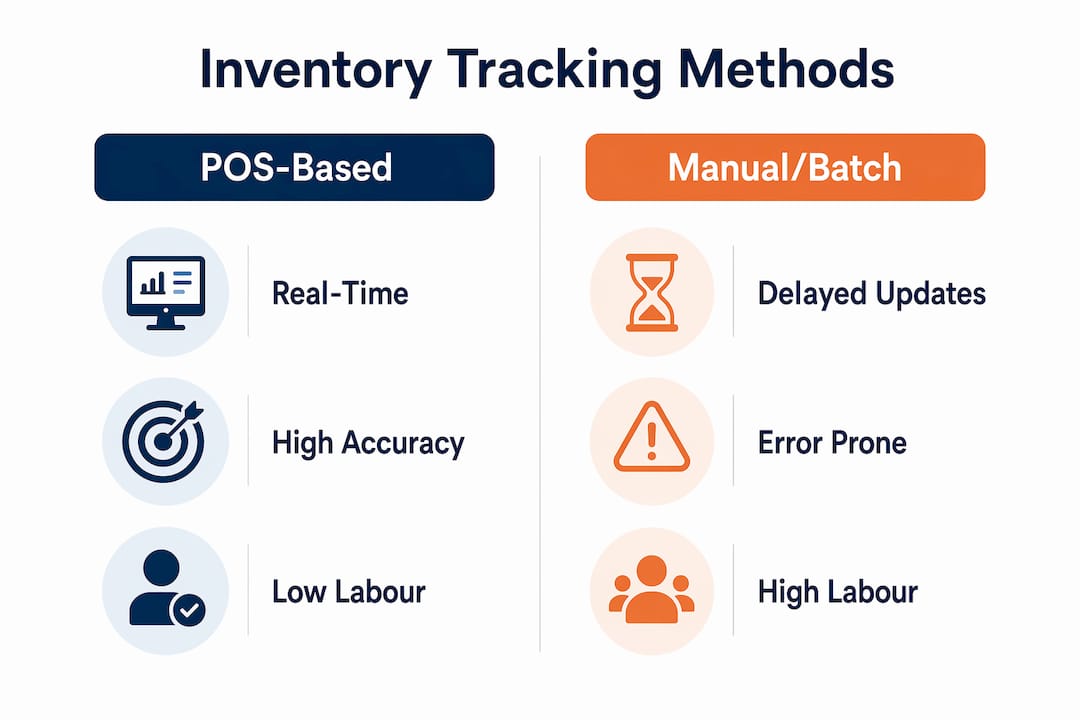
Multi-location visibility is another area where POS-based tracking outperforms alternatives. When each site runs the same integrated POS software, a head-office buyer can see live stock levels across every branch from a single dashboard. Manual methods simply cannot replicate this without significant administrative overhead. The role of POS in supply chain coordination becomes clear when you consider that purchasing decisions, supplier negotiations, and logistics planning all depend on accurate, timely stock data.
How to leverage POS systems for better inventory control
Getting the most from your POS system’s inventory capabilities requires deliberate setup and consistent operational discipline. The technology is only as good as the processes built around it.
-
Configure reorder points before you go live. Set thresholds for every product based on your current sales velocity and your suppliers’ lead times. Location-specific reorder points tailored to sales velocity and supplier lead times produce more accurate inventory control than blanket thresholds applied across all sites.
-
Integrate your POS with your receiving process. Every goods-in delivery must be entered into the system the moment it arrives. Inventory accuracy demands seamless data flow from POS sales through receiving, returns, and transfers in back-office systems to maintain coherence. A delivery left unprocessed overnight creates a gap between your system’s stock count and physical reality.
-
Train staff on returns, transfers, and write-offs. A sale is not the only event that changes stock levels. Returns, inter-site transfers, wastage, and theft all need to be recorded accurately. Using POS systems with inventory features reduces manual errors and enables detailed sales and stock reporting, but only when all stock movements are captured.
-
Use reporting features for demand forecasting. Most POS software platforms include sales trend reports that show which products sell fastest at which times. Use these to adjust reorder points ahead of seasonal peaks rather than reacting after a stockout occurs.
-
Audit your data regularly. Run a spot-check stocktake on a rotating selection of products each week. Compare the physical count against your POS system’s recorded quantity. Discrepancies reveal where your process has a gap, whether that is at the till, in the stockroom, or at goods-in.
The table below illustrates a practical workflow for a hospitality operator combining front-end POS data with back-office processes:
| Stage | Action | Responsible party |
|---|---|---|
| Sale recorded | POS updates stock quantity and COGS instantly | System (automatic) |
| Reorder alert fires | Draft purchase order created per supplier | System (automatic) |
| Delivery arrives | Goods received entered into back-office system | Stockroom staff |
| Returns processed | Return transaction recorded at POS or back office | Till operator |
| Weekly audit | Spot-check count reconciled against system data | Manager |
The POS integration with back-office systems is what transforms a checkout device into a genuine inventory management tool. Without that integration, you have fast data at the front and slow data at the back, and the gap between them is where errors live.
Key takeaways
POS systems deliver accurate inventory control only when real-time sales data is matched by equally timely back-office input for receiving, returns, and transfers.
| Point | Details |
|---|---|
| Real-time stock updates | POS captures every sale instantly, updating quantity and cost of goods sold simultaneously. |
| Reorder point automation | Set thresholds per product and location to trigger alerts and draft purchase orders before stockouts occur. |
| Back-office synchronisation | Delayed receiving or returns entries undermine POS accuracy regardless of how fast the front-end captures sales. |
| Integration with ERP systems | Connecting POS to platforms like NetSuite creates a single stock data source across purchasing, finance, and logistics. |
| Regular audits remain necessary | Spot-check stocktakes catch discrepancies that automated systems alone cannot identify. |
What I have learned from watching operators get this wrong
After years of working closely with hospitality and retail businesses across the UK, the pattern I see most often is this: operators invest in good POS hardware and software, configure it carefully at launch, and then let the discipline around it erode over six months. The technology does not fail them. The process does.
The most damaging habit is treating the POS as the only data entry point. A delivery arrives on a busy Friday afternoon, the stockroom is short-staffed, and the goods-in entry gets deferred until Monday. By Saturday evening, the system is showing stock that does not exist, reorder alerts are not firing when they should, and a manager is making purchasing decisions based on numbers that are three days out of date. I have seen this cause genuine operational crises in restaurants and convenience stores alike.
Location-specific reorder points are another area where operators consistently under-invest. A single threshold applied across a chain of five shops sounds efficient, but it is not. The flagship store in a city centre sells three times the volume of the suburban branch. Applying the same reorder point to both means the city store runs out and the suburban store sits on excess stock. The benefits of POS in stock tracking are only fully realised when the configuration reflects the reality of each individual site.
My honest recommendation is to treat your POS inventory setup as a living document. Review reorder points quarterly, audit your back-office entry discipline monthly, and retrain staff on stock movement recording at least twice a year. The technology from providers like Ycr is capable of delivering genuine operational precision. The operators who get the most from it are the ones who treat the process with the same seriousness as the hardware.
— John
How Ycr supports your inventory tracking goals

Ycr has spent over three decades supplying POS hardware and software to hospitality and retail operators across the UK. The company’s portfolio includes POS terminals, barcode scanners, and integrated software solutions such as SAMTOUCH and EZEEPOS, all designed to support real-time inventory tracking from the point of sale through to back-office management. Whether you run a single café or a multi-site retail chain, Ycr’s solutions are built to connect front-end sales data with the inventory processes that keep your operation accurate and efficient. Explore the full range of POS software options on the Ycr website, or browse the retail POS hardware range to find the right fit for your business.
FAQ
What is the role of POS in inventory tracking?
A POS system captures every sale in real time and immediately updates stock quantities and cost of goods sold, making it the primary tool for live inventory control in retail and hospitality. NetSuite identifies POS as the frontline data system feeding inventory analysis across the entire business.
How do reorder points work within a POS system?
Reorder points are stock thresholds set per product and location; when a product’s quantity falls to that level, the POS system fires an alert and can generate a draft purchase order automatically. Platforms such as Stockria calculate these thresholds using rolling sales rate and supplier lead time data.
Why does POS inventory data sometimes show inaccurate stock levels?
Inventory accuracy relies on timely back-office input to complement POS sales data. If deliveries, returns, or inter-site transfers are not entered promptly, the system records stock that no longer reflects physical reality.
Can a POS system manage inventory across multiple locations?
Yes. Integrated POS software allows operators to set location-specific reorder points and view live stock levels across all sites from a central dashboard, which is particularly valuable for multi-branch retail and hospitality groups.
What is the difference between a perpetual and a periodic inventory system?
A perpetual inventory system updates stock levels continuously at every transaction, as supported by POS technology. A periodic system counts stock at set intervals, leaving gaps in accuracy between counts that can lead to stockouts or over-ordering.