

TL;DR:
- Thermal receipt printers offer fast, quiet, and low-maintenance printing ideal for busy retail environments.
- Proper paper choice and environment are crucial to maintaining print quality and longevity of thermal receipts.
- Combining hardware selection with software integration ensures reliable operation and customer satisfaction.
Many UK hospitality and retail operators treat receipt printers as an afterthought, buying whatever is cheapest or most familiar. That approach quietly costs money and slows service. The wrong printer technology drives up supply costs, causes frustrating downtime during busy periods, and leaves customers waiting. Understanding thermal receipt printing is not a technical luxury; it is a practical business decision that affects daily operations in every café, takeaway, and retail shop across the country. This guide explains exactly how thermal printing works, what it does well, where it falls short, and how to choose the right solution for your operation.
Table of Contents
- How thermal receipt printing works
- Core benefits for UK hospitality and retail
- Popular models and selection tips for UK POS
- Limitations, risks, and when not to choose thermal
- The overlooked realities of thermal receipt printing in the UK
- Upgrade your POS with the right thermal solutions
- Frequently asked questions
Key Takeaways
| Point | Details |
|---|---|
| No ink or ribbons needed | Thermal receipt printers work by heat alone and need only special thermal paper. |
| Quicker, quieter, more reliable | These printers improve checkout speed and reduce noise, making them ideal for UK retail and hospitality. |
| Careful selection matters | Choose a model suitable for your business’s environment, usage, and integration needs. |
| Not ideal for all uses | Thermal print fades over time and shouldn’t be relied on for kitchen printing or long-term archives. |
How thermal receipt printing works
Inside a thermal receipt printer, there are no ink cartridges to replace, no toner to spill, and no ribbons to snap mid-service. The process is elegant in its simplicity, and understanding it helps you buy smarter, maintain more effectively, and troubleshoot faster.
Thermal receipt printing uses direct thermal technology where a thermal printhead with tiny heating elements operating at 200 to 300°C selectively heats heat-sensitive coated paper. The paper reacts to that targeted heat by turning dark at precise points, forming characters, numbers, and barcodes without any ink transfer whatsoever.
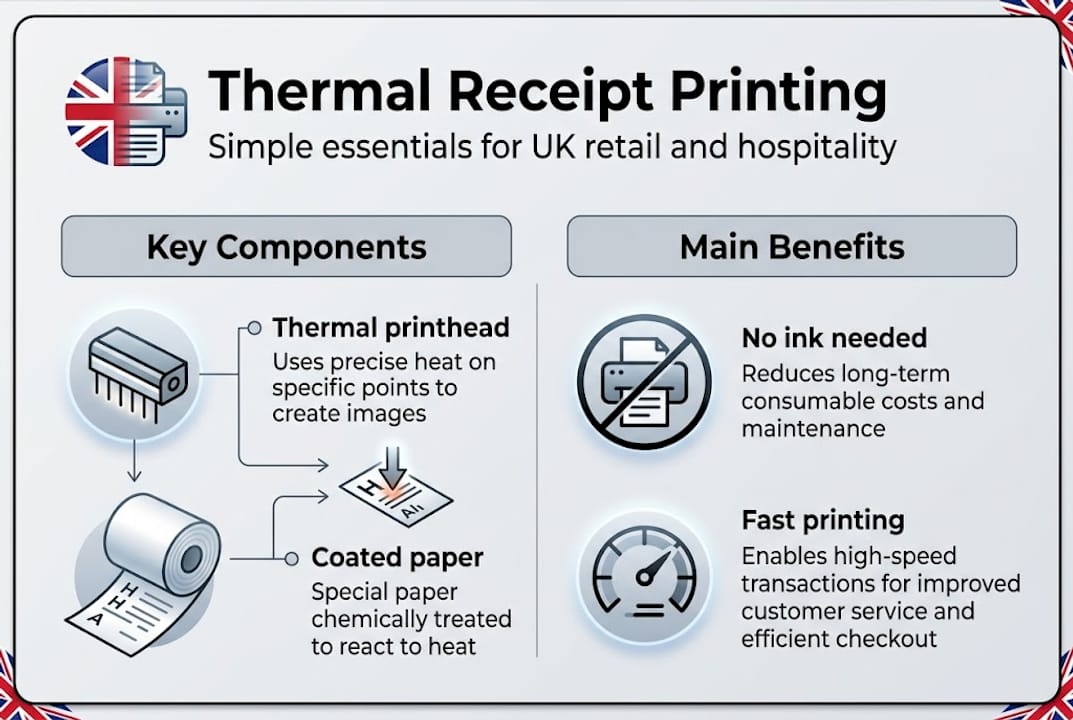
The key components inside every thermal printer work together to produce each receipt:
| Component | Function |
|---|---|
| Thermal printhead (TPH) | Applies controlled heat to create the printed image |
| Platen roller | Feeds paper smoothly past the printhead at consistent pressure |
| Stepper motor | Drives the roller with precise, incremental movement |
| Sensors | Detect paper presence and roll depletion |
| Control PCB | Interprets data from the POS and coordinates printing |
The resolution of a thermal printer is measured in dots per inch (DPI). Most modern receipt printers print at 203 DPI, which is more than sufficient for crisp text, barcodes, and simple logos on a receipt. Higher DPI models exist for label or ticket applications, but for customer-facing receipts it is rarely necessary.
Common pitfalls are almost always related to paper choice or the environment. Using low-grade or non-thermal paper is the most frequent mistake, producing blank or illegible output. Storing paper rolls in direct sunlight or near a heat source causes pre-activation, meaning the paper turns dark before you even load it. High humidity can also degrade print quality over time.
When choosing POS printers for your business, look for models that list their compatible paper specifications clearly. Not all thermal paper is equal, and mismatches affect both print quality and mechanism longevity.
Pro Tip: Not sure if your current printer is thermal? Open the paper compartment and look for an ink ribbon or cartridge. If there is none and the paper rolls feel slightly waxy or smooth on one side, it is a direct thermal printer. You can also scratch the coated side with a fingernail; it will leave a dark mark if it is thermal paper. The HPRT POS80H is a good example of a modern direct thermal unit that makes this identification straightforward.
Core benefits for UK hospitality and retail
Now you know the basics of how thermal printing works, let’s see why it is the smart choice for most UK retail and hospitality environments.
The most compelling argument for thermal is speed. Thermal printers print at 250 to 300mm per second, operate quietly, require minimal maintenance, and are compact in form. During a Friday evening rush or a packed Saturday market, that speed is not a trivial detail. It is the difference between customers walking away satisfied or standing awkwardly at a counter waiting.
Thermal technology now holds over 70% POS market share, with an 11% compound annual growth rate in the UK projected from 2025 to 2035. That dominance reflects genuine commercial logic, not just trend-following.
| Feature | Thermal printer | Impact printer |
|---|---|---|
| Print speed | 250 to 300mm/s | 50 to 100mm/s |
| Noise level | Very quiet | Noticeably loud |
| Maintenance | Minimal (no ink) | Regular ribbon changes |
| Running costs | Paper only | Ribbons plus paper |
| Print quality | Crisp, high resolution | Adequate, limited |
For frontline staff and the customer experience, the day-to-day benefits are significant:
- No mid-shift ink changes that interrupt service or frustrate staff
- Faster receipts mean shorter queues at busy periods
- Compact design frees counter space for other equipment
- Quieter operation contributes to a better in-store atmosphere
- Fewer mechanical failures mean less reactive maintenance
Understanding the role of receipt printers in your operation helps you frame this as an investment rather than a running cost. When you add up ribbon replacements, downtime from breakdowns, and the labour spent on maintenance calls, thermal often costs substantially less annually.

Pro Tip: To calculate your current annual supply spend, total your monthly ribbon or cartridge purchases and multiply by 12. Then compare that against a year’s thermal paper rolls. For most operators running three or more terminals, the savings on consumables alone justify the hardware investment within the first year. Pairing the right hardware with software that can streamline UK POS operations makes the return even stronger.
Popular models and selection tips for UK POS
With those advantages in mind, it’s essential to choose the right equipment to get the results you want.
| Model | Print speed | Notable features |
|---|---|---|
| Epson TM-T70II | 250mm/s | Front-feed, ENERGY STAR, compact |
| Epson TM-T20IV | 250mm/s | USB and Ethernet, 15M line head life |
| Star TSP143III | 250mm/s | 120km head life, cutter reliability |
| HPRT TP80R | 250mm/s | USB/Serial/Ethernet, versatile connectivity |
Models such as the Epson TM-T70II, TM-T20IV, and Star TSP143III are widespread UK choices, delivering 250mm/s print speed, front-feed paper loading, 120km head life, ENERGY STAR certification, and 15 million lines of mechanism life. These figures matter in a busy pub or café where the printer is running from open to close seven days a week.
When selecting a thermal printer for your site, work through this checklist:
- Assess your environment: High-volume kitchens or bars with grease and steam may need a more rugged enclosure or a different technology altogether.
- Confirm paper roll size: Most UK receipt printers use 80mm or 58mm wide rolls. Check what your counter space and software support before ordering.
- Choose your connectivity: USB is universal, but Ethernet is far more reliable for networked POS setups with multiple terminals. Bluetooth suits mobile or pop-up applications.
- Check the mechanism life rating (MTBF): Mean time between failures and mechanism life in kilometres of paper are real indicators of durability. Do not ignore these figures.
- Verify POS software compatibility: Your printer must communicate correctly with your POS software. Ask your supplier for a confirmed compatibility list before purchasing.
The HPRT TP80R is worth considering for operators needing flexible connectivity, particularly those running mixed wired and wireless environments. Alongside that, exploring Bixolon printer models gives you well-regarded alternatives with strong UK support.
Pro Tip: Front-feed paper loading sounds like a minor convenience but saves real time in a busy service environment. Staff can reload paper without pulling the printer away from the wall or disrupting the counter setup. ENERGY STAR certification, meanwhile, reduces electricity consumption across multiple units, which adds up meaningfully for larger retail operations.
Limitations, risks, and when not to choose thermal
For a balanced decision, you need to know the cases where thermal receipt printers might not fit your needs.
Thermal printing is genuinely excellent for customer-facing receipts, but it does have real limitations that can cause problems if overlooked.
Thermal receipts typically fade within 3 to 5 years, are sensitive to heat and light, and cannot be used for multi-part forms or in kitchens where conditions are harsh. That fading risk is not just an inconvenience; it can create compliance problems if you are storing physical receipts for HMRC record-keeping purposes.
“Direct thermal technology dominates receipt printing, but impact printing remains the better choice for kitchen environments and multi-copy document needs.” Guidespot
Consider whether thermal is truly right for your setup by checking these indicators:
- Your receipts need to last more than five years in physical form for legal or warranty purposes
- Your printer will be positioned in or near a kitchen with high ambient temperatures
- You need to produce multi-part carbon copies for suppliers or delivery notes
- Your storage area is humid or exposed to direct sunlight for extended periods
- Your operation requires printing on pre-printed or coloured stock
For kitchen order printing specifically, impact or dot matrix printers are the practical choice. They are louder and slower, but they cope with heat and splatter far better than thermal units. If you need rugged printer options designed for demanding environments, it is worth reviewing purpose-built models.
You can maximise the life of thermal receipts at the front of house by storing paper rolls in sealed bags away from heat sources, setting your printer to the appropriate density rather than maximum, and pairing physical receipts with digital alternatives. Many UK operators now offer email or SMS receipts alongside printed ones, which solves the longevity issue for customers who need records.
The overlooked realities of thermal receipt printing in the UK
From working closely with UK retail and hospitality operators, a pattern emerges consistently. Buyers focus almost entirely on print speed and initial unit cost, which are important, but they routinely underestimate two things: integration depth and ongoing supplier support.
A printer that prints at 300mm/s but does not communicate cleanly with your POS software is actually a slower printer in practice. Dropped connections, garbled output, and compatibility errors create delays that no speed rating can offset. The hardware decision and the software decision need to happen together. Reviewing leading POS hardware in the context of your existing or planned software stack is the smarter approach.
The other reality is that hybrid receipt delivery, combining printed thermal receipts with digital alternatives, is quickly becoming a compliance and efficiency baseline in the UK rather than a premium add-on. Businesses that design their POS setup for hybrid delivery from the start are better positioned for regulatory changes and customer expectations.
Finally, the false economy of cheap thermal paper is one of the most consistently damaging decisions we see operators make. Poor quality paper accelerates printhead wear, produces faded output, and increases jam frequency. The paper you choose is as important as the printer itself. Spend appropriately on both.
Upgrade your POS with the right thermal solutions
With these insights, you are ready to make confident decisions about your own POS setup. Whether you are refreshing a single counter printer or specifying hardware across multiple sites, getting the thermal printing decision right pays dividends in reliability, staff efficiency, and customer experience from day one.

At YCR Distribution, we have spent over three decades helping UK retail and hospitality businesses choose, integrate, and maintain the right POS hardware. From understanding POS hardware terminology to sourcing the exact model for your environment, we provide practical guidance alongside a market-leading product range. Browse our full range at shop POS hardware or explore POS software tailored for UK hospitality and retail. Our team is ready to help you specify with confidence.
Frequently asked questions
What type of paper do thermal receipt printers use?
Thermal printers require heat-sensitive coated paper; using standard non-thermal paper will produce a completely blank receipt with no readable image.
Can thermal receipts be stored long-term for records or HMRC compliance?
Printed thermal images fade within 3 to 5 years and are sensitive to heat, so digital copies are far more reliable for long-term HMRC record-keeping.
Are thermal receipt printers better than impact printers for kitchens?
Impact printers suit kitchens better due to their resistance to heat and humidity, and their ability to print legible multi-part order forms that thermal technology cannot produce.
How do I check if my POS printer is thermal?
Thermal printers use no ribbons or ink; if your printer only takes paper rolls and the output feels slightly warm after printing, it is almost certainly a direct thermal unit.